
Are you tired of struggling to understand websites in foreign languages? Do you wish there was an easier way to translate web pages on your iPhone? Look no further! In this article, we will guide you through the process of translating web pages on your iPhone using various methods.
Method 1: Using Apple’s Built-in Translator
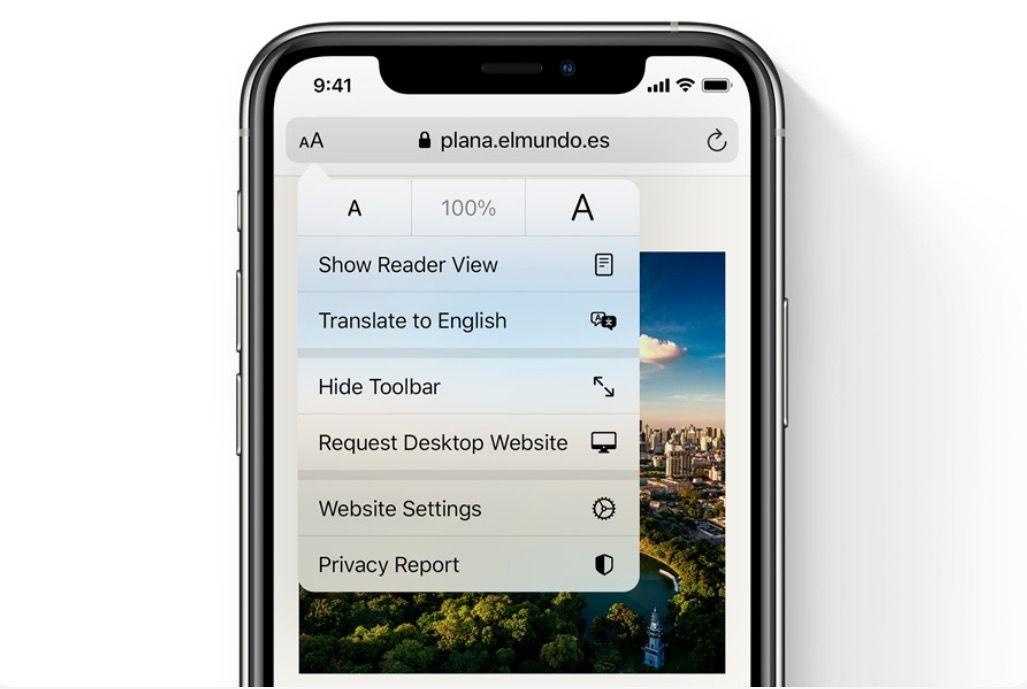
Did you know that Safari, the default browser on your iPhone, has a built-in translator feature? Yes, it’s true! To access this feature, follow these simple steps:
- Open Safari and navigate to the web page you want to translate.
- Tap the “AA” icon in the address bar and select “Translate in: Italian” (or any other language you prefer).
- Confirm that you want to translate the page, and the translated version will be displayed.
Method 2: Using The Command App
The Command app is a powerful tool developed by Apple that can automate various tasks on your iPhone. To use it for translation purposes:
- Download the Command app from the App Store.
- Create a script called “Translate selection” (available in the Command gallery).
- Open Safari, select the text you want to translate, and tap the sharing icon (square with an arrow).
- Choose “Translate selection” from the menu, and the translated version will be displayed.
Method 3: Using Chrome
Chrome is another popular browser on your iPhone that has a built-in translation feature. To use it:
- Download Chrome from the App Store.
- Open Safari or Chrome and navigate to the web page you want to translate.
- Tap the three dots in the top-right corner, then select “Translate”.
- Choose the language you want to translate into, and the translated version will be displayed.
Other Apps For Translation
If the above methods don’t satisfy your translation needs, there are other apps available on the App Store that can help. Some of these apps include:
- Microsoft Edge: A browser with a built-in translator feature.
- Reverso Translator Dictionary: An app that translates text into 12 languages and provides examples of usage.
- ITranslate Translator: A comprehensive app that supports over 100 languages.
- You Translate: The official Apple translation app.
Online Services For Translation
If you prefer to use online services, there are several options available. Some popular ones include:
- Google Translate: A web-based service that translates text, phrases, and entire pages into any language.
- Microsoft Bing Translator: A web-based service that translates text, phrases, and entire pages into any language.
- DeepL: A translation service that provides precise translations of text, rows, and documents.
- BabelFish: A web-based service that translates text into multiple languages.
- WordReference: A dictionary service that translates single words and provides definitions.
Conclusion
Translating web pages on your iPhone has never been easier. With these methods and apps, you can easily navigate foreign language websites and stay connected with the world. Whether you use Apple’s built-in translator, Chrome, or other apps, there’s always a solution for translation needs.
Frequently Asked Questions (FAQs)
- What is The Best Method For Translating Web Pages on my Iphone?
The best method depends on your personal preference and the type of content you want to translate. - Can I Use Google Translate on my Iphone?
Yes, you can use Google Translate on your iPhone by opening Safari or Chrome and navigating to the Google Translate website. - How do I Disable Automatic Translation in Chrome?
To disable automatic translation in Chrome, go to Settings > Advanced > Languages, and toggle off the “Translate pages” option. - Can I Translate a Single Word or Phrase on my Iphone?
Yes, you can use various apps, including Reverso Translator Dictionary and iTranslate Translator, to translate single words or phrases. - Are There Any Fees Associated With Using Translation Services on my Iphone?
Some apps, like DeepL, offer free basic services but charge for premium features. Check the app’s pricing before subscribing.
By following these steps and exploring various methods and apps, you can easily translate web pages on your iPhone and stay connected with the world.


