
Conveying a Sign Wifi at Arm’s Length: A Comprehensive Guide
Are you tired of weak internet signals in your home or office? Do you want to extend the coverage area of your WiFi network without breaking the bank? Look no further! In this article, we’ll explore various methods to convey a sign WiFi at arm’s length, including using range extenders, powerline adapters, parabolas for Wi-Fi, and transforming your computer into a wireless repeater.
The Problem: Weak Wifi Signals
Have you ever tried to stream videos or play online games in areas with weak WiFi signals? It can be frustrating, right? The problem lies in the limited coverage area of your router. Even if you have a high-speed internet plan, the signal strength may not reach all corners of your home or office.
Solution 1: Range Extenders
The first solution to convey a sign WiFi at arm’s length is by using range extenders. These devices pick up the primary signal generated by your router and “repeat” it to their vault, broadening the range of coverage. Range extenders can be acquired online or in-store physical electronics stores, with prices ranging from 30 to 100 euros.
Some popular options include:
- TP-Link TL-WA850RE Repeater
- TP-Link Onemesh RE200 Repeater
- NETGEAR EX3700-100PES Repeater
To use a range extender, follow these steps:
- Place the device in an area with strong WiFi signal intensity.
- Connect the range extender to your router using Ethernet cable.
- Configure the range extender using its panel of inner control.
Solution 2: Powerline Adapters
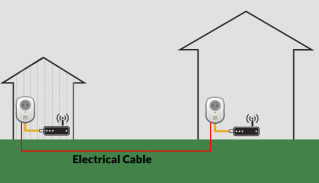
Another solution is by using powerline adapters. These devices explode the electrical facility cables, transferring the internet signal at high speeds. There are many powerline options available in the market, with varying prices and characteristics.
Some popular options include:
- Netgear PL1000-100PES Adapters
- Netgear Plw1000-100Pes Adapters
To use a powerline adapter, follow these steps:
- Connect the primary adapter to an electrical facility near your router.
- Connect the secondary adapter to another electrical facility in the area you want to extend the WiFi signal.
- Configure the adapters using their panel of inner control.
Solution 3: Parabolas For Wi-fi
If you need to extend the transmission of the WiFi sign in big external environments, consider using parabolas for Wi-Fi. These devices are particularly resistant to external factors and can provide a wider coverage area than range extenders.
Some popular options include:
- Ubiquiti Networks PBE-M5-400 1000Mbit/s Bridge and Repeater
- TP-Link Deco M5 WiFi Mesh, Pack of 1
To use a parabola for Wi-Fi, follow these steps:
- Place the device in a high location to minimize obstacles.
- Connect the antenna to your router or another device using cable pigtail.
- Configure the device using its panel of inner control.
Solution 4: Transforming Your Computer Into a Wireless Repeater
You can also transform your computer into a wireless repeater by creating a hotspot. This method is available on both Windows and macOS operating systems.
To create a hotspot on Windows 10, follow these steps:
- Go to Settings > Network & Internet.
- Click on Mobile hotspot.
- Choose the connection to share and set up a password.
On Mac, follow these steps:
- Go to System Preferences > Sharing.
- Select Internet sharing.
- Set up a name and password for your hotspot.
Conclusion
Conveying a sign WiFi at arm’s length is no longer a problem with these solutions! Whether you choose range extenders, powerline adapters, parabolas for Wi-Fi, or transforming your computer into a wireless repeater, the possibilities are endless. Remember to always follow proper installation and configuration procedures to ensure optimal results.
Frequently Asked Questions
Q: How far can I extend my WiFi signal?
A: The distance you can extend your WiFi signal depends on various factors, including the strength of your router’s signal and the quality of your range extender or powerline adapter.
Q: Are range extenders compatible with all routers?
A: Range extenders are generally compatible with most modern routers. However, it’s essential to check compatibility before purchasing a range extender.
Q: Can I use multiple powerline adapters to extend my WiFi signal?
A: Yes, you can use multiple powerline adapters to create a mesh network and extend your WiFi signal further.
Q: How do I configure my range extender or powerline adapter?
A: Configuration steps may vary depending on the device. Refer to the user manual or online resources for specific instructions.
Q: Can I use a parabola for Wi-Fi indoors?
A: While parabolas for Wi-Fi are typically used outdoors, you can also use them indoors if necessary.
Q: How do I transform my computer into a wireless repeater?
A: Follow the steps outlined in the article to create a hotspot on Windows or macOS.


