
How to Synchronize Digital Terrestrial Channels on Your TV or Decoder
Are you tired of searching for channels on your TV or decoder? Do you want to know how to synchronize digital terrestrial channels on your device? Look no further! In this article, we will guide you through the process of synchronizing digital terrestrial channels on your TV or decoder.
What is Digital Terrestrial Television (DTT)?
Digital Terrestrial Television, also known as DTT, is a type of television broadcasting that uses digital technology to transmit signals. Unlike analog television, which was transmitted over the airwaves, DTT uses digital signals to provide clearer and more reliable reception.
Why Synchronize Digital Terrestrial Channels?
Synchronizing digital terrestrial channels on your TV or decoder is essential to ensure that you receive all available channels. This process involves scanning for available frequencies and configuring your device to receive them.
How to Synchronize Digital Terrestrial Channels on Your TV
If you have a TV with an integrated DTT receiver, synchronizing digital terrestrial channels is relatively simple. Here’s how:
- Connect Your Antenna: Ensure that your antenna is properly connected to the TV.
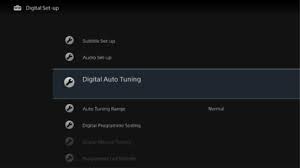
- Access The Settings Menu: Go to the settings menu on your TV and select “Digital Terrestrial” or “DTT”.
- Select The Correct Standard: Choose the standard for your region, which is usually DVB-T2 in Italy.
- Configure The Channels: Set up the channels by selecting “Automatic Scanning” or “Manual Configuration”.
- Verify The Settings: Check that the settings are correct and save them.
How to Synchronize Digital Terrestrial Channels on Your Decoder
If you have a separate decoder for digital terrestrial signals, synchronizing channels is slightly more complex. Here’s how:
- Connect Your Antenna: Ensure that your antenna is properly connected to the decoder.
- Access The Settings Menu: Go to the settings menu on the decoder and select “Digital Terrestrial” or “DTT”.
- Select The Correct Standard: Choose the standard for your region, which is usually DVB-T2 in Italy.
- Configure The Channels: Set up the channels by selecting “Automatic Scanning” or “Manual Configuration”.
- Verify The Settings: Check that the settings are correct and save them.
Troubleshooting Common Issues
If you’re experiencing issues synchronizing digital terrestrial channels, here are some common problems to check:
- Antenna Connectivity: Ensure that your antenna is properly connected to the TV or decoder.
- Signal Strength: Check if the signal strength is sufficient for clear reception.
- Frequency Conflicts: Make sure there are no frequency conflicts with other devices in your area.
Frequently Asked Questions (FAQs)
Q: What is the difference between DTT and analog television?
A: Digital Terrestrial Television (DTT) uses digital signals, while analog television uses analog signals.
Q: Why do I need to synchronize digital terrestrial channels on my TV or decoder?
A: Synchronizing channels ensures that you receive all available frequencies for clear reception.
Q: Can I use a separate antenna for DTT and analog television?
A: Yes, but ensure that the antenna is compatible with both standards.
Q: What should I do if I’m experiencing issues synchronizing digital terrestrial channels?
A: Check the antenna connectivity, signal strength, and frequency conflicts before seeking further assistance.
Conclusion
Synchronizing digital terrestrial channels on your TV or decoder is a straightforward process. By following these steps and troubleshooting common issues, you can enjoy clear reception of all available channels. Remember to check for updates on your device’s compatibility with the latest DTT standards to ensure seamless viewing experience.
Detailed Steps For Synchronizing Digital Terrestrial Channels
Step 1: Connect Your Antenna
- Ensure that your antenna is properly connected to the TV or decoder.
- Use a high-quality coaxial cable to minimize signal loss.
Step 2: Access The Settings Menu
- Go to the settings menu on the TV or decoder and select “Digital Terrestrial” or “DTT”.
- Choose the correct standard for your region, which is usually DVB-T2 in Italy.
Step 3: Configure The Channels
- Set up the channels by selecting “Automatic Scanning” or “Manual Configuration”.
- Verify that the settings are correct and save them.
Step 4: Verify The Settings
- Check that the settings are correct and save them.
- Test the reception to ensure clear signals.
Troubleshooting Common Issues
Issue 1: Antenna Connectivity
- Ensure that your antenna is properly connected to the TV or decoder.
- Use a high-quality coaxial cable to minimize signal loss.
Issue 2: Signal Strength
- Check if the signal strength is sufficient for clear reception.
- Consider using an amplifier for improved signal quality.
Issue 3: Frequency Conflicts
- Make sure there are no frequency conflicts with other devices in your area.
- Contact local authorities to resolve any frequency disputes.
Faqs
Q: What is the difference between DTT and analog television?
A: Digital Terrestrial Television (DTT) uses digital signals, while analog television uses analog signals.
Q: Why do I need to synchronize digital terrestrial channels on my TV or decoder?
A: Synchronizing channels ensures that you receive all available frequencies for clear reception.
Q: Can I use a separate antenna for DTT and analog television?
A: Yes, but ensure that the antenna is compatible with both standards.
Q: What should I do if I’m experiencing issues synchronizing digital terrestrial channels?
A: Check the antenna connectivity, signal strength, and frequency conflicts before seeking further assistance.


