
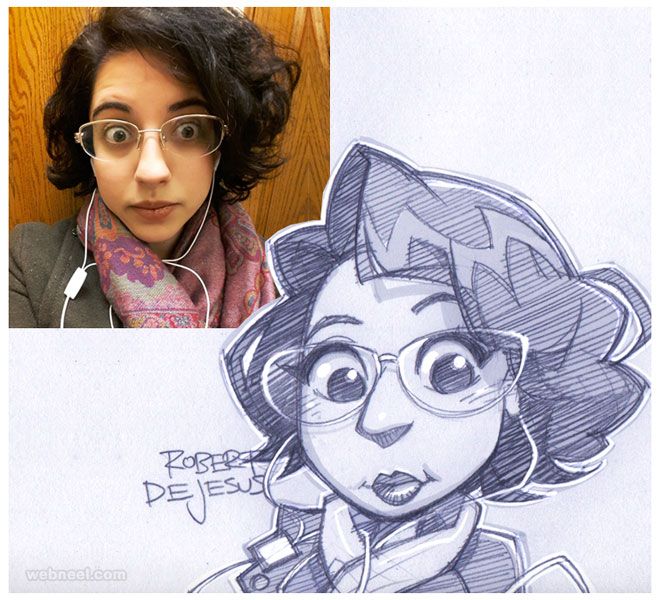
Ever wanted to turn your photos into fun cartoon characters? Whether it’s for a personal project, social media, or just for fun, transforming a photo into a cartoon can give you a unique and creative result. In this comprehensive guide, we will explore various ways to convert your images into cartoons using both software and apps. Ready to dive in?
Table of Contents
- Introduction to Turning Photos into Cartoons
- Why Cartoonize Your Photos?
- Tools You Can Use
- Free Software for Desktop
- XnSketch (Windows, macOS, Linux)
- FotoSketcher (Windows)
- Best Online Tools for Cartoonizing Photos
- LunaPic
- Pho.to
- How to Use Photoshop to Create Cartoons from Photos
- Top Apps to Cartoonize Photos on Mobile
- MomentCam Cartoons & Stickers
- ArtistA, Arte, Foto, Cartoon Face
- ToonCamera
- Comparing Desktop vs. Mobile Solutions
- Enhancing Your Cartoonized Images
- Common Mistakes to Avoid
- Tips for Choosing the Right Tool for You
- Using Cartoonized Photos for Social Media
- The Best Formats to Save Your Cartoon Images
- Conclusion
- FAQs
1. Introduction to Turning Photos into Cartoons
Turning your photo into a cartoon is a fun and creative way to transform an ordinary image into something visually striking. From funny caricatures to artistic sketches, many tools can help you achieve that. Let’s break down the different methods available.
2. Why Cartoonize Your Photos?
There are many reasons why you might want to turn a photo into a cartoon. For one, it’s a fantastic way to stand out on social media. It also makes for unique gifts, avatars, and even personalized merchandise. Plus, it’s just a lot of fun!
3. Tools You Can Use
From desktop software to online tools and mobile apps, there are numerous ways to cartoonize your photos. Some are free, while others come with a premium, but each has its own unique features.
4. Free Software for Desktop
If you prefer to work on a larger screen with more control over the editing process, desktop software is a great choice. Below are two excellent free options to consider.
XnSketch (Windows, macOS, Linux)
XnSketch is a user-friendly software that allows you to apply cartoon and sketch effects to your photos. Whether you’re using Windows, macOS, or Linux, this software is a great option for beginners.
How to Use XnSketch:
- Download the software from the official website.
- Open the application and load the photo you wish to cartoonize.
- Choose from several available effects, including cartoon and pencil sketches.
- Adjust brightness, contrast, and other settings to fine-tune the look.
- Save the finished product by selecting your desired format and location.
FotoSketcher (Windows)
FotoSketcher is another excellent program for turning photos into cartoons. It’s easy to use and includes a variety of artistic filters.
Steps to Cartoonize Photos with FotoSketcher:
- Download FotoSketcher from the official site.
- Open the program and upload the photo.
- Select a cartoon or sketch filter.
- Fine-tune the effect using various sliders to achieve the perfect look.
- Save your work in the desired format.
5. Best Online Tools for Cartoonizing Photos
Prefer not to download software? These online tools let you transform your photos into cartoons directly in your browser.
LunaPic
LunaPic is a free, web-based tool that offers a variety of editing options, including cartoon effects.
- Upload your image to LunaPic.
- Select the “Art” tab and choose the “Sketch2” or similar filter.
- Adjust the intensity of the effect.
- Download the final image in the format of your choice.
Pho.to
Pho.to is another fantastic online tool for cartoonizing images. It’s simple to use and free, although customization options are more limited.
- Visit Pho.to and upload your image.
- Select the cartoon effect, and the photo will be automatically transformed.
- Save the cartoonized image to your computer.
6. How to Use Photoshop to Create Cartoons from Photos
If you’re looking for a more professional and detailed result, Photoshop is the go-to tool. You can create custom cartoon effects that can look as realistic or as exaggerated as you want.
Steps to Cartoonize Photos in Photoshop:
- Open your image in Photoshop.
- Use the “Poster Edges” filter from the Filter Gallery.
- Adjust the edges to create a more cartoon-like appearance.
- Add layers of color and shading for a more detailed effect.
- Save the image in the desired format.
7. Top Apps to Cartoonize Photos on Mobile
Want to cartoonize photos on the go? These mobile apps are available for both Android and iOS and are easy to use.
MomentCam Cartoons & Stickers
- Available on Android and iOS.
- Offers a variety of cartoon and caricature filters.
- You can also create custom stickers and emoticons.
ArtistA, Arte, Foto, Cartoon Face
- Available on Android.
- Features multiple cartoon effects, from sketches to full-blown comic-style images.
- Free to use but includes in-app purchases.
ToonCamera
- Available on iOS.
- Known for its realistic cartoon effects.
- Costs $3.49 but offers a high level of detail and customization.
8. Comparing Desktop vs. Mobile Solutions
Choosing between desktop software and mobile apps depends on your specific needs. If you want more control over the editing process and need higher-quality output, desktop software like XnSketch or Photoshop is the best option. On the other hand, if you’re looking for quick and easy results while on the move, apps like MomentCam are perfect.
9. Enhancing Your Cartoonized Images
Once you’ve cartoonized your photo, you might want to add some enhancements:
- Contrast and Brightness: Adjusting these can make your cartoon pop more.
- Text: Adding captions can turn your image into a comic strip.
- Filters: Layer additional filters for a unique look.
10. Common Mistakes to Avoid
Here are some common errors when cartoonizing photos and how to avoid them:
- Overdoing Effects: Keep your edits subtle for a more professional look.
- Ignoring Image Quality: Always use high-resolution images to maintain quality.
- Forgetting to Save in the Right Format: Use PNG or JPEG to maintain image quality.
11. Tips for Choosing the Right Tool for You
Consider these factors when picking a tool:
- Skill Level: Beginners may prefer apps, while advanced users might opt for Photoshop.
- Cost: Free tools are great for casual users, but premium software like Photoshop offers more features.
- Portability: Need to edit on the go? Mobile apps are your best bet.
12. Using Cartoonized Photos for Social Media
Cartoonized images can be a hit on social media platforms like Instagram and Facebook. Create unique profile pictures or share your cartoon art to engage your followers.
13. The Best Formats to Save Your Cartoon Images
When saving your cartoonized images, always choose the right format:
- JPEG: Best for sharing on social media.
- PNG: Ideal for retaining transparency and high quality.
- SVG: For vectorized, scalable images.
14. Conclusion
Turning your photos into cartoons is easier than ever, thanks to the variety of tools available. Whether you prefer working on your desktop or your mobile device, there’s a solution for everyone. Now that you’ve learned how to transform your photos into cartoons, go ahead and give it a try!
FAQs
-
What is the best free tool to cartoonize photos?
XnSketch and LunaPic are both excellent free tools that offer great cartoon effects. -
Can I use Photoshop to create cartoon images?
Yes, Photoshop offers advanced features for creating custom cartoon effects. -
Is there a mobile app for cartoonizing photos?
Yes, MomentCam, ArtistA, and ToonCamera are popular apps for mobile cartoonization. -
Which file format should I save my cartoon images in?
Save in PNG or JPEG for high-quality images, and SVG for scalable designs. -
Can I add text to my cartoon images?
Yes, tools like LunaPic allow you to add text, turning your image into a comic. -
Do mobile apps provide the same quality as desktop software?
While mobile apps are great for quick edits, desktop software like Photoshop offers higher-quality results. -
Can I turn multiple photos into a cartoon at once?
Some tools, like XnSketch, allow batch processing, letting you cartoonize multiple images at once. -
Are there any paid apps for more professional results?
ToonCamera and Photoshop are both paid options that provide professional-level cartoon effects.


