
Unblocking a Person on Facebook: A Step-by-step Guide
Have you ever wanted to unblock someone on Facebook, but weren’t sure how? Perhaps you’ve had a misunderstanding with a friend or family member, and now you want to reconnect with them. Whatever the reason, this guide will show you how to unblock a person on Facebook using your smartphone.
Why Unblocking Someone is Important
Before we dive into the steps, let’s talk about why unblocking someone is essential. When you block someone on Facebook, they can’t contact you through the platform, and you won’t see their posts or updates in your newsfeed. However, if you’ve had a change of heart and want to reconnect with them, blocking them permanently might not be the best solution. By unblocking them, you can still maintain some level of separation while allowing for communication and social interaction.
Unblocking Someone on Facebook Using an Android Smartphone
To unblock someone on Facebook using your Android smartphone, follow these steps:
- Open The Facebook App: Start by opening the Facebook app on your Android device.
- Access Your Account: Log in to your account by entering your email address and password.
- Tap on The Menu Icon: Tap on the three horizontal lines (☰) at the top left corner of the screen.
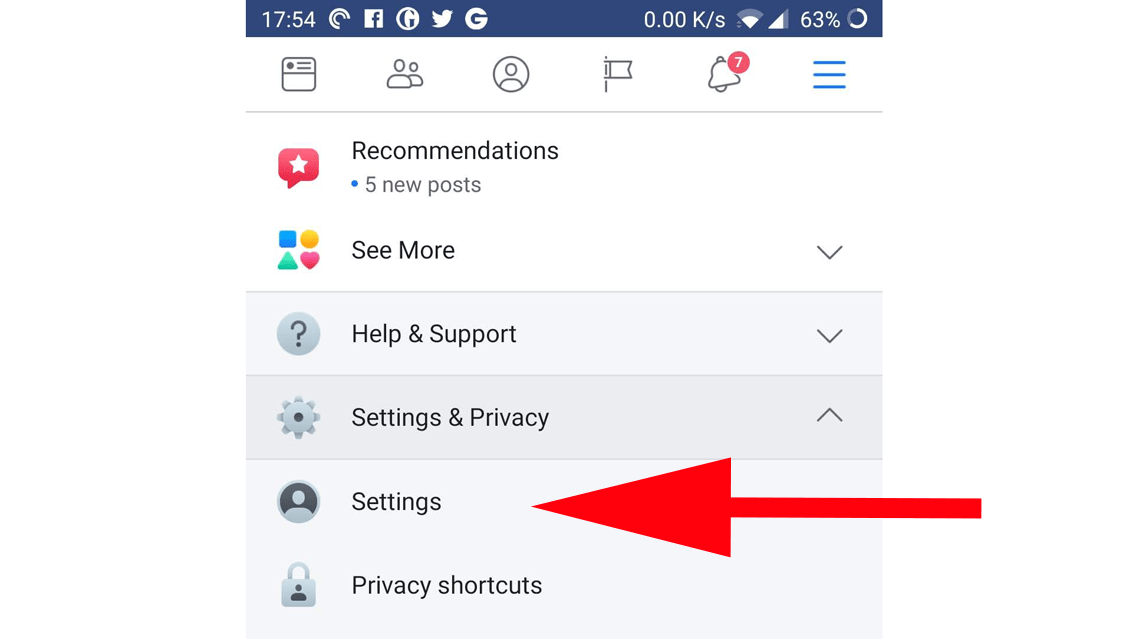
- Select Settings And Privacy: Scroll down and select “Settings and Privacy.”
- Choose Settings: Select “Settings” from the menu.
- Public And Visibility Section: Go to the “Public and visibility” section, then tap on “Block somebody.”
- Access The Blocked List: You will see a list of people you’ve blocked in the past. Tap on the person you want to unblock.
- Unblock The Person: Tap on the “Unblock” button next to their name.
Unblocking Someone on Facebook Using an Iphone
If you’re using an iPhone, follow these steps:
- Open The Facebook App: Open the Facebook app on your iPhone.
- Access Your Account: Log in to your account by entering your email address and password.
- Tap on The Menu Icon: Tap on the three horizontal lines (☰) at the top left corner of the screen.
- Select Settings And Privacy: Scroll down and select “Settings and Privacy.”
- Choose Settings: Select “Settings” from the menu.
- Public And Visibility Section: Go to the “Public and visibility” section, then tap on “Block somebody.”
- Access The Blocked List: You will see a list of people you’ve blocked in the past. Tap on the person you want to unblock.
- Unblock The Person: Tap on the “Unblock” button next to their name.
Unblocking Someone on Facebook Messenger
If you’ve blocked someone on Facebook Messenger, follow these steps:
- Open The Messenger App: Open the Messenger app on your smartphone.
- Access Your Conversation: Go to the conversation with the person you want to unblock.
- Tap on The Three Dots: Tap on the three dots at the top right corner of the screen.
- Select Unblock Person: Select “Unblock person” from the menu.
Unblocking Someone From a Facebook Page
If you’ve blocked someone from a Facebook page, follow these steps:
- Access The Facebook Business Suite App: Open the Facebook Business Suite app on your smartphone.
- Tap on The Menu Icon: Tap on the three horizontal lines (☰) at the top left corner of the screen.
- Select Settings: Select “Settings” from the menu.
- Users Blocked Section: Go to the “Users blocked” section, then tap on the person you want to unblock.
- Unblock The Person: Tap on the “Unblock” button next to their name.
Additional Tips
If you’ve previously blocked someone’s updates in your Facebook newsfeed, follow these steps:
- Access Your Account Settings: Go to your account settings by tapping on the three horizontal lines (☰) at the top left corner of the screen.
- Select News And Posts: Select “News and posts” from the menu.
- Riconnected Section: Scroll down and select “Reconnect” next to the person’s profile picture.
By following these steps, you can easily unblock someone on Facebook using your smartphone. Remember that blocking someone is a temporary measure, and if you’ve changed your mind about reconnecting with them, it’s always possible to unblock them.


