
Unblocking a Person on Facebook: A Step-by-step Guide
Are you tired of being blocked by someone on Facebook? Do you want to reconnect with that person but don’t know how to unblock them? Look no further! In this article, we will guide you through the process of unblocking a person on Facebook using your smartphone, tablet, or computer.
Why Can’t I Unblock Someone on Facebook?
Before we dive into the steps, it’s essential to understand that Facebook doesn’t provide an option to directly unblock someone. However, there are some workarounds that you can use to contact the person who blocked you.
How to Unblock a Person on Facebook From Your Smartphone or Tablet
To unblock someone on Facebook using your smartphone or tablet:
- Open the Facebook app.
- Tap on the menu icon (three horizontal lines) in the top right corner.
- Scroll down and select “Settings.”
- Tap on “Account Settings” and then tap on “Block Users.”
- Find the person you want to unblock and tap on their name.
- Select “Unblock” and confirm your decision.
How to Unblock a Person on Facebook From Your Computer
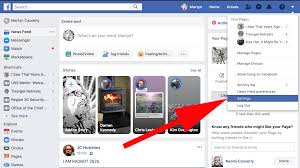
To unblock someone on Facebook using your computer:
- Log in to your Facebook account.
- Click on the menu icon (three horizontal lines) in the top right corner.
- Select “Settings.”
- Scroll down and click on “Block users.”
- Find the person you want to unblock and click on their name.
- Select “Unblock” and confirm your decision.
What Happens When I Unblock Someone?
When you unblock someone on Facebook, they will be able to see your profile again, and you can interact with each other through messages or comments. However, if the person was part of your friend list before being blocked, they may need to send a new friendship request for you to accept.
Can I Unblock Someone Who Blocked Me on Messenger?
If someone blocked you on Facebook and also on Messenger, you will need to unblock them on both platforms separately. To do this:
- Open the Messenger app.
- Tap on the conversation with the person you want to unblock.
- Tap on the three dots in the top right corner.
- Select “Block” and then tap on “Unblock.”
What If I Want to Reconnect With Someone Who Blocked Me?
If someone blocked you, it’s possible that they may not have intended to block you permanently. You can try reaching out to them through other means, such as:
- Sending a private message or email.
- Contacting them through another social media platform.
- Asking a mutual friend to help facilitate communication.
Conclusion
Unblocking someone on Facebook is a relatively straightforward process, and we hope this guide has helped you understand the steps involved. Remember that if someone blocked you, it’s essential to respect their boundaries and not pressure them into unblocking you. By following these steps, you can reconnect with someone who may have unintentionally blocked you.
Frequently Asked Questions
- Q: Can I Unblock Someone Who Blocked me on Facebook?
A: Yes, but there are some workarounds that you can use to contact the person who blocked you. - Q: What Happens When I Unblock Someone on Facebook?
A: When you unblock someone, they will be able to see your profile again, and you can interact with each other through messages or comments. - Q: Can I Unblock Someone Who Blocked me on Messenger?
A: Yes, but you will need to unblock them on both Facebook and Messenger separately. - Q: What if I Want to Reconnect With Someone Who Blocked Me?
A: You can try reaching out to them through other means, such as sending a private message or email, or contacting them through another social media platform. - Q: Can I Unblock Someone Who Blocked me on Facebook From my Computer?
A: Yes, the process is similar to unblocking someone from your smartphone or tablet. - Q: What if I Don’t Have Access to The Person’s Profile?
A: You can try asking a mutual friend to help facilitate communication or contact the person through another social media platform. - Q: Can I Report Someone Who Blocked me on Facebook?
A: No, you cannot report someone for blocking you on Facebook.


