
How to Unblock Someone on Instagram: A Step-by-step Guide
Are you tired of being blocked by someone on Instagram? Do you want to know how to unblock a person who has blocked you back? Well, you’re in luck! In this article, we’ll guide you through the process of unblocking someone on Instagram, whether you’re using your smartphone or computer.
What Happens When Someone Blocks You on Instagram
Before we dive into the steps, let’s quickly cover what happens when someone blocks you on Instagram. When a person blocks you, they can no longer see your posts or stories. In addition, you won’t be able to see their posts or stories either. It’s a two-way street, and it’s usually done to avoid any kind of conflict or drama.
Why Would You Want to Unblock Someone on Instagram?
There are several reasons why you might want to unblock someone on Instagram. Maybe you’ve had a change of heart and no longer want to block them. Perhaps you’re trying to resolve an issue and need to communicate with the person who blocked you. Whatever your reason, we’ll show you how to unblock someone on Instagram.
How to Unblock Someone on Instagram Using Your Smartphone
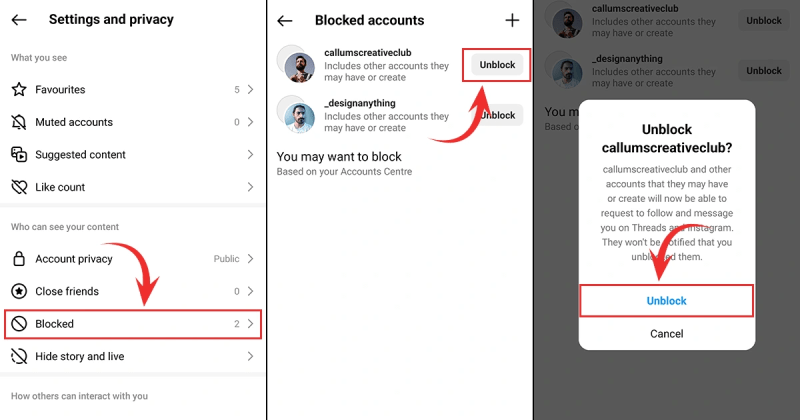
To unblock someone on Instagram using your smartphone (or tablet), follow these steps:
- Open Instagram: Open the Instagram app on your device.
- Tap on The Profile Icon: Tap on the profile icon located in the bottom-right corner of the screen.
- Search For The Person: Search for the person you want to unblock by typing their name in the search bar at the top of the screen.
- Select The Person’s Profile: Select the person’s profile from the search results.
- Tap on The Three Horizontal Lines: Tap on the three horizontal lines located in the top-right corner of the screen.
- Select “Settings And Privacy”: Select “Settings and Privacy” from the menu.
- Select “Users Blocked”: Select “Users Blocked” from the settings menu.
- Find The Person You Want to Unblock: Find the person you want to unblock in the list of blocked users.
- Tap on The “Unblock” Button: Tap on the “Unblock” button next to their name.
How to Unblock Someone on Instagram Using Your Computer
To unblock someone on Instagram using your computer, follow these steps:
- Open Instagram: Open Instagram on your computer by going to www.Instagram.Com.
- Click on The Profile Icon: Click on the profile icon located in the top-right corner of the screen.
- Search For The Person: Search for the person you want to unblock by typing their name in the search bar at the top of the screen.
- Select The Person’s Profile: Select the person’s profile from the search results.
- Click on The “Unblock” Button: Click on the “Unblock” button next to their name.
What Happens After You Unblock Someone on Instagram?
After you unblock someone on Instagram, they will no longer be blocked by you. However, if you had previously restricted them, they will still be able to see your posts and stories. If you want to remove the restrictions, you’ll need to visit their profile and tap on the “Remove Restrictions” button.
Why Can’t I Unblock Someone Who Blocked Me Back?
There are a few reasons why you might not be able to unblock someone who blocked you back. One reason is that Instagram has a feature called “Restrictions,” which allows users to restrict certain people from seeing their posts and stories, even if they’re no longer blocked.
How Do I Know If Someone Has Restricted Me on Instagram?
If someone has restricted you on Instagram, you won’t be able to see their posts or stories. However, they will still be able to see your posts and stories. To check if someone has restricted you, try visiting their profile and seeing if you can see their posts.
What Are The Benefits of Unblocking Someone on Instagram?
Unblocking someone on Instagram can have several benefits, including:
- Improved Communication: Unblocking someone allows you to communicate with them again, which can be helpful for resolving issues or clearing up misunderstandings.
- Increased Followers: If someone unblocks you and follows you back, it can increase your followers count and help your account grow.
- Better Relationships: Unblocking someone can also improve relationships by allowing you to interact with each other again.
Conclusion
Unblocking someone on Instagram is a simple process that can be done using either your smartphone or computer. By following the steps outlined in this article, you’ll be able to unblock someone who blocked you and start communicating with them again. Remember to always use caution when interacting with someone who has restricted or blocked you in the past.
Common Questions About Unblocking Someone on Instagram
- Q: Can I Still See a Person’s Posts if They’ve Restricted me But Not Blocked Me?
A: Yes, if someone has restricted you on Instagram, you’ll still be able to see their posts and stories. - Q: How do I Know if Someone Has Restricted me on Instagram?
A: If someone has restricted you on Instagram, you won’t be able to see their posts or stories. However, they will still be able to see your posts and stories. - Q: What Happens if I Unblock Someone Who Blocked me Back?
A: If you unblock someone who blocked you back, it will remove the block between the two of you. However, if you had previously restricted them, they may still be restricted from seeing your posts and stories.


