
Unblocking People on Instagram: A Step-by-step Guide
Are you worried about the messages and comments from someone on Instagram that you’ve blocked? Do you want to understand how to unblock them and come back to normal interactions? Look no further! In this article, we’ll guide you through the process of unblocking people on Instagram, whether you’re using an Android or iOS device, or a PC.
Informazioni Preliminari (Preliminary Information)
Before we dive into the steps, it’s essential to know that blocking someone on Instagram prevents them from interacting with your profile. Additionally, blocking someone also removes their follow in your comparison list. This means that after unblocking someone, you’ll need to re-follow them if you want to see their content again.
Come Unblock The Persons Blocked on Instagram (Unblocking People on Instagram)
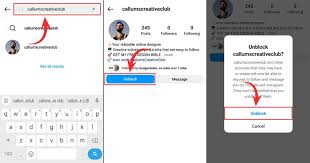
If you’ve updated the Instagram app and can’t find the functionality to unblock users, don’t worry! We’ve got you covered. To unblock someone on Instagram:
- Open the Instagram app on your Android or iOS device.
- Tap on the profile of the person you want to unblock.
- Tap on their name in the top-right corner.
- Select “Unblock” from the menu.
Alternatively, you can unblock users by going to Settings > Privacy > Users blocked. Find the user you want to unblock and tap on the “Unblock” button twice to confirm.
Da PC (From Pc)
If you’re using a PC, follow these steps:
- Open the Instagram app or website.
- Tap on the profile of the person you want to unblock.
- Select “Unblock” from the menu.
Come Unblock The Histories on Instagram (Unblocking Posts And Stories)
If you’ve blocked someone’s posts and stories, but now want to see them again:
- Open the Instagram app on your smartphone.
- Tap on the profile of the person whose posts and stories you want to unblock.
- Tap on the “Follow” button.
- In the menu that appears, select “Mute” and then toggle off the switch next to “Stories.”
Come Unblock The Direct (Unblocking Direct Messages)
If you’ve disabled direct messages for someone but now want to enable them again:
- Open the Instagram app on your smartphone.
- Tap on the profile of the person whose direct messages you want to unblock.
- Tap on the camera icon in the top-right corner.
- Select “Video” from the menu.
- Choose whether you want to receive notifications or not by toggling the switch next to “Video.”
Frequently Asked Questions
- Can I Unblock Someone if I’ve Blocked Them From my Pc?
Yes, you can unblock someone from your PC by following the steps outlined above. - How do I Re-follow Someone After Unblocking Them?
To re-follow someone, simply go to their profile and tap on the “Follow” button. - Can I Unblock Multiple People at Once?
Unfortunately, no. You’ll need to unblock each person individually. - What Happens if I Unblock Someone But Don’t Re-follow Them?
If you unblock someone but don’t re-follow them, their posts and stories won’t appear in your feed.
We hope this guide has been helpful! If you have any further questions or concerns, feel free to ask.


