
Understanding if a Mobile Has Two Sim Cards
Are you wondering if your new smartphone can accommodate two SIM cards? You’re not alone! Many people are curious about this feature, especially with the increasing demand for dual-SIM functionality.
In this article, we’ll explore the world of dual-SIM smartphones and help you understand how to check if your device supports two SIM cards. Whether you’re a tech-savvy individual or just looking to upgrade your phone, this guide will walk you through everything you need to know.
What is a Dual-sim Smartphone?
A dual-SIM smartphone is a device that can accommodate two SIM cards at the same time. This allows users to have separate phone numbers and plans on a single device. Dual-SIM smartphones are popular in many countries, especially in Asia and Africa, where multiple SIM cards are often used for personal and business purposes.
How to Check if Your Smartphone Supports Two Sim Cards
To check if your smartphone supports two SIM cards, you can follow these steps:
Method 1: Physical Inspection
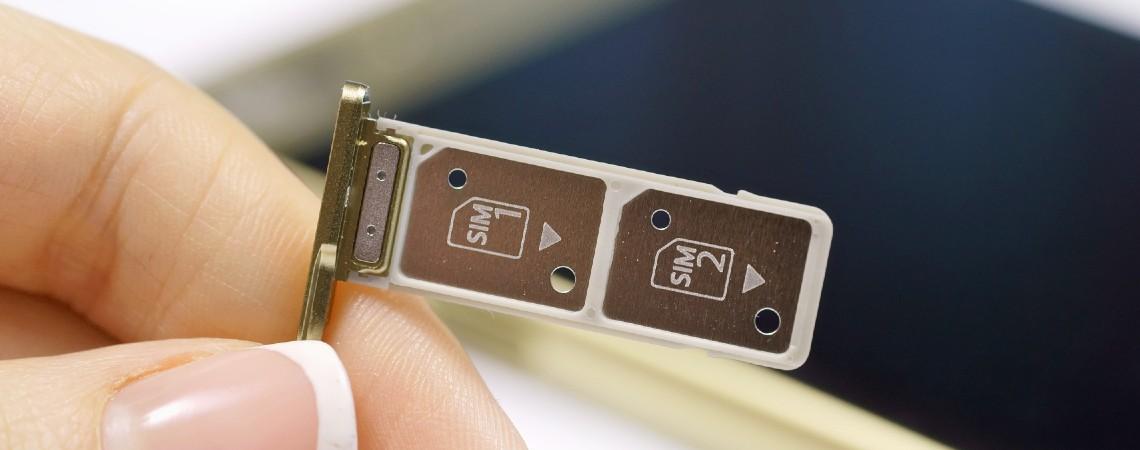
- Carefully examine the phone’s SIM card tray. If it has two separate slots, then your device likely supports dual-SIM functionality.
- Note that some phones may have a hybrid SIM card tray that can accommodate either one or two SIM cards.
Method 2: Check The Device Settings
- On most Android devices, you can check the phone’s settings to see if it supports dual-SIM functionality.
- Go to Settings > More or Advanced > Dual SIM Settings.
- If your device supports dual-SIM functionality, you should see an option to enable or disable this feature.
Method 3: Consult The User Manual
- Check your phone’s user manual or online documentation to see if it mentions dual-SIM support.
- This is usually indicated in the specifications section of the manual.
What to Do If Your Smartphone Doesn’t Support Dual-sim Functionality?
If your smartphone doesn’t support dual-SIM functionality, you have a few options:
- Consider upgrading to a new phone that supports this feature.
- Use a third-party adapter or accessory that can add an additional SIM card slot.
- Contact the manufacturer or a authorized service provider for more information.
Conclusion
In conclusion, checking if your smartphone supports two SIM cards is relatively straightforward. By following these steps and consulting your device’s documentation, you should be able to determine whether your phone has this feature.
We hope this article has been helpful in answering your questions about dual-SIM smartphones. If you have any further doubts or concerns, feel free to ask!
Frequently Asked Questions (FAQs)
-
What Are The Benefits of a Dual-sim Smartphone?
A dual-SIM smartphone allows users to have separate phone numbers and plans on a single device, making it ideal for individuals who need multiple lines for personal or business purposes.
-
How do I Enable Dual-sim Functionality on my Android Device?
To enable dual-SIM functionality on your Android device, go to Settings > More or Advanced > Dual SIM Settings and follow the instructions.
-
What Are Some Common Issues With Dual-sim Smartphones?
Some common issues with dual-SIM smartphones include poor signal strength, dropped calls, and difficulty switching between SIM cards.


