
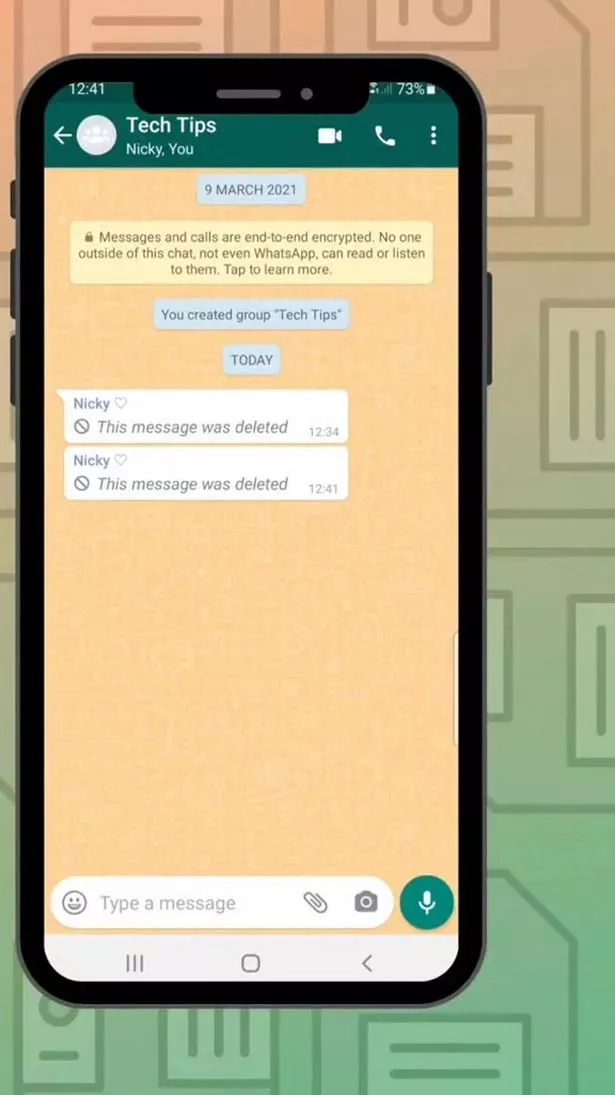
The Art of Surveillance: How to Know if Someone Has Erased Your Chat
Are you wondering if someone has erased your chat conversation? Have you noticed that a particular person seems to be deleting messages or entire conversations without telling you? Do you want to know the truth about what’s happening behind closed doors?
In this article, we’ll explore the various ways to detect and uncover deleted chats on popular messaging apps like Instagram, WhatsApp, and Messenger. We’ll delve into the world of chat surveillance, providing you with practical tips and tricks to get to the bottom of the mystery.
Understanding The Anatomy of a Chat
Before we dive into the specifics of each app, it’s essential to understand how chats are structured. Chats typically consist of messages, which can be text-based, image-based, or video-based. When you send a message on any of these apps, it gets stored on the server and is also saved locally on your device.
Instagram: The Silent Eraser
On Instagram, deleting a chat conversation is as easy as using the “Temporarily delete” feature. This functionality allows you to erase all messages in a chat without leaving any trace. However, there are some ways to recover deleted chats:
- Check The Album: On Android devices, go to the Gallery app and navigate to the Instagram album. Look for photos or videos that might have been shared in the deleted conversation.
- Use Google Files: If you can’t find the album on your device, try using Google Files to access the folder where Instagram stores its media files.
- Look For Hidden Conversations: On Instagram, you can access hidden conversations by swiping up on a chat and tapping “View conversation”.
Whatsapp: The Stealthy Deleter
On WhatsApp, deleting a chat conversation is a bit more complicated. When you delete a message or an entire conversation, it’s removed from the server, but some remnants might still be present on your device.
- Check The Chat History: Look for deleted messages in the “Chat history” section of the app.
- Use Android File Explorer: On Android devices, use a file explorer like Google Files to access the WhatsApp cache and look for deleted messages.
- Recover From Backup: If you’ve backed up your chats before deleting them, you can recover them by reinstalling WhatsApp and restoring from the backup.
Messenger: The Sneaky Deleter
On Messenger, deleting a chat conversation is relatively easy. When you delete a message or an entire conversation, it’s removed from the server, but some remnants might still be present on your device.
- Check The Chat History: Look for deleted messages in the “Chat history” section of the app.
- Use Android File Explorer: On Android devices, use a file explorer like Google Files to access the Messenger cache and look for deleted messages.
- Recover From Backup: If you’ve backed up your chats before deleting them, you can recover them by reinstalling Messenger and restoring from the backup.
General Tips And Tricks
When trying to uncover deleted chats, remember these general tips:
- Check The App’s Settings: Look for any settings or features that might allow you to access deleted messages or conversations.
- Use a File Explorer: On Android devices, use a file explorer like Google Files to access the app’s cache and look for deleted messages.
- Recover From Backup: If you’ve backed up your chats before deleting them, you can recover them by reinstalling the app and restoring from the backup.
Conclusion
Knowing if someone has erased your chat conversation requires a combination of technical knowledge and attention to detail. By understanding how chats are structured and using the tips and tricks outlined in this article, you can uncover deleted messages and conversations on popular messaging apps like Instagram, WhatsApp, and Messenger.
Frequently Asked Questions
- Can I Recover Deleted Messages or Conversations?
- Yes, but it might require some technical know-how and attention to detail.
- Will I be Able to Access Deleted Messages or Conversations on Other Devices?
- It depends on the app’s settings and whether you’ve backed up your chats before deleting them.
- Are There Any Risks Associated With Trying to Recover Deleted Messages or Conversations?
- Yes, if you’re not careful, you might end up reinstalling the app or restoring from a backup that contains sensitive information.
- Can I Prevent Someone Else From Deleting my Chat Conversation?
- Yes, by using two-factor authentication and keeping your device’s software up-to-date.
- Are There Any Apps or Tools That Can Help me Recover Deleted Messages or Conversations?
- Yes, but be cautious of apps or tools that promise to recover deleted chats without any consequences.
By following these tips and tricks, you’ll be well on your way to uncovering deleted chats and keeping your digital life secure.


