
Understanding Iphone Battery Health: A Comprehensive Guide
Are you wondering if your iPhone’s battery is still healthy? Do you want to know the signs that indicate a battery replacement might be needed? Look no further! In this article, we’ll delve into the world of iPhone battery health and provide you with a comprehensive guide on how to understand and maintain your device’s power.
What Causes an Iphone Battery to Deteriorate?
Before we dive into the symptoms, let’s talk about what causes an iPhone battery to deteriorate. Just like any other rechargeable battery, the iPhone’s lithium-ion battery will naturally degrade over time due to repeated charge cycles. However, there are some factors that can accelerate this process:
- Exposure to extreme temperatures
- Physical damage to the device or battery
- Software issues, such as bugs or compatibility problems
- Using the iPhone in a way that puts excessive strain on the battery (e.G., Using power-intensive apps or features)
Common Symptoms of a Deteriorating Iphone Battery
So, what are the signs that indicate your iPhone’s battery might be losing its effectiveness? Here are some common symptoms to look out for:
- Slow Charging: If your iPhone takes longer than usual to charge, it could be a sign that the battery is no longer holding its charge well.
- Reduced Battery Life: If you’re noticing that your iPhone’s battery isn’t lasting as long as it used to, even when you use it in the same way, it might be due to a deteriorating battery.
- Overheating: If your iPhone becomes excessively hot during use, it could indicate that the battery is working harder than usual to maintain power levels.
- Apps And Features Not Functioning as Expected: Certain apps or features may not work properly if they’re consuming more power than usual due to a deteriorating battery.
How to Check Your Iphone Battery Health
Fortunately, there are ways to check your iPhone’s battery health without having to take it to an Apple Store. Here are some methods:
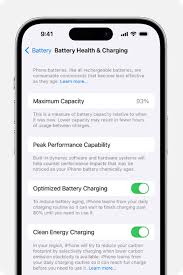
- Using Ios Settings: Go to Settings > Battery and look for the “Battery Health” section. This will give you an idea of your iPhone’s maximum capacity, which should be around 95-100% if the battery is in good condition.
- Third-party Apps: There are several third-party apps available that can provide a more detailed analysis of your iPhone’s battery health.
What to Do If Your Iphone Battery Is Deteriorating
If you’ve identified that your iPhone’s battery is deteriorating, there are some steps you can take:
- Calibrate The Battery: Calibrating the battery can help restore its performance. This involves letting it drain completely and then charging it up to 100%.
- Use a Power Bank or External Charger: If you’re consistently finding yourself without enough juice to make it through the day, consider investing in a portable power bank or an external charger.
- Consider Replacing The Battery: If your iPhone’s battery is still under warranty or if you’ve found that other factors are contributing to its deterioration (e.G., Software issues), it might be worth replacing the battery.
Conclusion
Understanding and maintaining your iPhone’s battery health is crucial for extending its lifespan. By being aware of the signs that indicate a deteriorating battery, using the right methods to check your device’s power levels, and taking corrective actions when needed, you can ensure that your iPhone stays healthy for years to come.
Frequently Asked Questions (FAQs)
- Q: How Often Should I Calibrate my Iphone’s Battery?
A: Calibrating the battery every 3-6 months is a good practice. - Q: Can I Replace my Iphone’s Battery Myself?
A: Yes, but be aware that doing so will void your warranty. - Q: How do I Know if my Iphone’s Battery is Still Under Warranty?
A: Check with Apple or the manufacturer to see if your device is still covered. - Q: Are There Any Third-party Apps That Can Help me Monitor my Iphone’s Battery Health?
A: Yes, several apps are available for download from the App Store.
Important
Remember to always follow proper safety guidelines when working with electrical components.


