
Removing Bitdefender: A Step-by-step Guide
Are you tired of using Bitdefender antivirus software, but not sure how to uninstall it from your PC? Look no further! This article will guide you through the process of removing Bitdefender on Windows, Mac, Android, and iOS/iPadOS devices.
Why Uninstall Bitdefender?
Before we dive into the removal process, let’s consider why you might want to uninstall Bitdefender. Perhaps you’ve found a better antivirus solution or simply don’t need the extra security features. Whatever your reason, this guide will walk you through the steps to remove Bitdefender from your device.
Removing Bitdefender on Windows
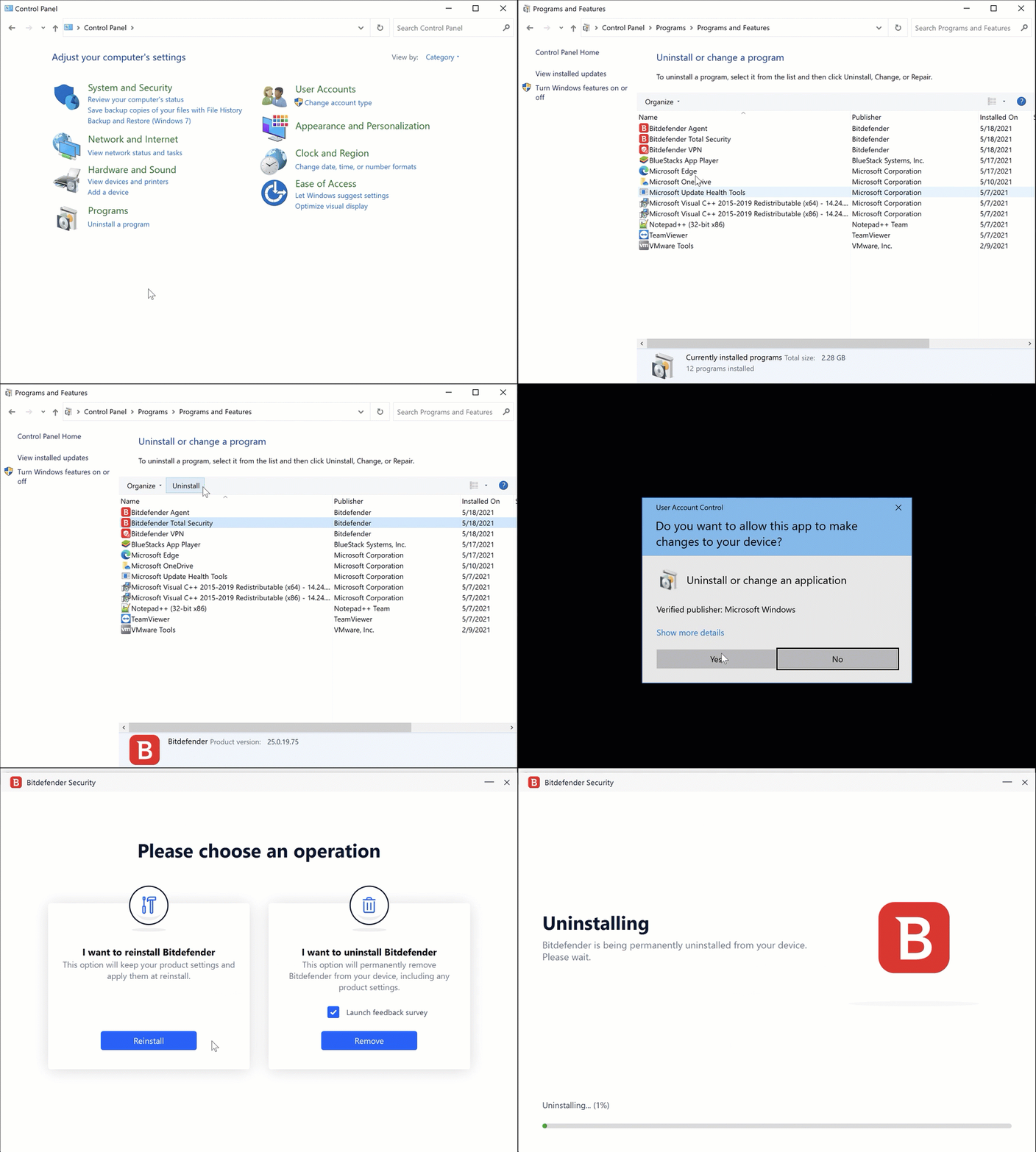
To uninstall Bitdefender on Windows, follow these simple steps:
- Click on The Start Button: Located in the bottom left corner of your screen, click on the Start button.
- Select Settings: From the dropdown menu, select the Settings icon.
- Open The Apps & Features Section: In the Settings window, navigate to the Apps & features section.
- Find Bitdefender: Scroll through the list of installed apps and find Bitdefender.
- Click on The Three Dots: Next to Bitdefender, click on the three dots to open a dropdown menu.
- Select Uninstall: From the dropdown menu, select Uninstall.
Removing Bitdefender on Mac
Uninstalling Bitdefender on a Mac is just as easy:
- Open The Finder: Locate the Finder icon on your dock or in the Applications folder.
- Access The Applications Folder: In the Finder window, navigate to the Applications folder.
- Find Bitdefender: Scroll through the list of installed apps and find Bitdefender.
- Drag Bitdefender to The Trash: Click and hold on Bitdefender, then drag it to the Trash icon located in the dock.
- Empty The Trash: Right-click (or control-click) on the Trash icon and select Empty Trash.
Removing Bitdefender on Android
If you’re using Bitdefender on your Android device:
- Long Press on The Bitdefender Icon: Locate the Bitdefender icon on your home screen or in the app drawer.
- Drag to The Uninstall Button: Drag the Bitdefender icon to the Uninstall button that appears on top of the home screen.
- Confirm Uninstallation: Tap Yes to confirm that you want to uninstall Bitdefender.
Removing Bitdefender on Ios/ipados
To remove Bitdefender from your iPhone or iPad:
- Long Press on The Bitdefender Icon: Locate the Bitdefender icon on your home screen.
- Tap The X: Tap the X in the top-left corner of the screen to open a dropdown menu.
- Select Delete App: From the dropdown menu, select Delete App.
What Happens After Uninstalling Bitdefender?
After uninstalling Bitdefender, you may be prompted to complete a survey or review your experience with the app. Feel free to skip this step if you’re not interested.
If you encounter any issues during the uninstallation process, refer to our troubleshooting guide for further assistance.
Why Choose Our Guide?
Our comprehensive guide provides detailed instructions on how to remove Bitdefender from various devices. Unlike other resources, we cater to different operating systems and offer a straightforward approach to ensure a smooth removal experience.
Removing Additional Files And Folders (Optional)
If you want to delete any remaining files or folders associated with Bitdefender, follow these steps:
- On Windows: Navigate to the ProgramData folder, then search for the Bitdefender directory. Delete the entire directory.
- On Mac: Access the Library/Application Support/Bitdefender folder and drag it to the Trash.
Final Thoughts
Removing Bitdefender is a relatively simple process that can be completed within minutes. If you have any questions or need further assistance, please don’t hesitate to reach out.
Common Questions Answered
- Q: Will uninstalling Bitdefender affect my device’s security?
A: No, removing Bitdefender will not compromise your device’s security. - Q: Can I reinstall Bitdefender if needed?
A: Yes, you can always reinstall Bitdefender in the future. - Q: What should I do with leftover files and folders?
A: You can safely delete any remaining files or folders associated with Bitdefender.
Conclusion
In conclusion, removing Bitdefender from your device is a straightforward process that requires minimal technical expertise. Our guide has provided you with step-by-step instructions for uninstalling Bitdefender on Windows, Mac, Android, and iOS/iPadOS devices.
If you have any further questions or concerns, feel free to reach out to our support team. We’re here to help!


