
Upgrade to Portable Pc: A Comprehensive Guide
Introduction
===============
Are you tired of your portable pc’s sluggish performance? do you want to breathe new life into an old machine without breaking the bank? look no further! in this guide, we’ll show you how to potentiate a portable pc by applying various solutions that won’t dent your wallet. We’ll explore how to upgrade storage, memory, and even intervene on the operating system to achieve remarkable improvements.
Preliminary Information
===========================
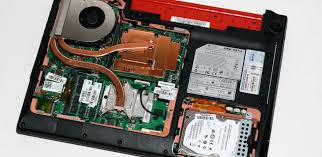
Before diving into the nitty-gritty, let’s cover some essential information. Your portable pc is essentially a compact computer with all necessary peripherals, including a monitor, keyboard, mouse, usb ports, and internal hardware components like the motherboard, processor, ram, audio card, video card, and network card. Due to its reduced size, you can’t easily swap out these components for upgrades.
How to Upgrade a Notebook
==============================
While it’s not possible to upgrade individual components like the cpu, graphics card, or audio card, there are still ways to improve your portable pc’s performance. Let’s focus on upgrading storage and memory.
Install to Ssd
Upgrading to a solid-state drive (SSD) is an excellent way to boost your portable PC’s performance. SSDs offer faster access times compared to traditional mechanical hard drives, making them ideal for applications that require quick loading times. Most modern notebooks support sata 3 connectors with a 2.5-Inch form factor. When selecting a new ssd, ensure it’s compatible with your notebook model.
Increase The Ram
Memory (ram) plays a crucial role in determining your portable pc’s performance. The more memory available, the more programs you can run simultaneously without compromising speed. Upgrading ram is relatively easy on most notebooks and doesn’t require any technical expertise. Before buying new ram, verify its compatibility with your notebook’s motherboard.
Enhance The Wifi pc Portable
If your portable pc’s wi-fi reception isn’t up to par, consider investing in a usb wi-fi adapter. These devices provide improved signal strength and can help you connect to nearby networks more efficiently. Some adapters even feature external antennas for enhanced coverage.
Unload The Operating System
Lightening the operating system is another way to improve performance without upgrading hardware. By disabling unnecessary programs, allocating more virtual ram, deleting pre-installed apps, using a lightweight antivirus, and erasing unwanted files, you can enjoy better overall performance.
How to Upgrade Your Portable pc For Gaming
If you’re looking to upgrade your portable pc for gaming purposes, consider upgrading the hardware or using software solutions. Upgrading the graphics card is usually not feasible due to its direct attachment to the motherboard. However, investing in a dedicated graphics card with a Thunderbolt 3 connection can be an effective alternative.
Software to Enhance The Portable PC
Unfortunately, there’s no magic software that can upgrade your portable pc’s performance without any hardware modifications. Be cautious of programs claiming to offer such benefits, as they might compromise your system’s stability or even introduce malware risks.
Conclusion
==============
By following the guidelines outlined in this comprehensive guide, you’ll be able to potentiate your portable pc and unlock its full potential. From upgrading storage and memory to lightening the operating system, there are numerous solutions available that won’t break the bank.
Frequently Asked Questions (faqs)
======================================
-
What is The Best Way to Upgrade my Portable Pc’s Performance?
-
Upgrade your ssd for faster access times.
-
How do I Verify if my Notebook Supports a Sata 3 Connector With a 2.5-Inch Form Factor?
-
Consult your notebook’s user manual or manufacturer’s website for specifications.
-
What is The Difference Between Ddr3 And Ddr4 Ram?
-
Ddr4 offers faster speeds and improved performance compared to ddr3.
-
Can i Upgrade my Portable Pc’s Graphics Card?
-
Due to its direct attachment to the motherboard, upgrading the graphics card might not be feasible.
-
Are There Any Software Solutions That Can Improve my Portable Pc’s Performance Without Hardware Upgrades?
-
Unfortunately, no magic software can offer such benefits without compromising system stability or introducing malware risks.
Hope this helps you upgrade your portable pc and make it perform faster


