
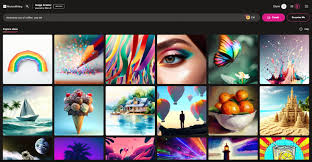
Unlocking Creativity: How Bing Image Creator is Revolutionizing Digital Art
Are you tired of being limited by your own artistic abilities? Do you dream of creating stunning digital images without needing to be a skilled artist? Look no further than Bing Image Creator, the revolutionary new tool from Microsoft that’s taking the world of digital art by storm.
What is Bing Image Creator?
Bing Image Creator is a cutting-edge platform that utilizes artificial intelligence (AI) to generate original digital images based on text prompts. With this innovative tool, you can create stunning visual masterpieces without needing any artistic experience or training. Simply type in your desired image description, and the AI will do the rest.
How Does Bing Image Creator Work?
Using a sophisticated algorithm developed by OpenAI, Bing Image Creator generates unique digital images based on text prompts. This means that with just a few words, you can create stunning visual art that rivals the work of professional artists. The platform also allows for specific artistic styles to be incorporated into your creations, such as surrealism or impressionism.
Getting Started With Bing Image Creator
To begin using Bing Image Creator, you’ll need to sign in with your Microsoft account. This will grant you access to a wide range of features and tools that will help you unlock your creative potential. Once signed in, simply type in your desired image description, choose the artistic style you prefer, and click on the “Create” button.
Using Bing Image Creator on Web
To use Bing Image Creator on web, follow these simple steps:
- Visit the official page of Bing Image Creator
- Type in the text prompt that describes the image you want to create
- Choose the artistic style you prefer (e.G. Surrealism, impressionism)
- Click on the “Create” button
Using Bing Image Creator With Microsoft Edge
If you’re using the default browser on Windows 10 or Windows 11, you can access Bing Image Creator directly from within the browser. Simply click on the icon that resembles a brush to initiate a conversation with the AI.
Using Bing Image Creator on Smartphone And Tablet
You can also use Bing Image Creator on your smartphone or tablet by downloading the official app from the App Store (for iOS devices) or Google Play Store (for Android devices). Follow these simple steps:
- Download the app
- Sign in with your Microsoft account
- Choose the image category you prefer
- Type in your desired image description
- Click on the “Create” button
Tips And Tricks For Using Bing Image Creator
- Keep your text prompts concise and clear to ensure accurate results.
- Experiment with different artistic styles to achieve unique visual effects.
- Don’t be afraid to try again if the initial result doesn’t meet your expectations.
The Future of Digital Art: What Does Bing Image Creator Mean For Artists?
Bing Image Creator is set to revolutionize the world of digital art by democratizing access to high-quality visual creations. With this innovative tool, anyone can become a digital artist without needing extensive training or experience. As the platform continues to evolve and improve, we can expect to see even more stunning visual masterpieces that push the boundaries of what’s possible in digital art.
Conclusion
Bing Image Creator is an exciting new tool that’s set to change the game for digital artists. By harnessing the power of artificial intelligence, this innovative platform enables anyone to create stunning visual images without needing artistic experience or training. Whether you’re a seasoned artist or just starting out, Bing Image Creator is sure to unlock your creative potential and take your digital art to new heights.
Frequently Asked Questions
- What is Bing Image Creator?
Bing Image Creator is a platform that utilizes artificial intelligence (AI) to generate original digital images based on text prompts. - How Does Bing Image Creator Work?
Using a sophisticated algorithm developed by OpenAI, Bing Image Creator generates unique digital images based on text prompts. - What Artistic Styles Can I Use in Bing Image Creator?
You can choose from a wide range of artistic styles, including surrealism, impressionism, futurism, and more. - Can I Download The Generated Image?
Yes, you can download the generated image as a high-resolution JPG file. - Is Bing Image Creator Free to Use?
Yes, Bing Image Creator is free to use, with optional boosts available for faster generation times. - What Are The Limitations of Using Bing Image Creator?
While Bing Image Creator is incredibly powerful, there may be limitations on the complexity and accuracy of generated images. - Can I Use Bing Image Creator Commercially?
No, the images generated by Bing Image Creator cannot be used for commercial purposes without explicit permission from Microsoft. - Is my Personal Data Safe When Using Bing Image Creator?
Yes, your personal data is secure and protected when using Bing Image Creator.


