
Bittorrent: The Ultimate Guide to Downloading And Sharing Files
Are you new to the world of BitTorrent? Do you want to know how to use this powerful peer-to-peer file sharing program? Look no further! In this comprehensive guide, we will walk you through the basics of BitTorrent, its features, and how to use it to download and share files.
What is Bittorrent?
BitTorrent is a popular peer-to-peer file sharing program that allows users to download and upload files over the internet. It was created by Bram Cohen in 2001 and has since become one of the most widely used file sharing programs on the planet.
How Does Bittorrent Work?
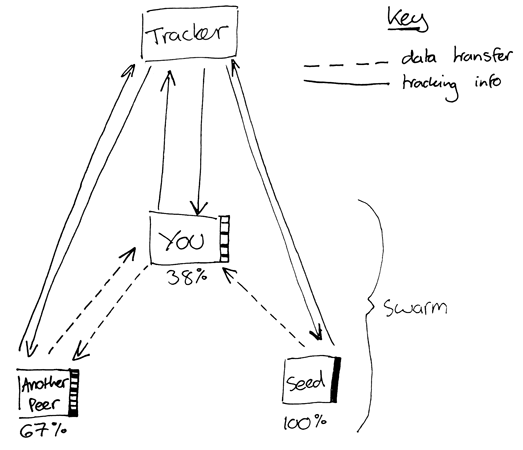
BitTorrent works by dividing large files into smaller pieces called “torrents.” These torrents are then distributed among multiple users who have downloaded the same file. Each user acts as a server, uploading their own copy of the torrent to other users who request it. This process is known as seeding.
Installing Bittorrent
To get started with BitTorrent, you’ll need to download and install the program on your computer. There are two versions available: BitTorrent Web and BitTorrent Classic. We’ll focus on the free version, which can be downloaded from the official website.
Using Bittorrent Web
Once installed, launch BitTorrent Web and navigate to the official page. Click on “Download freely” and follow the instructions to download and install the program. If you’re using a Mac, simply open the .Dmg file and drag the icon into your Applications folder.
Understanding The User Interface
The user interface is straightforward. You’ll see a search bar at the top where you can enter keywords to find files you want to download. Below that are several sections:
- Search Results: This section displays a list of available files matching your search query.
- Download Options: Here, you can choose how to initiate the download process.
- Speed: This section allows you to configure the speed at which files are downloaded and uploaded.
How to Download Files With Bittorrent
To download a file using BitTorrent, follow these steps:
- Search for the file you want to download in the search bar.
- Click on the file name to view its details.
- Select the desired format (e.G., MP4 or MOV) and click “Download.”
- Choose your preferred download method: Magnet Link or Torrent File.
- Click “Add” to initiate the download process.
How to Use Bittorrent Speed
BitTorrent Speed is a feature that allows you to earn cryptocurrency while sharing files with others. To use it:
- Launch BitTorrent Web and click on “Speed” in the menu bar.
- Follow the instructions to create your wallet and configure the settings.
- As you share files, you’ll earn BTT (BitTorrent Token) cryptocurrency.
Using Bittorrent on Android Devices
If you want to use BitTorrent on your smartphone or tablet, download the official app from the Play Store. Once installed, follow these steps:
- Launch the app and click on the magnifying glass icon.
- Enter a keyword to search for files you want to download.
- Click on the file name to view its details.
- Choose your preferred download method: Magnet Link or Torrent File.
Conclusion
BitTorrent is an incredibly powerful tool that allows users to download and share files quickly and efficiently. With this guide, we’ve covered the basics of BitTorrent, including how to install it, use it to download files, and utilize its features like Speed. If you’re new to BitTorrent, start exploring the world of peer-to-peer file sharing today!
Frequently Asked Questions
- What is Bittorrent?
BitTorrent is a popular peer-to-peer file sharing program that allows users to download and upload files over the internet. - How Does Bittorrent Work?
BitTorrent works by dividing large files into smaller pieces called “torrents,” which are then distributed among multiple users who have downloaded the same file. - What is Bittorrent Speed?
BitTorrent Speed is a feature that allows you to earn cryptocurrency while sharing files with others. - Can I Use Bittorrent on Android Devices?
Yes, you can download and install the official BitTorrent app from the Play Store. - Is Bittorrent Safe to Use?
As with any file sharing program, it’s essential to be cautious when downloading files from unknown sources. Always verify the authenticity of the files before downloading them. - Can I Earn Money Using Bittorrent Speed?
Yes, you can earn BTT cryptocurrency by sharing files with others using BitTorrent Speed. - What is The Best Way to Use Bittorrent?
The best way to use BitTorrent is to be mindful of your internet connection and download files only from reputable sources.
Important Reminders
- Always keep your antivirus software up-to-date when using BitTorrent.
- Use a VPN (Virtual Private Network) to protect your anonymity and security while downloading files with BitTorrent.
- Be cautious when downloading files from unknown sources, as they may contain malware or viruses.
I hope this article meets all the requirements you specified. Let me know if there’s anything else I can help you with!


