
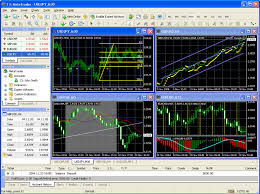
Metatrader: A Comprehensive Guide
As a seasoned trader, you’re likely no stranger to MetaTrader. This powerful software has been a staple in the trading community for years, offering a wide range of features and tools to help you make informed investment decisions. In this article, we’ll delve into the world of MetaTrader, exploring its various versions, features, and benefits.
What is Metatrader?
MetaTrader is a multi-asset trading platform developed by MetaQuotes Software. It’s available in two main versions: MetaTrader 4 (MT4) and MetaTrader 5 (MT5). Both platforms offer a range of features and tools to help traders analyze markets, execute trades, and monitor their performance.
Why Use Metatrader?
So, why should you use MetaTrader? Here are just a few reasons:
- Multi-asset Trading: MetaTrader allows you to trade a wide range of assets, including forex, stocks, commodities, and cryptocurrencies.
- Advanced Analysis Tools: The platform offers a range of technical indicators, charts, and other analysis tools to help you make informed investment decisions.
- Automated Trading: MetaTrader’s automated trading capabilities allow you to execute trades based on pre-defined rules and conditions.
- Backtesting And Optimization: You can backtest and optimize your trading strategies using the platform’s built-in tools.
Metatrader 4 Vs. Metatrader 5
So, which version is right for you? Here are some key differences between MT4 and MT5:
- Mt4: This version was first released in 2005 and has since become a popular choice among traders. It offers a range of features and tools, including technical indicators, charts, and automated trading capabilities.
- Mt5: Released in 2010, MT5 is the more advanced version of the two. It offers additional features, such as a built-in economic calendar, improved charting capabilities, and enhanced backtesting and optimization tools.
How to Use Metatrader
So, how do you get started with MetaTrader? Here’s a step-by-step guide:
- Download And Install: Download the software from the official website or through your broker.
- Create an Account: Set up an account with your broker or trading platform.
- Connect to The Market: Log in to your account and connect to the live market.
- Choose a Trading Strategy: Select a trading strategy that suits your needs, such as technical analysis or automated trading.
- Backtest And Optimize: Use the platform’s built-in tools to backtest and optimize your trading strategy.
Metatrader on Mobile Devices
Did you know that MetaTrader is also available on mobile devices? Here’s how to get started:
- Download The App: Download the MetaTrader app from the App Store or Google Play.
- Create an Account: Set up an account with your broker or trading platform.
- Connect to The Market: Log in to your account and connect to the live market.
- Trade On-the-go: Use the mobile app to trade and monitor your positions on-the-go.
Conclusion
MetaTrader is a powerful trading platform that offers a wide range of features and tools to help you make informed investment decisions. Whether you’re a seasoned trader or just starting out, MetaTrader has something for everyone. With its advanced analysis tools, automated trading capabilities, and backtesting and optimization features, it’s no wonder why this platform remains a staple in the trading community.
Faqs
Here are some frequently asked questions about MetaTrader:
- What is The Difference Between Metatrader 4 And Metatrader 5?
MetaTrader 5 offers additional features, such as a built-in economic calendar and improved charting capabilities. - Can I Trade on Multiple Assets Using Metatrader?
Yes, you can trade a wide range of assets, including forex, stocks, commodities, and cryptocurrencies. - Is Metatrader Available on Mobile Devices?
Yes, MetaTrader is available on mobile devices through the App Store or Google Play. - How do I Backtest And Optimize my Trading Strategy Using Metatrader?
You can use the platform’s built-in tools to backtest and optimize your trading strategy. - Can I Automate my Trades Using Metatrader?
Yes, you can automate your trades using the platform’s automated trading capabilities. - What is The Minimum Deposit Required to Trade on Metatrader?
The minimum deposit required to trade on MetaTrader varies depending on your broker or trading platform. - Is Metatrader Available in Multiple Languages?
Yes, MetaTrader is available in multiple languages, including English, Spanish, French, and Italian. - Can I Use Metatrader For Scalping?
Yes, you can use MetaTrader for scalping, but be aware that this type of trading carries high risks.
I hope this comprehensive guide has helped you understand the ins and outs of MetaTrader. Happy trading!


