
Understanding Command Checking: A Comprehensive Guide
Are you looking to create a professional website but unsure how to check if a command is available? Or perhaps you’re concerned about the property of a domain being associated with your service? This guide will walk you through the process of checking commands, including email commands, domain properties, and Google Search Console checks.
Why Check Commands?
Before acquiring a command for your website or service, it’s essential to check if it’s available. A command can be used for various purposes, such as sending emails, hosting websites, or providing services. However, some commands may be blacklisted or associated with malicious activities. Checking the availability of a command helps you avoid potential issues and ensures that your website or service runs smoothly.
Checking Commands: A Step-by-step Guide
- Check Command Availability
- Use platforms like DrWhois to check if a command exists.
- Enter the command name in the search bar, and the platform will indicate whether it’s available or not.
- Verify Domain Property
- Associate the property of a domain with your service by following these steps:
- Initiate the validate procedure on the chosen service.
- Select the appropriate form for checking ownership.
- Confirm the validation process on your website or service.
- Associate the property of a domain with your service by following these steps:
- Check Command on Business Manager (Meta)
- Ensure you have a business account or portfolio associated with Meta/Facebook.
- Have complete control over the portfolio.
- Access the Business Suite, and select the “Commands” option.
- Follow the instructions to add a new command and confirm its ownership.
Checking Command on Google Search Console
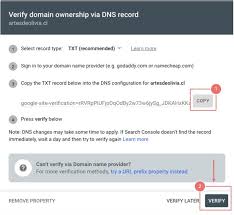
- Access Google Search Console
- Log in to your Google account associated with the website or service.
- Select the property of the website or service for which you want to check the command.
- Initiate The Check Process
- Enter the command name or subdomain in the text field.
- Click the “Continuous” button, and then copy the TXT record.
- Add Record to Dns Configuration
- Access your domain’s DNS configuration.
- Add the copied TXT record to the corresponding box.
Why Use Google Search Console?
Google Search Console provides a convenient way to monitor website traffic and understand how users interact with your content. By checking command ownership on Google, you can ensure that your website or service is associated with your account, providing accurate data for analysis.
Best Practices For Command Checking
- Use Reputable Platforms
- Utilize trusted platforms like DrWhois, Domaintools, or Google Search Console.
- Verify Ownership
- Confirm command ownership through official channels to avoid potential issues.
- Regularly Check Commands
- Periodically review command availability and ownership to ensure seamless service.
Conclusion
Checking commands is a crucial step in creating a professional website or service. By following this guide, you’ll be able to check the availability of email commands, verify domain properties, and use Google Search Console to confirm command ownership. Remember to use reputable platforms, verify ownership, and regularly review commands to ensure smooth operation.
Faqs
- What is Command Checking?
Command checking involves verifying if a specific command (e.G., Email address) exists or is available for use. - Why Check Domain Property?
Verifying domain property ensures that the associated service runs smoothly and avoids potential issues related to command ownership. - How do I Check Command Availability on Google Search Console?
Enter the command name or subdomain in the text field, click “Continuous,” and then copy the TXT record for addition to DNS configuration. - What is Business Manager (Meta), And How Does it Relate to Command Checking?
Business Manager (Meta) is a service used for managing business accounts and verifying command ownership. It involves following specific steps to add and confirm command ownership. - Why Should I Use Google Search Console For Command Verification?
Google Search Console provides an efficient way to check command ownership, monitor website traffic, and understand user interactions with your content.
Additional Resources
- DrWhois: A platform for checking command availability
- Domaintools: A service for verifying domain properties and related information
- Google Search Console: A tool for monitoring website traffic and analyzing user interactions
Remember to always follow best practices when checking commands, use reputable platforms, and regularly review your services to ensure seamless operation.


