
How to Check Your Fortnite Account: A Step-by-step Guide
Are you a passionate gamer who spends hours playing Fortnite? Do you want to ensure the safety of your account and prevent potential breaches? If yes, then this guide is for you! As a seasoned gamer, I’ll walk you through the process of checking your Fortnite account, along with some valuable tips to boost its security.
Why Check Your Fortnite Account?
Before we dive into the nitty-gritty details, let’s talk about why it’s essential to check your Fortnite account. With so many players online, there’s a risk of unauthorized access to your profile. By taking a few simple steps, you can safeguard your account and prevent potential breaches.
Verifying Your Email Address
The first step in checking your Fortnite account is to verify your email address. This process ensures that only authorized personnel have access to your account information. To do this:
- Log in to your Epic Games account using the official website.
- Go to the Account section and click on the pencil icon next to your email address.
- Enter your new email address in the corresponding field.
- Confirm your changes by clicking on the “Confirm” button.
Activating Two-factor Authentication (2FA)
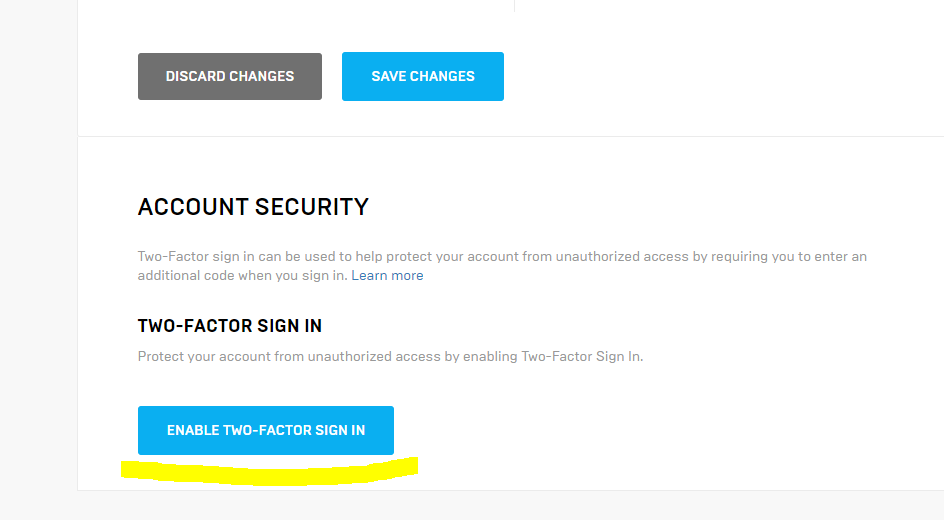
Two-factor authentication is a robust security measure that adds an extra layer of protection to your account. To activate 2FA:
- Log in to your Epic Games account using the official website.
- Go to the Account section and click on Password and Security.
- Choose how you’d like to receive the 2FA code (Google Authenticator, SMS, or email).
- Follow the prompts to set up 2FA.
Using a Strong Password
A strong password is essential for protecting your account from unauthorized access. To change your password:
- Log in to your Epic Games account using the official website.
- Go to the Account section and click on Password and Security.
- Enter your new password in the corresponding field.
- Confirm your changes by clicking on the “Save” button.
Troubleshooting Common Issues
If you’re experiencing problems with 2FA or password management, don’t panic! You can contact Epic Games’ support team for assistance.
How to Contact Epic Games Support
In case of issues or concerns regarding your Fortnite account, here’s what you can do:
- Visit the Fortnite support page on the official website.
- Click on “Contact Us” and select the issue type (e.G., 2FA or password management).
- Fill out the form with detailed information about your problem.
- Submit your request for assistance.
Additional Tips For Enhanced Security
To further protect your account, consider these additional tips:
- Use a reputable antivirus software to scan your device for malware.
- Avoid using public computers or public Wi-Fi networks to access your Fortnite account.
- Keep your browser and operating system up-to-date with the latest security patches.
Conclusion
In conclusion, checking your Fortnite account is a straightforward process that requires only a few simple steps. By verifying your email address, activating 2FA, using a strong password, and troubleshooting common issues, you can ensure the safety of your account and prevent potential breaches. Remember to always contact Epic Games’ support team if you need assistance or have concerns about your account.
Frequently Asked Questions (FAQs)
- What is Two-factor Authentication (2FA)?
Two-factor authentication is a security measure that requires both your password and a verification code sent to your email, phone, or authenticator app to access your Fortnite account.
- How do I Activate 2FA on my Fortnite Account?
To activate 2FA, log in to your Epic Games account using the official website, go to the Account section, click on Password and Security, choose how you’d like to receive the 2FA code (Google Authenticator, SMS, or email), and follow the prompts.
- Why is a Strong Password Essential For my Fortnite Account?
A strong password helps protect your account from unauthorized access by making it difficult for hackers to guess or crack your password.
- How do I Change my Password on my Fortnite Account?
To change your password, log in to your Epic Games account using the official website, go to the Account section, click on Password and Security, enter your new password, and confirm your changes.
- What Should I do if I Experience Problems With 2FA or Password Management?
If you encounter issues with 2FA or password management, contact Epic Games’ support team for assistance.


