
How to See Dazn on Tivùsat: Requirements And Costs
Are you a fan of sports and entertainment, looking for ways to access your favorite content without breaking the bank? Well, you’re in luck! With this guide, we’ll show you how to see DAZN on Tivùsat, a popular Italian satellite TV platform.
What You Need to Know Before Getting Started
Before diving into the step-by-step instructions, it’s essential to understand what’s required to access DAZN on Tivùsat. Here are the key points:
- Subscription: You’ll need an active subscription to DAZN, which costs €34.99/Month for the Standard plan or €59.99/Month for the Premium plan.
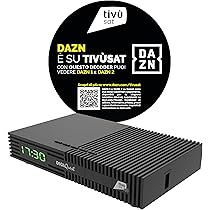
- Devices: To watch DAZN on Tivùsat, you’ll require a Tivùsat decoder and a compatible smart card (CI). You can purchase these devices from Amazon or other authorized retailers.
- Tivùsat Activation: Once you’ve acquired the necessary equipment, you’ll need to activate your Tivùsat subscription. This involves creating an account on the Tivùsat website and following the on-screen instructions.
Step 1: Activating Your Dazn Subscription
To start watching DAZN on Tivùsat, follow these steps:
- Sign up For a Dazn Account: Head over to the DAZN website and create an account using your email address or Facebook login details.
- Choose Your Subscription Plan: Select either the Standard (€34.99/Month) or Premium (€59.99/Month) plan, depending on your needs.
- Set up Payment: Enter your payment information to complete the sign-up process.
Step 2: Activating Your Tivùsat Subscription
Now that you have a DAZN subscription, it’s time to activate your Tivùsat account:
- Go to The Tivùsat Website: Visit the Tivùsat website and click on “Register” to create an account.
- Enter Your Details: Fill in the required information, including your email address, password, and name.
- Follow The Activation Process: Complete the activation process by following the on-screen instructions.
Step 3: Configuring Your Tivùsat Device
With your DAZN subscription activated, it’s time to configure your Tivùsat device:
- Connect Your Device: Plug in your Tivùsat decoder and smart card (CI) to your TV.
- Turn on Your Device: Switch on your Tivùsat device and follow the on-screen instructions to complete the setup process.
Step 4: Watching Dazn on Tivùsat
The final step is to watch DAZN on Tivùsat:
- Switch to Channel 214: Use your remote control to switch to channel 214 on your Tivùsat device.
- Enjoy The Content: Sit back and enjoy the exclusive sports and entertainment content available on DAZN.
Frequently Asked Questions (FAQs)
Here are some additional questions you might have:
- Q: What devices do I need to watch DAZN on Tivùsat?
A: You’ll require a Tivùsat decoder and a compatible smart card (CI) to access DAZN content. - Q: How much does the DAZN subscription cost?
A: The Standard plan costs €34.99/Month, while the Premium plan is priced at €59.99/Month. - Q: Can I watch DAZN on Tivùsat with a free trial?
A: Yes, DAZN offers a 30-day free trial period for new subscribers.
Conclusion
Watching DAZN on Tivùsat is now within your reach! By following these step-by-step instructions and understanding the required equipment and subscription costs, you can enjoy exclusive sports and entertainment content without breaking the bank.


