
How to Watch Dvd on Windows 10: A Step-by-step Guide
Are you tired of searching for ways to watch DVDs on your Windows 10 computer? Look no further! In this article, we will guide you through the process of watching DVDs on Windows 10 using various software options.
Why Can’t I Play Dvds on Windows 10?
Before we dive into the solutions, let’s understand why DVD playback is not working on Windows 10 by default. Microsoft has removed the built-in support for DVD playback in Windows 10, which means you need to install additional software to play DVDs.
Solution 1: Use Reader Dvd of Windows
One of the easiest ways to watch DVDs on Windows 10 is to use the Reader DVD of Windows app. This app is available for free download from the Microsoft Store and provides a simple way to play DVDs.
To get started, follow these steps:
- Go to the Microsoft Store and search for “Reader DVD of Windows”.
- Click on the app icon and select the Free version.
- Wait for the installation to complete.
- Insert your DVD into the reader and click on the notification that appears in the bottom right corner of the screen.
- Select the operation you want to perform, such as playing the DVD.
- Follow the on-screen instructions to complete the playback.
Solution 2: Use Vlc Media Player
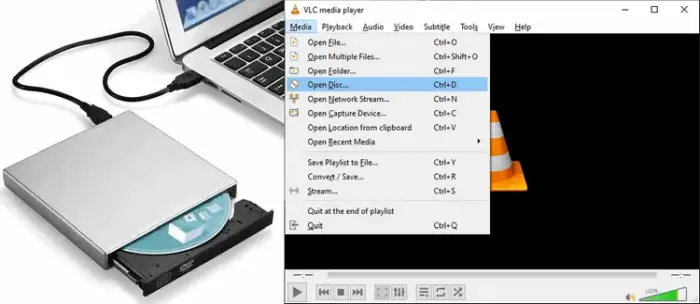
Another popular option for watching DVDs on Windows 10 is VLC Media Player. This free and open-source media player can play a wide range of video formats, including DVDs.
To get started with VLC:
- Download VLC from the official website.
- Run the setup file and follow the installation instructions.
- Insert your DVD into the reader and click on the notification that appears in the bottom right corner of the screen.
- Select the “Reproduce” option to start playing the DVD.
Solution 3: Use Mpc-hc
MPC-HC (Media Player Classic – Home Cinema) is another media player that can play DVDs on Windows 10.
To get started with MPC-HC:
- Download the software from the GitHub page.
- Run the setup file and follow the installation instructions.
- Insert your DVD into the reader and click on the icon to start playing the DVD.
Other Options
If you’re not satisfied with these solutions or have specific requirements, there are other options available. You can explore other media players like Windows Media Player or use software specifically designed for DVD playback, such as PowerDVD or CyberLink Media Suite.
Troubleshooting Tips
If you encounter issues while trying to watch DVDs on Windows 10, here are some troubleshooting tips:
- Check if your DVD reader is compatible with Windows 10.
- Ensure that the correct drivers are installed for your DVD reader.
- Try playing the DVD using a different media player.
- If you’re experiencing issues with playback, try updating the software or checking for updates.
Conclusion
Watching DVDs on Windows 10 doesn’t have to be complicated. With these solutions and troubleshooting tips, you can enjoy your favorite movies and TV shows without any hassle.
Frequently Asked Questions (FAQs)
- Q: Why Can’t I Play Dvds on Windows 10 by Default?
A: Microsoft has removed the built-in support for DVD playback in Windows 10. - Q: What Are Some Alternative Options For Watching Dvds on Windows 10?
A: You can use software like VLC Media Player, MPC-HC, or explore other media players. - Q: How do I Troubleshoot Issues With Dvd Playback on Windows 10?
A: Check if your DVD reader is compatible, ensure correct drivers are installed, and try using a different media player. - Q: Can I Use Windows Media Player to Watch Dvds on Windows 10?
A: Yes, you can try using Windows Media Player as an alternative option. - Q: What Should I do if my Dvd Reader is Not Working Correctly?
A: Try updating the software or checking for updates to resolve issues with playback. - Q: Can I Use a Usb Drive to Play Dvds on Windows 10?
A: No, you need to insert your DVD into the DVD reader connected to your computer. - Q: How do I Check if my Dvd Reader is Compatible With Windows 10?
A: Check the manufacturer’s website for compatibility information or try contacting their support team.
Recommended Software
- VLC Media Player
- MPC-HC (Media Player Classic – Home Cinema)
- Windows Media Player


