
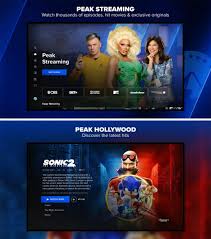
Welcome to Paramount+: Your Ultimate Guide to Streaming Entertainment
Are you ready to experience the best of entertainment streaming? Look no further than Paramount+, the latest addition to the world of digital streaming services. As a content writer, I’m excited to take you on a journey through the ins and outs of this exciting platform.
What is Paramount+?
Paramount+ is a streaming service that offers an extensive library of movies, TV shows, and original content from some of the most popular networks in the world, including Paramount Pictures, Nickelodeon, Showtime, Comedy Central, and MTV. With its user-friendly interface and impressive catalog, Paramount+ is poised to become a go-to destination for entertainment enthusiasts.
How to Sign Up For Paramount+
Signing up for Paramount+ is easy peasy! Here’s what you need to do:
- Visit The Paramount+ Website: Head over to the official Paramount+ website and click on the “Sign Up” button.
- Choose Your Plan: Select your preferred subscription plan, which starts at just $7.99/Month or $79.90/Year.
- Create an Account: Fill out the registration form with your name, email address, password, and other details.
- Start Watching!: Once you’ve signed up, you can start watching your favorite shows and movies right away!
How to Watch Paramount+ on Your Device
Paramount+ is available on a wide range of devices, including:
- Computer: Simply visit the Paramount+ website and sign in with your credentials.
- Smartphone And Tablet: Download the official Paramount+ app from the App Store or Google Play Store.
- TV: Use a streaming device like Chromecast, Apple TV, or a smart TV to watch Paramount+ on your big screen.
How to Watch Paramount+ For Free
If you’re not ready to commit to a subscription just yet, don’t worry! Paramount+ offers a 7-day free trial, allowing you to sample the platform’s content without any obligation. You can also sign up through Sky Cinema in Italy and enjoy Paramount+’s content on your TV.
Watching Paramount+ on Smart Tvs
If you own a smart TV, you’re in luck! Many smart TVs, including those from Samsung and Sony, come with built-in support for Paramount+. Simply download the app, sign in, and start watching!
Watching Paramount+ on Apple TV
Apple TV users can also enjoy Paramount+’s content by downloading the official app. With a vast library of movies and shows at your fingertips, you’ll never run out of entertainment options.
Other Ways to Watch Paramount+ on Your TV
Don’t have a smart TV or Apple TV? No problem! You can still watch Paramount+ on your TV using devices like Chromecast with Google TV, Amazon Fire TV Stick, or Amazon Fire TV Cube. These devices allow you to stream Paramount+’s content directly onto your television.
Conclusion
Paramount+ is an exciting new player in the world of streaming services, offering a vast library of movies and shows that cater to diverse tastes. With its user-friendly interface, impressive catalog, and affordable pricing, Paramount+ is sure to become a favorite among entertainment enthusiasts. So why wait? Sign up today and experience the best of entertainment streaming!
Frequently Asked Questions
-
What Devices Can I Watch Paramount+ On?
You can watch Paramount+ on your computer, smartphone, tablet, TV, smart TV, Apple TV, Chromecast with Google TV, Amazon Fire TV Stick, or Amazon Fire TV Cube. -
How Much Does a Paramount+ Subscription Cost?
A Paramount+ subscription starts at just $7.99/Month or $79.90/Year. -
Can I Watch Paramount+ For Free?
Yes! You can sign up for a 7-day free trial to sample the platform’s content without any obligation. -
How do I Cancel my Paramount+ Subscription?
To cancel your Paramount+ subscription, simply visit the website and follow the instructions under “Account” or contact their support team. -
Can I Share my Paramount+ Account With Family Members?
Yes! You can add up to 6 family members to your Paramount+ account, allowing everyone in your household to enjoy the platform’s content together. -
What Kind of Content Does Paramount+ Offer?
Paramount+ offers a vast library of movies and TV shows from popular networks like Paramount Pictures, Nickelodeon, Showtime, Comedy Central, and MTV, as well as original content created exclusively for the platform. -
Can I Download Paramount+ Content For Offline Viewing?
Yes! You can download some content on Paramount+ for offline viewing, allowing you to enjoy your favorite shows and movies even without an internet connection. -
How do I Contact Paramount+ Support Team?
To contact Paramount+’s support team, visit the website and click on “Help” or reach out through their social media channels.


