
How to See Private Videos on Youtube: A Step-by-step Guide
Are you curious about how to access private videos on YouTube? As a content writer, I’ll guide you through the process, ensuring that you understand every step of the way.
Understanding Private Videos on Youtube
Private videos on YouTube are restricted from public view. Only those who have been added as viewers by the video owner can watch these private videos. This feature is useful for creators who want to share exclusive content with a select group of people.
Why Can’t I See Private Videos?
If you’re unable to see private videos, it’s because they are not publicly accessible. You need to be added as a viewer by the video owner or have access to their channel using YouTube Studio.
Accessing Private Videos on Your Computer
To see private videos on your computer:
- Open your browser and navigate to the YouTube website.
- Sign in with your Google account if you haven’t already done so.
- Click on the “Your videos” tab on the left-hand side of the page.
- Find the video you want to watch and click on it.
- If the video is private, you’ll see a lock icon next to it.
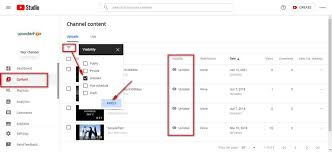
Accessing Private Videos Using Youtube Studio
If you’re having trouble finding private videos using the YouTube website:
- Open your browser and navigate to the YouTube Studio website.
- Sign in with your Google account if you haven’t already done so.
- Click on the “Videos” tab.
- Find the video you want to watch and click on it.
- If the video is private, you’ll see a lock icon next to it.
How to Share Private Videos on Youtube
To share a private video with others:
- Open your browser and navigate to the YouTube Studio website.
- Sign in with your Google account if you haven’t already done so.
- Click on the “Videos” tab.
- Find the video you want to share and click on it.
- Click on the “Visibility” option and select “Share in private.”
- Enter the email addresses of those you want to share the video with.
What Happens After Sharing a Private Video?
Once you’ve shared a private video, the recipients will receive an email with a link to watch the video. They can access the video by clicking on the link and signing in with their Google account.
Troubleshooting Private Videos on Youtube
If you’re experiencing issues accessing or sharing private videos:
- Ensure that you have been added as a viewer by the video owner.
- Make sure you’re signed in with your Google account when attempting to access the video.
- Check that the video has not been removed from public view.
Conclusion
Accessing private videos on YouTube is a straightforward process once you understand the steps involved. By following this guide, you should be able to see and share private videos without any issues.
Faqs: Accessing Private Videos on Youtube
- Can I Access Private Videos Using my Smartphone or Tablet?
- No, you cannot access private videos directly from your mobile device. You need to use the YouTube website or YouTube Studio on a computer.
- How do I Share a Private Video With Others?
- To share a private video, go to YouTube Studio, select the video, and choose “Share in private.” Enter the email addresses of those you want to share the video with.
- Can I Change The Visibility of a Private Video?
- Yes, you can modify the visibility settings for a private video by going to YouTube Studio, selecting the video, and choosing the new visibility option.
- What Happens if I Try to Access a Private Video Without Being Added as a Viewer?
- If you’re not a viewer of the private video, you won’t be able to access it. You’ll need to ask the owner to add you or share the video with you directly.
- Can I Copy a Link to a Private Video on Youtube?
- Yes, you can copy the link to a private video by selecting the “Link” option next to the video title in YouTube Studio.
- How do I Delete a Private Video From my Channel?
- To delete a private video, go to YouTube Studio, select the video, and choose the “Delete” option.
- Can I Make a Private Video Public Again?
- Yes, you can change the visibility of a private video back to public by going to YouTube Studio, selecting the video, and choosing the new visibility option.
Note: The content provided above is for informational purposes only and may not reflect the most up-to-date information on YouTube’s policies or features.


