
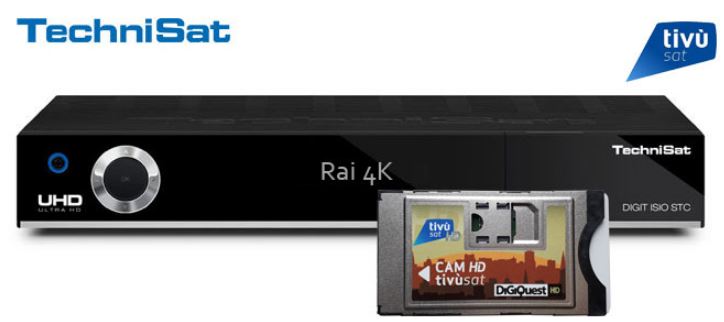
How to Watch Rai 4K on Your TV
Are you excited to watch your favorite shows and movies on Rai in stunning 4K quality? But are you unsure how to do it? Don’t worry, I’m here to guide you through the process.
What You Need to Know Before Starting
Before we dive into the instructions, let’s cover some essential information. To watch Rai 4K on your TV, you’ll need a few things:
- A new television with 4K resolution (UHD) support
- A digital terrestrial decoder or a compatible satellite receiver
- A subscription to Rai 4K (which requires a separate payment)
- A TV with a built-in 4K UHD player
Step 1: Prepare Your TV
First, ensure your TV is capable of displaying 4K resolution. Check the manufacturer’s specifications or consult the user manual for more information.
Step 2: Choose The Right Decoder or Satellite Receiver
Next, decide which type of decoder or satellite receiver to use:
- Decoder: This is a dedicated device that connects directly to your TV and receives the signal from the Rai satellites.
- Satellite Receiver: This is an external unit that decodes the signal from the satellite dishes.
Step 3: Acquire a Subscription to Rai 4K
To access Rai 4K, you’ll need to purchase a subscription. The cost varies depending on your location and the type of package you choose.
Step 4: Configure Your Decoder or Satellite Receiver
Once you have your decoder or satellite receiver, follow these steps:
- Connect The Device: Connect the device to your TV using an HDMI cable.
- Insert The Smart Card: Insert the Rai smart card into the designated slot on the decoder or satellite receiver.
- Configure The Device: Follow the on-screen instructions to configure the device for 4K UHD playback.
Step 5: Access Rai 4K
Now that your TV and decoder or satellite receiver are set up, you can access Rai 4K:
- Select The Channel: Select the Rai 4K channel from your TV’s menu.
- Enjoy The Content: Enjoy your favorite shows and movies in stunning 4K quality!
Alternative Method: Using a Smart TV With Hbbtv
If you don’t have a dedicated decoder or satellite receiver, you can still access Rai 4K on some smart TVs that support HbbTV (Hybrid Broadcast Broadband TV).
- Connect Your Smart TV: Connect your smart TV to the internet.
- Access The Hbbtv Menu: Access the HbbTV menu and select the Rai channel.
- Enjoy The Content: Enjoy your favorite shows and movies in 4K quality!
Frequently Asked Questions
Here are some answers to common questions:
- Q: What is Rai 4K?
A: Rai 4K is a digital terrestrial channel that broadcasts high-definition content in 4K resolution. - Q: Do I Need a Separate Subscription For Rai 4K?
A: Yes, you’ll need a separate subscription to access Rai 4K. - Q: Can I Watch Rai 4K on Any Tv?
A: No, not all TVs support 4K resolution. You’ll need a TV that meets the manufacturer’s specifications.
Conclusion
Watching Rai 4K on your TV is an exciting experience, but it requires some preparation and setup. By following these steps, you can enjoy stunning 4K quality content from Rai.
Faqs:
- Q: How Much Does it Cost to Subscribe to Rai 4K?
A: The cost varies depending on the package you choose. - Q: Can I Access Rai 4K on Any Device?
A: Currently, Rai 4K is only available on select smart TVs and dedicated decoders or satellite receivers. - Q: Do I Need to Purchase a New TV to Watch Rai 4K?
A: No, if your current TV meets the manufacturer’s specifications for 4K resolution, you can still access Rai 4K.
I hope this article has been helpful in guiding you through the process of watching Rai 4K on your TV.


