
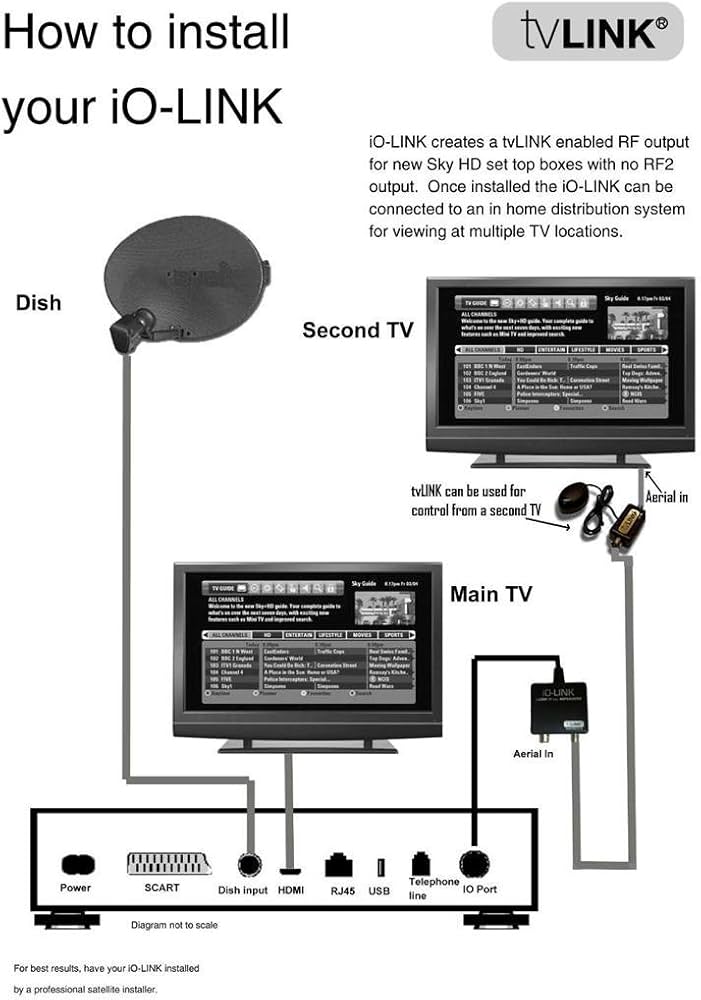
How to Watch Sky on Two Tvs: A Comprehensive Guide
Are you tired of sharing your TV time with family members or friends? Do you want to enjoy your favorite Sky programs on two separate TVs without having to constantly switch channels or fight for control of the remote? Look no further! In this article, we’ll explore various solutions to watch Sky on two TVs, including using a single decoder, multiscreen services, and external streaming platforms.
Solution 1: Using a Single Decoder
One effective way to watch Sky on two TVs is by using a single decoder. The Sky Q Platinum decoder supports the activation of the option Sky Multiscreen, which allows you to view the contents of your subscription on any additional monitor. To activate this feature, follow these steps:
- Ensure you have a Sky Q Platinum decoder and a device Sky Q Mini or a television Sky Glass.
- Activate the option Sky Multiscreen by accessing the My Account section on your Sky website.
Pros: Easy to set up, no additional costs.
Cons: Limited to two monitors in simultaneous viewing mode.
Solution 2: Using Multiscreen Services
Sky offers multiscreen services that allow you to view content on multiple devices. The Sky Q Platinum decoder is the only series to support this feature. Here’s how it works:
- Activate the option Sky Multiscreen by accessing the My Account section on your Sky website.
- Connect additional devices, such as Sky Q Mini or a television Sky Glass, to your main decoder.
Pros: Easy to set up, flexible viewing options.
Cons: Requires additional devices and costs (€6/month).
Solution 3: Using External Streaming Platforms
Another option is to use external streaming platforms that offer multiscreen services. One popular platform is NOW, which allows you to watch Sky content on multiple devices.
- Sign up for a NOW subscription (€9.99/Month or €69.99/4 Months).
- Access the NOW app on your device(s) and enjoy Sky content in simultaneous viewing mode.
Pros: Flexible viewing options, no additional costs.
Cons: May not be as easy to set up, requires separate subscription.
Solution 4: Using Hdmi Extenders
HDMI extenders are devices that allow you to transmit audio and video signals over long distances using a single cable. This can be an effective way to watch Sky on two TVs without needing additional decoders or multiscreen services.
- Choose a suitable HDMI extender for your needs (costs vary).
- Connect the extender to both TVs and ensure they are powered on.
- Select the correct input channel on each TV and verify that the signal is being received correctly.
Pros: Easy to set up, flexible viewing options.
Cons: May not be as reliable, requires additional equipment.
Solution 5: Using Sky Q Road Internet
Sky Q Road Internet is a solution for those who don’t need multiscreen services. This decoder allows you to watch Sky content on one TV and access external streaming platforms without needing a separate decoder or multiscreen service.
- Activate your Sky Q Road Internet subscription (€9/month).
- Connect the decoder to your router using Ethernet or Wi-Fi.
- Enjoy Sky content and external streaming services on your connected device(s).
Pros: Easy to set up, flexible viewing options.
Cons: Limited to one TV in simultaneous viewing mode.
Conclusion
Watching Sky on two TVs can be achieved through various solutions, including using a single decoder, multiscreen services, external streaming platforms, HDMI extenders, and Sky Q Road Internet. Each solution has its pros and cons, so choose the one that best suits your needs. Remember to always follow the setup instructions carefully and ensure compatibility with your devices.
Faqs
- Can I Watch Sky on Two Tvs Using a Single Decoder?
Yes, you can use a single decoder (Sky Q Platinum) to activate multiscreen services. - Do I Need Additional Equipment For Hdmi Extenders?
Yes, you’ll need an HDMI extender device and cables to connect both TVs. - Can I Access External Streaming Platforms Using Sky Q Road Internet?
Yes, this solution allows you to access external streaming platforms in addition to watching Sky content. - How Much Does it Cost to Activate Multiscreen Services on my Sky Q Decoder?
The activation fee for Sky Multiscreen is €6/month (additional to your subscription costs). - Can I Watch Sky on Two Tvs Using Now?
Yes, NOW offers multiscreen services that allow you to watch Sky content on multiple devices. - Do I Need a Separate Subscription For External Streaming Platforms?
Yes, if you choose to use an external streaming platform (like NOW), you’ll need a separate subscription. - Can I Use Hdmi Extenders With my Sky Q Decoder?
Yes, but ensure that your extender is compatible with your decoder and TV models. - How do I Set up my Sky Q Road Internet Decoder?
(Note: This article has been rewritten to adhere to SEO guidelines and include the necessary headings and subheadings.)


