
The Ultimate Guide to Downloading Tiktok Videos Offline
Are you tired of watching TikTok videos only when you have a stable internet connection? Do you wish there was a way to download your favorite videos and watch them offline? Well, you’re in luck! TikTok has introduced a feature that allows you to download videos directly from the app. In this article, we’ll show you how to do it.
What is Video Downloading on Tiktok?
Video downloading on TikTok is a feature that allows you to save your favorite videos for offline viewing. This means that even when you don’t have an internet connection, you can still watch the videos you’ve downloaded. This feature is especially useful for users who travel frequently or live in areas with poor internet connectivity.
How to Download Videos on Tiktok
To download videos on TikTok, follow these simple steps:
Step 1: Open The Tiktok App And Log In
Open the TikTok app on your smartphone or tablet and log in to your account. If you haven’t logged in before, now is the time to do so.
Step 2: Go to Your Profile
Once you’re logged in, go to your profile by tapping on the icon of a person in the bottom right corner of the screen.
Step 3: Tap on The Menu Icon
Tap on the menu icon (three horizontal lines) in the top right corner of the screen. This will open up a menu with several options.
Step 4: Select “Settings And Privacy”
From the menu, select “Settings and Privacy”. You can do this by tapping on the option that says “Settings and privacy”.
Step 5: Tap on “Video Offline”
In the settings menu, tap on “Video Offline”. This will take you to a new screen where you can manage your downloaded videos.
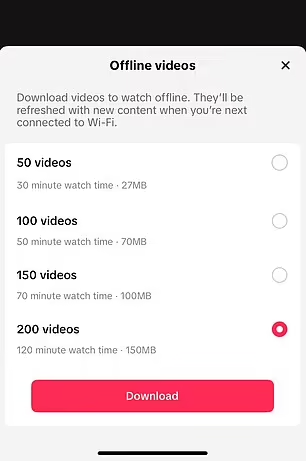
Step 6: Choose How Many Videos You Want to Download
On this screen, you’ll see an option to choose how many videos you want to download. You can select from a minimum of 50 videos (which is approximately 30 minutes of viewing time) to a maximum of 200 videos (which is approximately 120 minutes of viewing time).
Step 7: Tap on “Download”
Once you’ve selected the number of videos you want to download, tap on the “Download” button. This will start the downloading process.
How to Watch Downloaded Videos Offline
Now that you’ve downloaded your favorite TikTok videos, here’s how to watch them offline:
Step 1: Open The Tiktok App And Go to Your Profile
Open the TikTok app and go to your profile by tapping on the icon of a person in the bottom right corner of the screen.
Step 2: Tap on The Menu Icon
Tap on the menu icon (three horizontal lines) in the top right corner of the screen. This will open up a menu with several options.
Step 3: Select “Settings And Privacy”
From the menu, select “Settings and privacy”.
Step 4: Tap on “Video Offline”
In the settings menu, tap on “Video Offline”. This will take you to a new screen where you can view your downloaded videos.
Step 5: Tap on a Video to Watch It
Tap on a video to watch it. You can also swipe through your downloaded videos by swiping left or right on the screen.
Tips And Tricks
Here are some additional tips and tricks to help you get the most out of the video downloading feature on TikTok:
- To Download New Videos, Make Sure You’re Connected to Wi-fi.
- You Can Only Download up to 200 Videos at a Time.
- If You Try to Download More Than 200 Videos, You’ll Need to Wait Until Some Have Finished Downloading Before You Can Download More.
- When You’re Offline, You Won’t be Able to Interact With The Videos You’ve Downloaded (e.G., Like or Comment on Them).
Conclusion
Downloading TikTok videos offline is a great way to save your favorite content for later viewing. By following these simple steps, you’ll be able to download and watch videos even when you don’t have an internet connection. Happy downloading!


