
How to Cable a Cable Ethernet: A Step-by-step Guide
Are you tired of dealing with cables that seem to have a mind of their own? Do you want to learn how to cable a cable Ethernet like a pro? Look no further! In this article, we will guide you through the process of cabling a cable Ethernet, step by step.
What is a Cable Ethernet?
A cable Ethernet is a type of network cable that connects devices such as computers, routers, and modems. It is used to create a local area network (LAN) or to connect devices directly to the internet. There are two types of cables: Straight-through and crossover. Straight-through cables are used to connect devices to a router or modem, while crossover cables are used to connect two devices directly.
The Equipment You Will Need
Before you start cabling your cable Ethernet, make sure you have the following equipment:
- A length of cable Ethernet (choose a category 5e or higher)
- Two RJ45 connectors
- A wire stripper
- A crimping tool
Step 1: Prepare The Cable
To begin, take the length of cable Ethernet and remove any excess sheathing from one end. This will expose the internal wires.
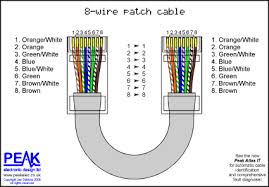
Step 2: Identify The Colors
Identify the colors of the internal wires:
- White/orange (W/O)
- Orange
- Green
- Blue
- White/blue (W/B)
Step 3: Straight-through Cabling
If you are creating a straight-through cable, follow this diagram:
| Color | Pin |
|---|---|
| W/O | 1 |
| O | 2 |
| G | 3 |
| B | 4 |
| W/B | 5 |
Step 4: Crossover Cabling
If you are creating a crossover cable, follow this diagram:
| Color | Pin |
|---|---|
| W/O | 1 |
| O | 2 |
| G | 3 |
| B | 4 |
| W/B | 6 |
Step 5: Crimp The Connectors
Take the RJ45 connectors and crimp them onto the ends of the cable Ethernet. Make sure to align the pins correctly.
Step 6: Test The Cable
Once you have completed the cabling process, test the cable by connecting it to a device and checking for connectivity.
Tips And Tricks
- Use a wire stripper to remove excess sheathing from the cable.
- Use a crimping tool to secure the connectors to the cable.
- Make sure to label the cable with its category and type (straight-through or crossover).
- Test the cable before using it in a production environment.
Conclusion
Cabling a cable Ethernet may seem daunting at first, but by following these steps, you can create a reliable and efficient network connection. Remember to always test your cables before using them in a production environment. Happy cabling!
Frequently Asked Questions
- What is The Difference Between Straight-through And Crossover Cables?
A: Straight-through cables are used to connect devices to a router or modem, while crossover cables are used to connect two devices directly.
- What is The Purpose of a Wire Stripper in Cabling?
A: A wire stripper is used to remove excess sheathing from the cable, exposing the internal wires.
- Why is it Important to Label my Cable?
A: Labeling your cable helps you identify its category and type, making it easier to troubleshoot any issues that may arise.
- Can I Use a Crossover Cable For Straight-through Applications?
A: No, using a crossover cable for straight-through applications can cause connectivity issues.
- What is The Best Way to Test my Cable?
A: The best way to test your cable is by connecting it to a device and checking for connectivity.
- Can I Use a Cable Ethernet For High-speed Internet Connections?
A: Yes, you can use a cable Ethernet for high-speed internet connections, but make sure to choose the correct category (5e or higher).
- What is The Purpose of a Crimping Tool in Cabling?
A: A crimping tool is used to secure the connectors to the cable.
- Can I Use a Cable Ethernet For Wi-fi Connections?
A: No, you cannot use a cable Ethernet for Wi-Fi connections.


