
How to Type Swift on Your Computer: Tips And Tricks
Are you tired of spending hours typing away on your computer? Do you wish there was a way to increase your productivity and get more done in less time? Look no further! In this article, we will explore the best tips and tricks for typing swift on your computer.
The Importance of Posture
Before we dive into the nitty-gritty of typing tips, it’s essential to talk about posture. Sitting correctly is crucial for your back, neck, and overall well-being. Make sure you’re sitting in a comfortable position with good lumbar support, feet flat on the floor or on a footrest, and knees at or below hip level.
The Correct Posture For Typing
When typing, keep your hands in the correct position:
- Place your wrists straight down, with fingers curled gently over the keyboard.
- Keep your elbows at a 90-degree angle, with arms relaxed and close to your body.
- Position your monitor directly in front of you, at a comfortable distance and height.
The Optimal Keyboard Layout
When it comes to typing speed and accuracy, the type of keyboard can make all the difference. Consider using an ergonomic keyboard that’s designed to reduce strain on your hands and wrists. Some popular options include:
- Logitech Wave Keys Keyboard: A wireless keyboard with a built-in wrist rest for added comfort.
- Microsoft Sculpt Ergonomic Desktop: A set that includes a curved keyboard and mouse, designed to promote good posture and reduce eye strain.
Tips For Typing Swift
Here are some additional tips to help you type more efficiently:
- Practice regularly: The more you practice typing, the faster and more accurate you’ll become.
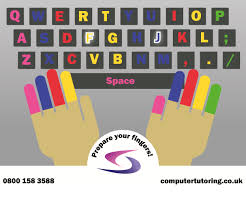
- Use the correct finger placement: Make sure your fingers are placed correctly on the keyboard to avoid mistakes.
- Take breaks: Don’t forget to take breaks every hour or so to stretch your hands and wrists.
Software For Improving Typing Speed
There are several software programs available that can help you improve your typing speed:
- Ratatype: A web-based portal that provides interactive lessons, exercises, and tests to help you improve your typing skills.
- Rapidtyping: A Windows program that offers a range of exercises and lessons to help you type more efficiently.
Conclusion
In conclusion, improving your typing speed takes practice, patience, and the right tools. By following these tips and using software programs designed for typing improvement, you can increase your productivity and get more done in less time.
Frequently Asked Questions (FAQs)
Here are some additional questions that might help clarify things:
-
What is the best way to practice typing?
A good place to start practicing typing is by taking a few minutes each day to type out simple exercises. You can also use software programs designed for typing improvement, such as Ratatype or RapidTyping.
-
How can I improve my posture while typing?
Good posture is crucial for your back, neck, and overall well-being. Make sure you’re sitting in a comfortable position with good lumbar support, feet flat on the floor or on a footrest, and knees at or below hip level. Keep your hands in the correct position, with wrists straight down and fingers curled gently over the keyboard.
-
What is the best type of keyboard for typing efficiency?
Consider using an ergonomic keyboard that’s designed to reduce strain on your hands and wrists. Some popular options include Logitech Wave Keys Keyboard or Microsoft Sculpt Ergonomic Desktop.


