
How to Zip Two Rows on Pc, Mac, Android, And Ios
Are you looking for a way to zip two rows on your computer or mobile device? Look no further! In this article, we’ll guide you through the process of zipping files on PC, Mac, Android, and iOS.
What is Zipping?
Zipping is a file compression technique that reduces the size of a file or folder by packing its contents into a single compressed archive. This allows for easier sharing and storage of large files.
Zipping Two Rows on PC (Windows)
If you’re using Windows, zipping two rows is a straightforward process.
Step 1: Select The Files
Open File Explorer and select the two files you want to zip by clicking on them while holding down the Ctrl key.
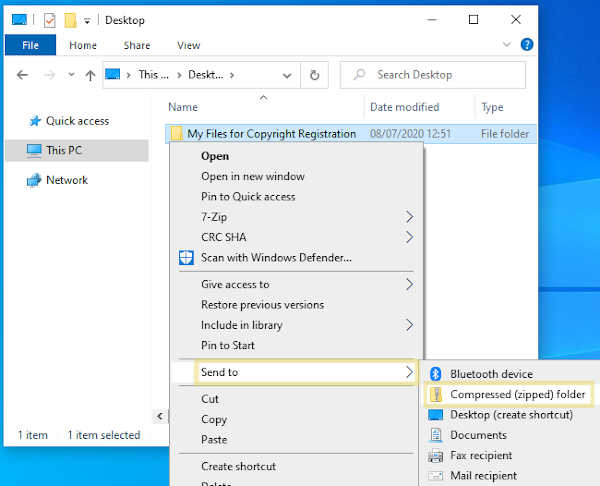
Step 2: Right-click And Compress
Right-click on one of the selected files and choose “Send to” > “Compressed (zipped) folder.” This will create a new zip file containing both files.
Zipping Two Rows on PC (Windows 10)
If you’re using Windows 10, you can zip two rows in just a few clicks.
Step 1: Select The Files
Open File Explorer and select the two files you want to zip by clicking on them while holding down the Ctrl key.
Step 2: Click And Compress
Click on one of the selected files and click on the “Zip” option in the ribbon. Choose the compression level and save location for your new zip file.
Zipping Two Rows on Mac (macOS)
If you’re using a Mac, zipping two rows is just as easy.
Step 1: Select The Files
Open Finder and select the two files you want to zip by clicking on them while holding down the Command key.
Step 2: Compress
Click on one of the selected files and choose “Compress” from the File menu. This will create a new zip file containing both files.
Alternative Solutions For Zipping Two Rows on PC
If you’re not satisfied with the built-in zipping functionality, there are other software options available.
7-Zip (Windows)
7-Zip is a free and open-source compression software that’s compatible with Windows, macOS, and Linux. It’s intuitive interface makes it easy to create zip files with multiple levels of compression.
Keka (macOS)
Keka is another free software for compressing and decompressing rows on your Mac. Its user-friendly interface allows you to create zip files in various formats with ease.
Zipping Two Rows on Android
If you’re using an Android device, zipping two rows is a straightforward process.
Step 1: Open The File Manager
Open the file manager app on your Android device and select the two files you want to zip by clicking on them while holding down the Shift key.
Step 2: Compress
Choose “Compress” from the context menu, and then choose the compression level and save location for your new zip file.
Zipping Two Rows on Ios (iPhone/iPad)
If you’re using an iPhone or iPad, zipping two rows is just as easy.
Step 1: Open The Files App
Open the Files app on your device and select the two files you want to zip by clicking on them while holding down the Command key.
Step 2: Compress
Choose “Compress” from the context menu, and then choose the compression level and save location for your new zip file.
Other Apps For Zipping Two Files
There are other apps available for zipping two files beyond the native functionality of Android and iOS. Here are a few options:
Zarchiver (Android)
ZArchiver is a free app that allows you to compress and extract zip files on your Android device. Its intuitive interface makes it easy to use.
Winzip (Android)
WinZip is another popular app for managing zip files on Android devices. It’s free, but offers additional features through in-app purchases.
Zipping Two Rows Online
If you don’t want to install an app or use your device’s native functionality, there are online services available for zipping two rows. One such service is ezyZip, which allows you to compress files without uploading them or installing software.
Step 1: Open The Service
Open the ezyZip website and click on the “Select Files” button.
Step 2: Select The Files
Choose the two files you want to zip by clicking on them while holding down the Ctrl key.
Step 3: Compress
Click on the “Zip” button, choose the compression level, and select a save location for your new zip file.
Conclusion:
Zipping two rows is a simple process that can be done on PC, Mac, Android, or iOS devices. Whether you use built-in functionality or third-party software, zipping files helps reduce their size and makes sharing easier.


