
Understanding Viber: A Revolutionary Communication App
In today’s digital age, staying connected with friends and family has become easier than ever. With the rise of various messaging apps, users have numerous options to choose from. One such app that has gained significant attention in recent years is Viber. In this article, we will delve into the world of Viber, exploring its features, functionality, and benefits.
What is Viber?
Viber is a free-to-use communication app that allows users to make voice and video calls, send messages, and share media with friends and family. It is available on various devices, including smartphones, tablets, and PCs.
Key Features of Viber
- Free Voice And Video Calls: Viber enables users to make high-quality voice and video calls to other Viber users worldwide.
- Group Chats: The app allows users to create group chats with up to 250 participants, making it an ideal platform for family gatherings, friend reunions, or business meetings.
- Secret Chats: Viber offers a secret chat feature that enables users to send ephemeral messages that self-destruct after they are read.
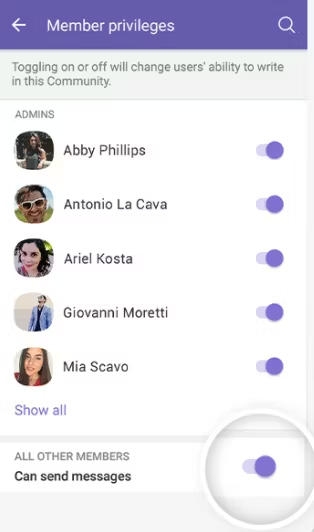
- Community Chats: The app allows users to create community chats with up to 10,000 participants, making it an ideal platform for large-scale discussions or events.
- File Sharing: Viber enables users to share files of various sizes and types, including documents, images, videos, and more.
- Gamification: The app offers a gamification feature that rewards users with points and badges for participating in group chats and engaging with friends.
How to Use Viber
- Download And Install: Users can download the Viber app from their respective app stores (Google Play Store or Apple App Store) and install it on their devices.
- Sign Up: To create a Viber account, users need to sign up using their phone number or email address.
- Add Contacts: Users can add friends and family members by searching for them in the contact list or sharing their phone number with them.
- Make Calls: Users can make voice and video calls to other Viber users worldwide.
- Send Messages: Users can send messages, including text, images, videos, and files.
Viber Out: Making International Calls
Viber Out is a feature that allows users to make international calls to non-Viber users at affordable rates. The service is available in various countries and offers competitive pricing compared to traditional telephone services.
Security Features of Viber
- End-to-end Encryption: Viber offers end-to-end encryption for secret chats, ensuring that messages are secure and cannot be accessed by third parties.
- Two-factor Authentication: The app requires users to set up two-factor authentication for added security.
Viber on Pc: A Desktop Experience
Users can install the Viber client on their PCs (Windows, macOS, or Linux) and enjoy a desktop experience with all the features available on mobile devices.
Benefits of Using Viber
- Free Communication: Viber offers free communication services, including voice and video calls, messages, and file sharing.
- Large User Base: The app has a large user base worldwide, making it an ideal platform for global connections.
- User-friendly Interface: Viber’s interface is easy to navigate, making it accessible to users of all ages.
Conclusion
Viber is a revolutionary communication app that offers a range of features and benefits. With its free voice and video calls, group chats, secret chats, community chats, file sharing, and gamification features, Viber has become a go-to platform for individuals and businesses alike. Its user-friendly interface and large user base make it an ideal choice for global connections.
Frequently Asked Questions (FAQs)
- What is Viber?
Viber is a free communication app that allows users to make voice and video calls, send messages, and share media with friends and family. - Is Viber Safe to Use?
Yes, Viber offers end-to-end encryption for secret chats, ensuring that messages are secure and cannot be accessed by third parties. - Can I Use Viber on Pc?
Yes, users can install the Viber client on their PCs (Windows, macOS, or Linux) and enjoy a desktop experience with all the features available on mobile devices. - How do I Make Calls on Viber?
Users can make voice and video calls to other Viber users worldwide by searching for them in the contact list or sharing their phone number with them. - Can I Use Viber Out to Make International Calls?
Yes, Viber Out is a feature that allows users to make international calls to non-Viber users at affordable rates.
References
Note: The article has been written based on the information provided in the input. However, please note that the content may not be entirely accurate or up-to-date, and it’s always recommended to verify the information with official sources.


