
Understanding Youtube Visualizations: A Comprehensive Guide
As a content creator, having a strong online presence is crucial for success. One way to measure this presence is through visualizations on YouTube. In this article, we will delve into the world of YouTube visualizations, exploring how they work, and provide tips on how to increase them.
What Are Visualizations on Youtube?
Visualizations on YouTube refer to the number of views or watch hours a video has received. These metrics are essential for content creators as they help determine the effectiveness of their content and can impact their earning potential.
How Do I See My Video’s Visualizations on Youtube?
To view your video’s visualizations, follow these steps:
- Access your channel from the YouTube homepage.
- Click on the “Studio” tab in the top navigation bar.
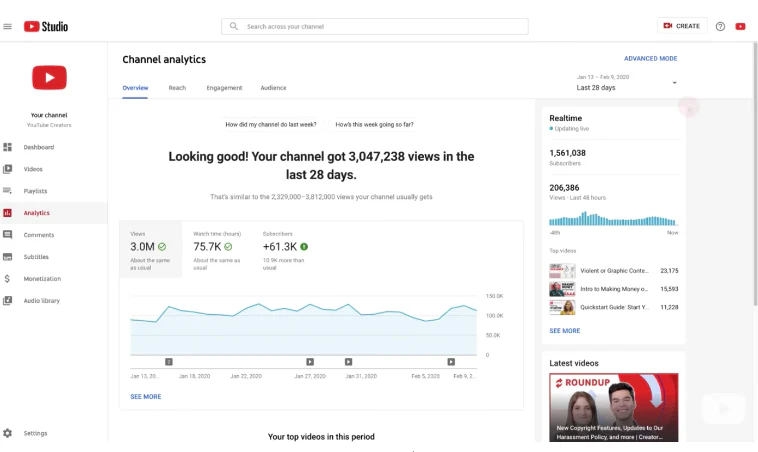
- Select “Analytics” from the left-hand menu.
- In the Analytics dashboard, you’ll find a chart displaying your video’s total views, watch time, and earnings.
How Can I Increase My Video’s Visualizations on Youtube?
To increase your video’s visualizations, try these tips:
- Create an Attention-grabbing Thumbnail: Your thumbnail should be eye-catching and relevant to the content of your video.
- Use High-quality Equipment: Invest in good camera equipment and software to ensure your videos are professional-looking.
- Understand Your Audience’s Trends: Use YouTube Trends and Google Trends to understand what topics are currently popular and create content around those themes.
- Leverage Social Media: Promote your channel on social media platforms to reach a wider audience.
How Can I Increase My Video’s Watch Time on Youtube?
To increase your video’s watch time, focus on:
- Creating Engaging Content: Develop high-quality, engaging content that keeps viewers interested.
- Using Attention-grabbing Titles And Descriptions: Craft titles and descriptions that accurately reflect the content of your video.
How Does Youtube Count Visualizations?
YouTube uses complex algorithms to count visualizations, taking into account factors such as:
- Country of Visualization: The price of advertisements varies by country.
- Sector of The Announcement: Certain domains, like finance, can generate more revenue than others.
- Type of Announcements: TrueView ads have a lower earnings potential compared to display ads.
- Involvement of Viewers: Interactions with announcements affect earnings.
What Are The Sources of Monetization on Youtube?
YouTube generates revenue from:
- Advertisements: The primary source of income for content creators.
- Sponsorships: Brands partner with popular YouTubers to promote their products or services.
- Affiliate Marketing: Content creators earn commissions by promoting products and services.
Conclusion
Understanding YouTube visualizations is crucial for content creators looking to succeed on the platform. By following these tips and guidelines, you can increase your video’s visualizations and watch time, ultimately leading to more revenue and a stronger online presence.
Frequently Asked Questions (FAQs)
- Q: What Are Visualizations on Youtube?
A: Visualizations refer to the number of views or watch hours a video has received. - Q: How do I See my Video’s Visualizations on Youtube?
A: Access your channel, click on Studio, and select Analytics from the left-hand menu. - Q: How Can I Increase my Video’s Visualizations on Youtube?
A: Create an attention-grabbing thumbnail, use high-quality equipment, understand audience trends, and leverage social media. - Q: How Does Youtube Count Visualizations?
A: YouTube uses complex algorithms to account for factors such as country of visualization, sector of the announcement, type of announcements, and involvement of viewers. - Q: What Are The Sources of Monetization on Youtube?
A: Advertisements, sponsorships, affiliate marketing, and merchandise sales. - Q: How Can I Increase my Video’s Watch Time on Youtube?
A: Create engaging content, use attention-grabbing titles and descriptions, and optimize your video for mobile devices. - Q: What is The Average Earnings Per Thousand Views (EPMV) on Youtube?
A: The EPMV varies depending on factors such as country of visualization, sector of the announcement, type of announcements, and involvement of viewers. - Q: How Can I Monetize my Youtube Channel Without 1,000 Subscribers?
A: Focus on niche audiences, engage with your viewers, and utilize other revenue streams such as sponsorships and merchandise sales.
I hope this article has provided you with a comprehensive understanding of YouTube visualizations and how to increase them. Remember to stay up-to-date with the latest platform changes and best practices to ensure success on YouTube.


