
Vodafone Tv: A Comprehensive Guide
Are you curious about Vodafone TV? Do you want to know how it functions, how to configure the box, and how to use it? Look no further! In this article, we will take a deep dive into the world of Vodafone TV, exploring its features, benefits, and uses.
What is Vodafone Tv?
Vodafone TV is a service provided by Vodafone that allows you to enjoy various contents such as TV shows, movies, and sports events on your television or mobile device. It’s a one-stop-shop for all your entertainment needs, bringing together traditional channels, streaming services, and on-demand content in a single solution.
How Does Vodafone TV Function?
Vodafone TV is connected to the internet via a fiber-optic network, providing a stable and fast connection that allows you to enjoy high-quality video content. The service is compatible with various devices, including smartphones, tablets, and smart TVs.
Configuring The Vodafone TV Box
Configuring the Vodafone TV box is a straightforward process that requires minimal technical expertise. Here’s a step-by-step guide:
- Connect the power cord to the box and plug it into a power outlet.
- Use the remote control to navigate to the menu and select the language of your preference.
- Follow the on-screen instructions to complete the initial configuration process.
- Connect the TV box to the internet using an Ethernet cable or Wi-Fi.
- Insert the activation code, which can be found in your email or by contacting Vodafone customer support.
Using The Vodafone TV Box
Once you’ve configured the box, you’re ready to start enjoying your favorite contents. Here’s a brief overview of how to use it:
- Use the remote control to navigate to the menu and select the desired content.
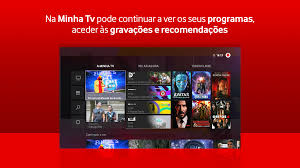
- Browse through various sections such as My TV, Guida TV, and On Demand to find your preferred shows or movies.
- Record your favorite programs using the R button on the remote control.
- Access settings to modify parameters related to the service and app operation.
Vodafone TV Mobile App
Did you know that you can also enjoy Vodafone TV on your mobile device? The Vodafone TV Italia app is available for Android and iOS devices, allowing you to access various contents even when you’re not at home.
Tips And Tricks
Here are a few additional tips to help you get the most out of Vodafone TV:
- Use the search function to quickly find contents.
- Record programs in direct or entire series using the R button on the remote control.
- Transfer programs from your mobile device to the TV box using the Guida on TV feature.
- Access settings to modify parameters related to the service and app operation.
Frequently Asked Questions (FAQs)
- Q: What is Vodafone TV?
A: Vodafone TV is a service provided by Vodafone that allows you to enjoy various contents such as TV shows, movies, and sports events on your television or mobile device. - Q: How does Vodafone TV function?
A: Vodafone TV is connected to the internet via a fiber-optic network, providing a stable and fast connection that allows you to enjoy high-quality video content. - Q: Can I use Vodafone TV on my mobile device?
A: Yes, you can download the Vodafone TV Italia app on your Android or iOS device to access various contents even when you’re not at home. - Q: How do I configure the Vodafone TV box?
A: Configuring the box is a straightforward process that requires minimal technical expertise. Simply connect it to the internet and follow the on-screen instructions to complete the initial configuration process.
Conclusion
Vodafone TV offers a comprehensive entertainment experience, bringing together traditional channels, streaming services, and on-demand content in a single solution. By understanding how Vodafone TV functions, configuring the box, and using it effectively, you can enjoy your favorite contents anywhere, anytime.


