
Temperature Monitoring Software: Essential Tools For PC Maintenance
As a computer user, you’re likely aware of the importance of monitoring your device’s temperature to prevent overheating issues. Prolonged exposure to high temperatures can cause serious damage to your PC’s components, leading to costly repairs or even complete system failure. In this article, we’ll explore the best temperature monitoring software for PCs and Macs, helping you stay on top of your device’s thermal health.
Understanding Temperature Monitoring
Temperature monitoring is a crucial aspect of PC maintenance. It involves tracking the temperature of various system components, including the CPU, GPU, hard drive, and other peripherals. By keeping an eye on these temperatures, you can identify potential issues before they escalate into major problems.
Top Temperature Monitoring Software For Pcs
Here are some of the best temperature monitoring software for PCs:
1. Hwmonitor
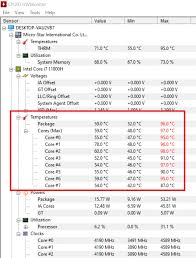
HWMonitor is a popular choice among PC enthusiasts. This free software provides real-time temperature monitoring for your system’s CPU, GPU, hard drive, and other components. Its intuitive interface makes it easy to use, even for those without extensive technical knowledge.
- Features: Real-time temperature monitoring, voltage monitoring, fan speed monitoring, and more
- Compatibility: Windows 10, Windows 8, Windows 7, and macOS (using Wine)
- Free Version Available: Yes
2. Speccy
Speccy is another highly-regarded temperature monitoring software for PCs. This free tool provides detailed information about your system’s hardware components, including temperatures, voltages, and fan speeds.
- Features: Detailed system hardware information, temperature monitoring, voltage monitoring, and more
- Compatibility: Windows 10, Windows 8, Windows 7, and macOS (using Wine)
- Free Version Available: Yes
3. Speedfan
SpeedFan is a free application that allows you to monitor your PC’s temperatures and control fan speeds. While it can be a bit more complex than HWMonitor or Speccy, it’s still an effective tool for temperature monitoring.
- Features: Temperature monitoring, fan speed control, and more
- Compatibility: Windows 10, Windows 8, Windows 7
- Free Version Available: Yes
4. Core Temp
Core Temp is a small free application that monitors your CPU’s temperature. It’s easy to use and provides detailed information about your system’s thermal health.
- Features: CPU temperature monitoring, voltage monitoring, and more
- Compatibility: Windows 10, Windows 8, Windows 7
- Free Version Available: Yes
5. Cpu-z
CPU-Z is a popular tool for monitoring your PC’s temperatures and other system information. While it’s primarily designed for CPU temperature monitoring, it can also provide details about your system’s other components.
- Features: CPU temperature monitoring, voltage monitoring, and more
- Compatibility: Windows 10, Windows 8, Windows 7
- Free Version Available: Yes
Temperature Monitoring Software For Macs
If you’re a Mac user, here are some top temperature monitoring software options:
1. Istat Menus
IStat Menus is a popular choice among Mac users. This app provides real-time temperature monitoring for your system’s CPU, GPU, and other components.
- Features: Real-time temperature monitoring, voltage monitoring, fan speed monitoring, and more
- Compatibility: MacOS 10.12 Or later
- Free Version Available: Yes
2. Stats
Stats is another highly-regarded temperature monitoring software for Macs. This free app provides detailed information about your system’s hardware components, including temperatures, voltages, and fan speeds.
- Features: Detailed system hardware information, temperature monitoring, voltage monitoring, and more
- Compatibility: MacOS 10.12 Or later
- Free Version Available: Yes
3. TG Pro
TG Pro is a paid app that provides detailed information about your Mac’s temperatures and other system components.
- Features: Detailed system hardware information, temperature monitoring, voltage monitoring, fan speed monitoring, and more
- Compatibility: MacOS 10.12 Or later
- Free Trial Available: Yes
4. Xrg
XRG is a free app that provides detailed information about your Mac’s temperatures and other system components.
- Features: Detailed system hardware information, temperature monitoring, voltage monitoring, fan speed monitoring, and more
- Compatibility: MacOS 10.12 Or later
- Free Version Available: Yes
5. Fanny
Fanny is a free widget for the macOS Notification Center that provides real-time temperature monitoring for your system’s CPU and GPU.
- Features: Real-time temperature monitoring, fan speed monitoring, and more
- Compatibility: MacOS 10.12 Or later
- Free Version Available: Yes
Conclusion
Temperature monitoring software is an essential tool for PC maintenance. By using one of the many options listed above, you can keep your system’s temperatures in check and prevent potential issues. Remember to choose a software that fits your specific needs and compatibility requirements.
Faqs
Q: What Are The Benefits of Temperature Monitoring Software?
A: Temperature monitoring software helps you identify potential overheating issues before they escalate into major problems. This can save you from costly repairs or even complete system failure.
Q: Which Temperature Monitoring Software is Best For Windows Pcs?
A: HWMonitor and Speccy are highly-regarded options for Windows PC temperature monitoring. They provide detailed information about your system’s temperatures, voltages, and fan speeds.
Q: Are There Any Free Temperature Monitoring Software Options Available?
A: Yes, many of the software options listed above offer free versions or trials. You can choose a free option that meets your needs without breaking the bank.
Q: Which Temperature Monitoring Software is Best For Macs?
A: IStat Menus and Stats are highly-regarded options for Mac temperature monitoring. They provide real-time temperature monitoring and detailed information about your system’s hardware components.
Q: Can I Use a Single Temperature Monitoring Software on Both Windows And Macos Devices?
A: Yes, some software options listed above are compatible with both Windows and macOS operating systems. However, be sure to check compatibility before making a purchase or using a free trial.
Additional Resources
For more information about temperature monitoring software and PC maintenance, check out these additional resources:
- PC Maintenance Guide: A comprehensive guide to maintaining your PC’s performance and preventing overheating issues.
- Temperature Monitoring Software Comparison: A detailed comparison of the top temperature monitoring software options for Windows PCs and Macs.


