
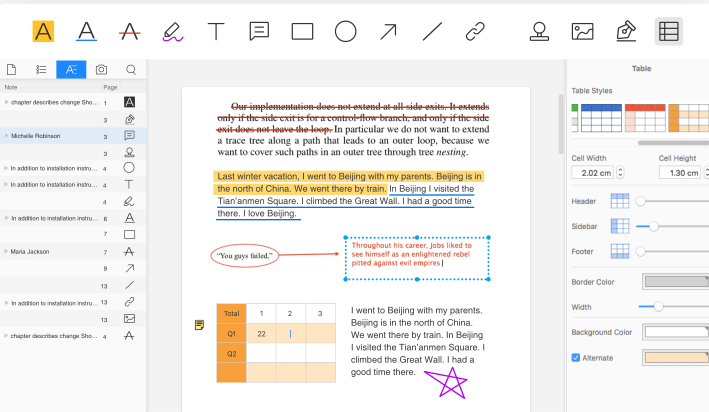
The Ultimate Guide to Pdf Readers: A Comprehensive Review
Are you tired of struggling to find a reliable PDF reader that meets your needs? Look no further! In this article, we’ll delve into the world of PDF readers, exploring both desktop and mobile options, to help you make an informed decision.
What is a Pdf Reader?
A PDF (Portable Document Format) reader is a software application designed to open, view, edit, and annotate PDF documents. These files are commonly used for sharing and exchanging information in various formats.
Desktop Pdf Readers
If you’re looking for a comprehensive PDF reading experience on your desktop computer, we’ve got you covered. Here are some top-notch options:
1. Microsoft Edge
If you’re using Windows 10 or later, you might be surprised to find that Microsoft Edge is an excellent PDF reader. Not only does it open and display PDF files with ease, but it also allows for basic editing functions like highlighting, annotating, and adding comments.
2. Sumatra Pdf
Sumatra PDF is another popular desktop PDF reader that’s lightweight, fast, and feature-rich. This app can handle various file formats, including EPub, Mobi, XPS, and CBZ/CBR comic books.
3. Adobe Acrobat Reader Dc
As the industry-standard for PDF readers, Adobe Acrobat Reader DC offers advanced features like editing, signing, and commenting on PDF documents. However, please note that this version is free to download but might not be available for older operating systems.
Mac Pdf Readers
If you’re using a Mac, here are some fantastic options to consider:
1. Preview (Apple’s Built-in Reader)
The default Mac reader, Preview, offers an impressive set of features, including annotation tools, zooming, and page navigation. It also integrates seamlessly with other Apple apps.
2. Skim
Skim is a free PDF reader that’s incredibly lightweight and fast. It boasts advanced features like annotating, creating bookmarks, and even integrating with Spotlight for quick searches.
Mobile Pdf Readers
Are you looking to read PDFs on your smartphone or tablet? We’ve got some excellent mobile options:
1. Google’s Pdf Viewer (Android & Ios)
This is an official app from Google that offers a sleek and user-friendly interface for viewing PDF files. It integrates with other Google services, making it an ideal choice.
2. Pdf Viewer & Reader (Android)
For Android users, this app provides an intuitive experience with basic editing features like text search, highlighting, and annotating.
Online Pdf Readers
Sometimes, you might need to access PDFs online without installing any software. Here are some web-based options:
1. Pdf24
This free online service allows you to view, edit, and annotate PDF documents directly within your browser. You can also upload files from local storage or cloud services like Google Drive.
Conclusion
Finding the perfect PDF reader for your needs is now a breeze. Whether you’re on Windows 10, macOS, Android, or iOS, we’ve provided a comprehensive list of top-notch desktop and mobile options to ensure seamless access to your PDF documents. Happy reading!
Frequently Asked Questions (FAQs)
- What’s The Difference Between Pdf Viewers And Editors?
PDF viewers primarily display PDF files without modifying them, whereas PDF editors offer basic editing functions like annotating, highlighting, or adding text.
- Can I Use Multiple Pdf Readers on my Computer?
Yes! You can install and run multiple PDF readers simultaneously, each with their unique features and capabilities.
- Are Online Pdf Readers Secure?
Online services usually protect user data by deleting uploaded files after a specified time frame. However, ensure you’re using reputable websites to safeguard your information.
- Can I Read Pdfs on my Mobile Device Without Downloading an App?
Some platforms, like Google’s PDF Viewer for Android and iOS, allow direct access to PDFs within the browser.
- How do I Convert a Pdf to Another File Format?
Certain online services or PDF readers offer built-in conversion tools. Alternatively, you can use third-party software specifically designed for this purpose.
- Can I Protect my Pdf Documents With Passwords?
Yes! Many desktop and mobile PDF readers offer password protection features, allowing you to safeguard sensitive information within your PDF files.
- Are There Any Pdf Readers Compatible With Older Operating Systems?
Some PDF readers might not be compatible with outdated operating systems. However, it’s always worth checking the software manufacturer’s website for specific requirements.
- Can I Annotate Multiple Pages in a Single Session?
Many modern PDF readers support multi-page annotation capabilities, allowing you to mark up and edit entire documents efficiently.
By exploring these comprehensive options and answering your questions, we aim to empower you with the knowledge needed to find the ideal PDF reader for your specific needs. Happy reading!


