
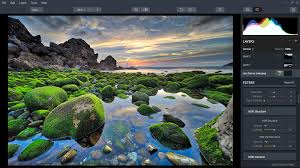
Hdr: Unlocking The Secrets of High Dynamic Range Imaging
As a photographer, you’ve likely encountered situations where your images were either too bright or too dark, losing valuable details in the process. This is where HDR (High Dynamic Range) imaging comes into play. In this article, we’ll delve into the world of HDR, exploring its benefits, how to create and edit HDR photos, and the best software and apps to use.
What is Hdr?
HDR refers to a technique that allows you to capture and display a wider range of tonal values than traditional photography. This means that you can see more details in both bright and dark areas of an image, resulting in a more realistic and immersive visual experience.
The Benefits of Hdr
So, what are the advantages of using HDR? Here are just a few:
- Improved Color Accuracy: HDR allows for a wider range of colors to be captured and displayed, resulting in more accurate and vibrant colors.
- Increased Detail: With HDR, you can see more details in both bright and dark areas of an image, making it ideal for capturing high-contrast scenes.
- Enhanced Visual Experience: HDR images are often more engaging and immersive than traditional photos, making them perfect for a wide range of applications, from photography to filmmaking.
How to Create Hdr Photos
So, how do you create HDR photos? The process involves taking multiple shots of the same scene at different exposures, then merging them into a single image. Here’s a step-by-step guide:
- Take Multiple Shots: Capture three or more images of the same scene at different exposures, using a tripod to ensure stability.
- Merge The Images: Use software like Adobe Photoshop or HDR merge tools to combine the images into a single HDR photo.
- Edit And Refine: Adjust the merged image to your liking, making any necessary edits to achieve the desired effect.
The Best Software For Hdr Editing
There are many software options available for editing and refining HDR photos. Here are some of the best:
- Adobe Photoshop: The industry-standard for image editing, Photoshop offers a range of tools and features for creating and editing HDR images.
- Hdrmerge: A free software that allows you to merge multiple images into a single HDR photo.
- Dynamic Photo Hdr: A professional-grade software that offers advanced features for creating and editing HDR photos.
Apps For Creating Hdr Photos on Mobile Devices
If you’re using a smartphone or tablet, there are many apps available that allow you to create HDR photos on the go. Here are some of the best:
- Fotocamera: A built-in app on Android devices that allows you to take and edit HDR photos.
- Snapseed: A popular photo editing app that offers advanced features for creating and editing HDR images.
- Adobe Photoshop Lightroom: A professional-grade app that offers advanced features for creating and editing HDR photos.
Conclusion
HDR imaging is a powerful technique that can greatly enhance the visual quality of your photographs. By understanding how to create and edit HDR photos, you can unlock new creative possibilities and take your photography to the next level. Whether you’re using software on your computer or apps on your mobile device, there’s never been a better time to explore the world of HDR.
Frequently Asked Questions
- What is Hdr?
HDR stands for High Dynamic Range, a technique that allows you to capture and display a wider range of tonal values than traditional photography. - How do I Create Hdr Photos?
To create HDR photos, take multiple shots of the same scene at different exposures, then merge them into a single image using software like Adobe Photoshop or HDRmerge tools. - What Are The Benefits of Hdr?
HDR allows for improved color accuracy, increased detail, and an enhanced visual experience. - How do I Edit And Refine Hdr Photos?
Use software like Adobe Photoshop or HDRmerge to merge and edit your images, making any necessary adjustments to achieve the desired effect. - What Are Some Popular Apps For Creating Hdr Photos on Mobile Devices?
Apps like Fotocamera, Snapseed, and Adobe Photoshop Lightroom offer advanced features for creating and editing HDR photos. - Is Hdr Suitable For All Types of Photography?
HDR is ideal for capturing high-contrast scenes, but may not be suitable for all types of photography, such as low-light or nighttime photography. - Can I Use Hdr on Older Devices?
While HDR software may require more powerful devices to run smoothly, there are many apps and tools available that can help you create HDR photos even on older devices.
Hdr Resources
- Adobe Photoshop: Www.Adobe.Com/photography
- HDRmerge: Www.Hdrmerge.Com
- Dynamic Photo HDR: Www.Dynamicphothdr.Com
Hdr Software Comparison Table
| Software | Operating System | Cost |
|---|---|---|
| Adobe Photoshop | Windows, macOS | $20.99/Month (basic plan) |
| HDRmerge | Windows, macOS | Free |
| Dynamic Photo HDR | Windows, macOS | $59.99 |
Hdr App Comparison Table
| App | Operating System | Cost |
|---|---|---|
| Fotocamera | Android, iOS | Free (built-in app) |
| Snapseed | Android, iOS | Free |
| Adobe Photoshop Lightroom | Android, iOS | $14.99/Month (basic plan) |
Hdr Resource List
- HDRmerge: Www.Hdrmerge.Com
- Dynamic Photo HDR: Www.Dynamicphothdr.Com
- Adobe Photoshop Lightroom: Www.Adobe.Com/lightroom
Hdr Tutorial List
- How to Create HDR Photos with Adobe Photoshop
- Creating HDR Photos on Mobile Devices using Snapseed
- Using HDRmerge for HDR Photo Creation and Editing


