
The Ultimate Guide to Writing a Thesis: Top Programs And Tools
Are you struggling to find the perfect tool to write your thesis? Look no further! In this comprehensive guide, we will explore the best programs and tools available for writing a thesis, from free and open-source options to paid software and online services.
What is a Thesis?
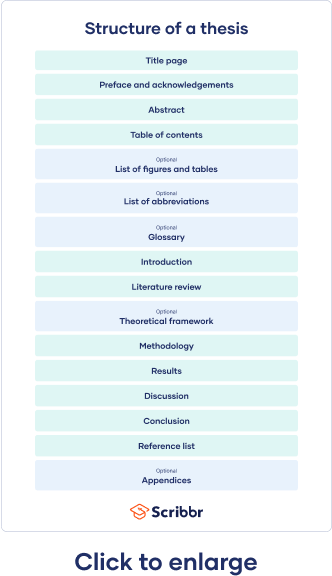
Before we dive into the tools, let’s define what a thesis is. A thesis is a research paper that represents an original contribution to knowledge in a particular field of study. It is typically written by graduate students as part of their degree requirements.
Why Choose The Right Tool?
Choosing the right tool for writing your thesis can make all the difference in terms of productivity, efficiency, and overall quality of work. A good tool should be user-friendly, feature-rich, and able to meet the specific needs of your research project.
Top Free And Open-source Tools For Writing a Thesis
- Libreoffice: LibreOffice is a free and open-source office suite that includes a word processor, spreadsheet, presentation, and drawing software. It is compatible with Windows, macOS, and Linux.
- Pages: Pages is a free writing app from Apple that comes pre-installed on Macs. It’s a great tool for writing short documents, but may not be suitable for longer thesis papers.
Paid Software For Writing a Thesis
- Microsoft Word: Microsoft Word is one of the most popular word processing software available. It offers advanced features, compatibility with various file formats, and collaboration tools.
- Scrivener: Scrivener is a writing software specifically designed for long documents like thesis papers. It offers advanced organization and research tools.
- Ulysses: Ulysses is a writing app developed by The Soulmen GmbH that’s available exclusively on Mac. It’s designed for writers who need to organize and structure their work.
Online Services For Writing a Thesis
- Google Documents: Google Docs is a free online word processing software that allows real-time collaboration with others.
- Microsoft Word Online: Microsoft Word Online is the web-based version of Microsoft Word, allowing users to create and edit documents from any device.
- Cryptpad: CryptPad is an online service that offers secure document editing, collaboration, and sharing.
Mobile Apps For Writing a Thesis
- Microsoft Word (Android/iOS): The mobile app version of Microsoft Word allows users to write and edit documents on-the-go.
- Pages (iOS/iPadOS): Pages is the mobile app version of Apple’s writing software, offering a range of templates and collaboration features.
Conclusion
Writing a thesis can be a daunting task, but with the right tools, it becomes more manageable. Whether you’re looking for free and open-source options or paid software, there are plenty of choices available to suit your needs. Remember to choose a tool that meets your specific requirements and helps you stay organized throughout the writing process.
Frequently Asked Questions
- What is The Best Tool For Writing a Thesis?
The best tool depends on individual preferences and needs. LibreOffice and Microsoft Word are popular options, while Scrivener and Ulysses offer advanced features specifically designed for thesis writing. - Can I Use Online Services to Write my Thesis?
Yes, Google Documents, Microsoft Word Online, and CryptPad are all viable options for writing a thesis online. However, consider the security and collaboration aspects when choosing an online service. - What is The Difference Between Scrivener And Ulysses?
Scrivener is a writing software specifically designed for long documents like thesis papers, offering advanced organization and research tools. Ulysses is a writing app developed by The Soulmen GmbH that’s available exclusively on Mac. - Can I Use Mobile Apps to Write my Thesis?
Yes, Microsoft Word (Android/iOS) and Pages (iOS/iPadOS) are both viable options for writing a thesis on-the-go. - What is The Best Way to Collaborate With Others on a Thesis Project?
Google Docs and Microsoft Word Online offer real-time collaboration features, making it easy to work with others on a thesis project.
Best Tools For Writing a Thesis: A Comparison
| Tool | Free/Paid | Operating System | Features |
|---|---|---|---|
| LibreOffice | Free/Open-source | Windows/macOS/Linux | Word processor, spreadsheet, presentation, and drawing software. |
| Pages | Paid (Free with Apple ID) | macOS | Writing app from Apple, ideal for short documents. |
| Microsoft Word | Paid | Windows/macOS/Linux | Advanced word processing software with compatibility and collaboration features. |
| Scrivener | Paid | Windows/macOS | Writing software specifically designed for long documents like thesis papers. |
| Ulysses | Paid | macOS | Writing app developed by The Soulmen GmbH, ideal for writers who need to organize and structure their work. |
| Google Documents | Free | Web-based | Real-time collaboration features and secure document editing. |
| Microsoft Word Online | Paid (Free with Microsoft ID) | Web-based | Web-based version of Microsoft Word, allowing users to create and edit documents from any device. |
| CryptPad | Free | Web-based | Secure document editing, collaboration, and sharing. |
Best Mobile Apps For Writing a Thesis: A Comparison
| Tool | Free/Paid | Operating System | Features |
|---|---|---|---|
| Microsoft Word (Android/iOS) | Paid (Free with Microsoft ID) | Android/iOS | Mobile app version of Microsoft Word, allowing users to write and edit documents on-the-go. |
| Pages (iOS/iPadOS) | Paid (Free with Apple ID) | iOS/iPadOS | Mobile app version of Apple’s writing software, offering a range of templates and collaboration features. |
I hope this helps you make an informed decision when choosing the right tool for writing your thesis!


