
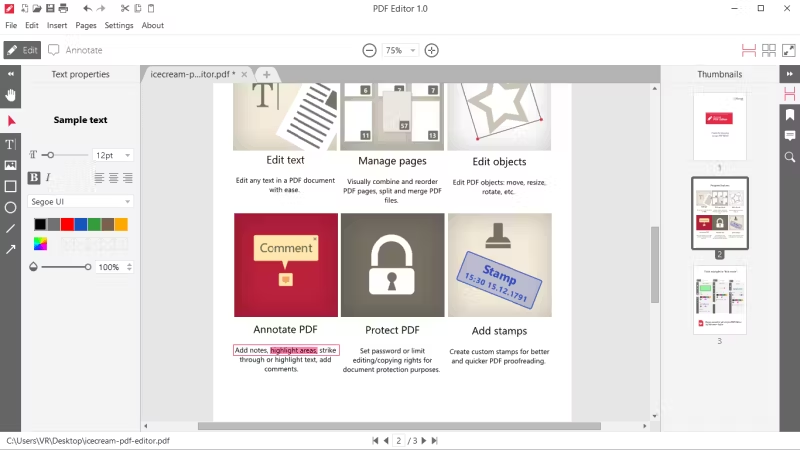
Are you looking for a software to modify your PDF files, but don’t know where to start? Look no further! In this article, we will guide you through the process of modifying a PDF file free in Italian using various software options.
Why Modify a Pdf File?
PDF files are widely used for sharing and viewing documents. However, sometimes you may need to modify the content of a PDF file, such as adding text or images, or making changes to the layout. Modifying a PDF file can be useful for various purposes, including:
- Adding comments or annotations to a document
- Changing the layout or design of a document
- Updating information in a PDF file
- Creating a new PDF file from an existing one
Software Options For Modifying a Pdf File
There are several software options available that allow you to modify a PDF file free in Italian. Some popular options include:
- Libreoffice: LibreOffice is a free and open-source office suite that includes a PDF editor.
- Wondershare Pdfelement: Wondershare PDFelement is a powerful PDF editing software that allows you to edit, annotate, and secure your PDF files.
- Pdf-xchange Editor: PDF-XChange Editor is a feature-rich PDF editing software that offers advanced editing capabilities.
Step-by-step Guide to Modifying a Pdf File With Libreoffice
LibreOffice is a popular choice for modifying PDF files. Here’s how to do it:
- Download And Install Libreoffice: Download the latest version of LibreOffice from the official website.
- Open a Pdf File: Open a PDF file using LibreOffice by clicking on “File” > “Open” and selecting the PDF file.
- Modify The Pdf File: Use the tools available in LibreOffice to modify the PDF file, such as adding text or images, changing font styles, etc.
Step-by-step Guide to Modifying a Pdf File With Wondershare Pdfelement
Wondershare PDFelement is another powerful option for modifying PDF files. Here’s how to do it:
- Download And Install Wondershare Pdfelement: Download the latest version of Wondershare PDFelement from the official website.
- Open a Pdf File: Open a PDF file using Wondershare PDFelement by clicking on “File” > “Open” and selecting the PDF file.
- Modify The Pdf File: Use the tools available in Wondershare PDFelement to modify the PDF file, such as adding text or images, changing font styles, etc.
Step-by-step Guide to Modifying a Pdf File With Pdf-xchange Editor
PDF-XChange Editor is another feature-rich option for modifying PDF files. Here’s how to do it:
- Download And Install Pdf-xchange Editor: Download the latest version of PDF-XChange Editor from the official website.
- Open a Pdf File: Open a PDF file using PDF-XChange Editor by clicking on “File” > “Open” and selecting the PDF file.
- Modify The Pdf File: Use the tools available in PDF-XChange Editor to modify the PDF file, such as adding text or images, changing font styles, etc.
Conclusion
Modifying a PDF file can be useful for various purposes, including adding comments or annotations, changing the layout or design, updating information, and creating a new PDF file. There are several software options available that allow you to modify a PDF file free in Italian, including LibreOffice, Wondershare PDFelement, and PDF-XChange Editor.
Frequently Asked Questions
- What is The Best Software For Modifying a Pdf File?
The best software for modifying a PDF file depends on your specific needs. Some popular options include LibreOffice, Wondershare PDFelement, and PDF-XChange Editor. - Can I Modify a Pdf File Free in Italian?
Yes, you can modify a PDF file free in Italian using various software options available, including LibreOffice, Wondershare PDFelement, and PDF-XChange Editor. - What Are The Benefits of Modifying a Pdf File?
The benefits of modifying a PDF file include adding comments or annotations, changing the layout or design, updating information, and creating a new PDF file. - Can I Modify a Pdf File on my Smartphone or Tablet?
Yes, you can modify a PDF file on your smartphone or tablet using various mobile apps available, including Wondershare PDFelement and PDF-XChange Editor. - Is it Possible to Export a Modified Pdf File in Italian?
Yes, it is possible to export a modified PDF file in Italian using the software options mentioned above.
Additional Resources
For more information on modifying PDF files, please visit the following websites:
- LibreOffice: Www.Libreoffice.Org
- Wondershare PDFelement: Www.Wondershare.Com/pdf-element
- PDF-XChange Editor: Www.Tracker-software.Com/product/pdf-xchange-editor


