
Slow Down: The Ultimate Guide to Slowing Down Videos
Are you tired of videos that seem to be zipping by too quickly? Do you want to relive the magic of a special moment, but at a more leisurely pace? Look no further! In this comprehensive guide, we’ll show you how to slow down videos using various software and online services.
What is Slow Motion Video Editing?
Slow motion video editing is a technique used to create a video that plays back at a slower speed than the original footage. This allows viewers to see details that might have been missed at normal speed. It’s often used in film, television, and sports broadcasting to emphasize key moments or add dramatic effect.
Software For Slowing Down Videos
There are several software programs available that can help you slow down videos. Here are some of the most popular ones:
1. Vlc Media Player
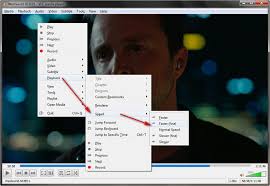
VLC is a free, open-source media player that’s available for Windows, macOS, and Linux. It allows you to change the playback speed of video files without modifying the original file.
- To slow down a video using VLC, simply open the video in VLC, go to “Media” > “Open,” select the video file, and click “Play.”
- Then, click on the gear icon next to the “Play” button and select “Speed” from the dropdown menu.
- Choose your desired speed (e.G., 0.5X) and click “OK.”
2. Avidemux
Avidemux is a free, open-source video editor that’s available for Windows, macOS, and Linux. It allows you to modify various aspects of a video, including its speed.
- To slow down a video using Avidemux, open the video in Avidemux, go to “Video” > “Filters,” and select “Change FPS.”
- Enter your desired frame rate (e.G., 24Fps) and click “Apply.”
3. Imovie
IMovie is a free video editing software that comes pre-installed on Macs. It allows you to create and edit videos, including slowing them down.
- To slow down a video using iMovie, open the video in iMovie, go to “Video” > “Speed,” and select your desired speed (e.G., 0.5X).
Online Services For Slowing Down Videos
If you don’t want to install software on your computer, there are several online services that can help you slow down videos. Here are a few options:
1. Clichamp
Clichamp is an online video editor that allows you to upload videos, modify them, and export the changes.
- To slow down a video using Clichamp, upload your video, select it in the timeline, and click on the “Speed” button.
- Choose your desired speed (e.G., 0.5X) and click “Export.”
2. Wevideo
WeVideo is another online video editor that allows you to upload videos, modify them, and export the changes.
- To slow down a video using WeVideo, upload your video, select it in the timeline, and click on the “Speed” button.
- Choose your desired speed (e.G., 0.5X) and click “Export.”
Mobile Apps For Slowing Down Videos
If you want to slow down videos on your mobile device, there are several apps available that can help you do so. Here are a few options:
1. Videoshow
VideoShow is a free app that allows you to edit videos, including slowing them down.
- To slow down a video using VideoShow, open the app, select the video you want to edit, and tap on the “Speed” button.
- Choose your desired speed (e.G., 0.5X) and tap “Export.”
2. Videoshop
Videoshop is another free app that allows you to edit videos, including slowing them down.
- To slow down a video using Videoshop, open the app, select the video you want to edit, and tap on the “Speed” button.
- Choose your desired speed (e.G., 0.5X) and tap “Export.”
Conclusion
Slowing down videos can be a fun and creative way to relive special moments or add drama to your content. Whether you use software, online services, or mobile apps, there are plenty of options available to help you achieve the desired effect.
Frequently Asked Questions (FAQs)
- Q: What is Slow Motion Video Editing?
- A: Slow motion video editing is a technique used to create a video that plays back at a slower speed than the original footage.
- Q: Which Software Can I Use to Slow Down Videos?
- A: You can use VLC Media Player, Avidemux, or iMovie to slow down videos.
- Q: Are There Online Services That Can Help me Slow Down Videos?
- A: Yes, you can use Clichamp or WeVideo to slow down videos.
- Q: Can I Slow Down Videos on my Mobile Device?
- A: Yes, you can use VideoShow or Videoshop to slow down videos on your mobile device.


