
The Ultimate Guide to Speeding Up Videos: Top Programs And Apps
Are you tired of boring videos that seem to drag on forever? Do you want to speed up your favorite clips without losing any of the important details? Look no further! In this article, we’ll explore the top programs and apps for speeding up videos, whether you’re using a computer or a mobile device.
Why Speed Up Videos?
Before we dive into the best tools for speeding up videos, let’s talk about why you might want to do so. Maybe you’ve got a long video that you need to condense for work or school, but you don’t want to sacrifice any of the important information. Or perhaps you’re just looking for a fun way to spice up your social media posts.
Whatever your reason, speeding up videos can be a game-changer. And with the right tools, it’s easier than ever!
Top Programs For Speeding Up Videos on Computers
If you’re using a computer to speed up your videos, here are some top programs to check out:
Shutter Encoder (Windows/macOS/Linux)
Shutter Encoder is a free software that allows you to convert video and audio files without losing any of the important details. It’s compatible with Windows, macOS, and Linux, making it a great option for those who use multiple operating systems.
To get started, download the program from the official website and follow these steps:
- Open Shutter Encoder and select the video file you want to speed up.
- Choose the output format (e.G., MP4 or AVI) and set the desired frame rate.
- Select the “Speed” option and choose your desired speed (e.G., 50% Faster).
- Click “OK” and let Shutter Encoder do its magic!
Vlc (Windows/macOS/Linux)
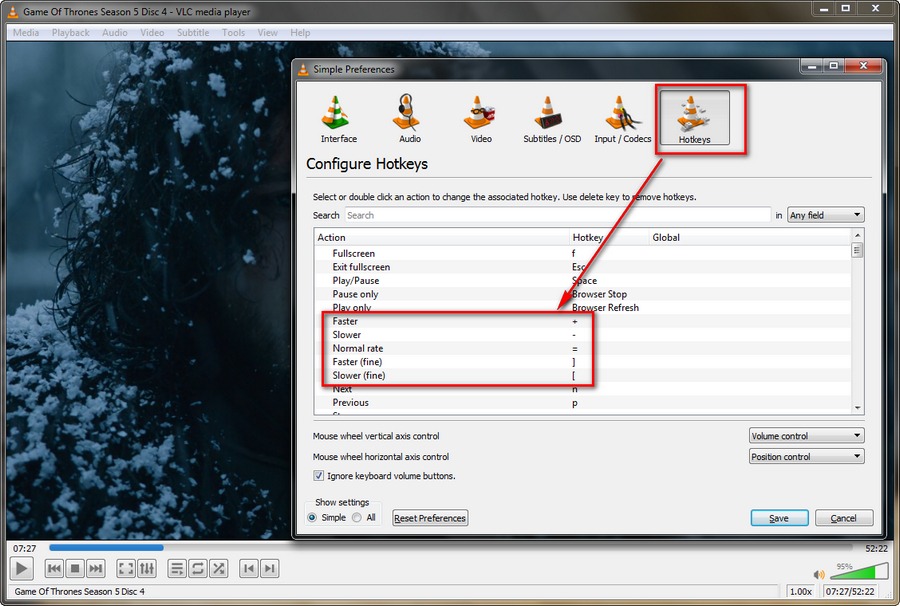
VLC is another popular video player that can be used to speed up videos. It’s free, open-source software available for Windows, macOS, and Linux.
To use VLC, follow these steps:
- Open VLC and select the video file you want to speed up.
- Go to “Media” > “Convert/Save…” And choose the output format (e.G., MP4 or AVI).
- Set the desired frame rate and select the “Speed” option.
- Choose your desired speed (e.G., 50% Faster) and click “OK”.
Mpv (Windows/macOS/Linux)
Mpv is a video player that can be used to speed up videos without losing any of the important details. It’s free, open-source software available for Windows, macOS, and Linux.
To use mpv, follow these steps:
- Open mpv and select the video file you want to speed up.
- Press “Ctrl+Shift+S” (Windows/Linux) or “Cmd+Shift+S” (macOS) to access the settings menu.
- Select the “Speed” option and choose your desired speed (e.G., 50% Faster).
- Click “OK” and let mpv do its magic!
Top Apps For Speeding Up Videos on Mobile Devices
If you’re using a mobile device, here are some top apps to check out:
Kinemaster (Android/iOS)
KineMaster is a popular video editing app that allows you to speed up videos without losing any of the important details. It’s free to download and offers in-app purchases for additional features.
To use KineMaster, follow these steps:
- Open KineMaster and select the video file you want to speed up.
- Tap the “Speed” option and choose your desired speed (e.G., 50% Faster).
- Adjust the speed as needed and tap “Apply”.
Videoshop (Android/iOS)
VideoShop is another popular video editing app that allows you to speed up videos without losing any of the important details. It’s free to download and offers in-app purchases for additional features.
To use VideoShop, follow these steps:
- Open VideoShop and select the video file you want to speed up.
- Tap the “Speed” option and choose your desired speed (e.G., 50% Faster).
- Adjust the speed as needed and tap “Apply”.
Vlc (Android/iOS)
Yes, VLC is also available on mobile devices! It’s a popular video player that can be used to speed up videos without losing any of the important details.
To use VLC on your mobile device, follow these steps:
- Open VLC and select the video file you want to speed up.
- Tap the “Speed” option and choose your desired speed (e.G., 50% Faster).
- Adjust the speed as needed and tap “Apply”.
Conclusion
Speeding up videos can be a great way to make them more engaging and easier to consume. With these top programs and apps, you can quickly and easily speed up your favorite clips without losing any of the important details.
Whether you’re using a computer or a mobile device, there’s a tool out there for you. So why wait? Get speeding up those videos today!
Faqs
- What Are Some Popular Video Editing Software?
- Some popular video editing software include Adobe Premiere Pro, Final Cut Pro, and Avid Media Composer.
- Can I Speed up Videos on a Mobile Device?
- Yes! Many video editing apps allow you to speed up videos on your mobile device.
- How do I Know What Speed is Right For my Video?
- Experiment with different speeds to find the one that works best for your video and audience.
- Can I Use These Tools For Commercial Purposes?
- Check the terms of service for each tool to see if they allow commercial use.
- How do I Save my Sped-up Video?
- Most tools will allow you to export your sped-up video in a variety of formats.
I hope this article has been helpful! If you have any further questions, feel free to ask.


