
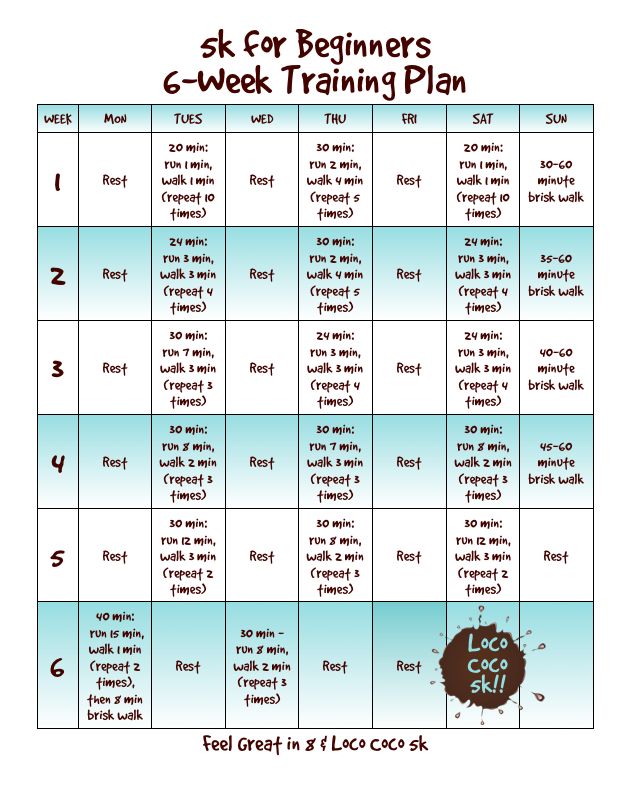
The Ultimate Guide to Running Programs: Boost Your Fitness With Ease
Are you a fitness enthusiast looking to take your running game to the next level? Do you want to track your progress, stay motivated, and achieve your goals? Look no further! In this comprehensive guide, we’ll explore the best running programs available for Windows, macOS, and Linux. From tracking your workouts to analyzing your performance, these programs will help you optimize your training and reach new heights.
Why Use a Running Program?
Before we dive into the details, let’s talk about why using a running program is essential for any serious runner. A good program can:
- Help you stay motivated and engaged in your training
- Track your progress and identify areas for improvement
- Provide personalized feedback and recommendations
- Analyze your performance and offer insights into your technique
Top Running Programs For Windows, Macos, And Linux
Here are some of the best running programs available for different operating systems:
1. Sportstracker (Windows/macOS/Linux)
- A free, multi-platform application that allows you to track your workouts, monitor your progress, and analyze your performance.
- Can be used with various devices, including Garmin, Suunto, Polar, and TomTom.
Installation And Usage
To install SportsTracker on Windows, follow these steps:
- Download the application from the official website.
- Run the installer and follow the prompts to complete the installation process.
- Launch the program and set up your account.
- Start tracking your workouts by selecting a sport (cycling or running) and subtype (e.G., Distance, time, or calories burned).
Key Features
- Calendar View: See all your workouts in a calendar view, with options to filter by date, sport, and performance level.
- Session Details: Track individual workout sessions, including duration, distance, speed, and other relevant metrics.
- Performance Analysis: Get insights into your running technique, pace, and progress over time.
2. Gpx Viewer And Recorder (Windows)
- A free application that allows you to view and record your runs on a map.
- Can be used with various devices, including Garmin, Suunto, Polar, and TomTom.
Installation And Usage
To install GPX Viewer and Recorder on Windows, follow these steps:
- Download the application from the Microsoft Store.
- Run the installer and follow the prompts to complete the installation process.
- Launch the program and set up your account.
- Start tracking your runs by selecting a sport (cycling or running) and subtype (e.G., Distance, time, or calories burned).
Key Features
- Map View: See all your runs on a map, with options to filter by date, sport, and performance level.
- Session Details: Track individual workout sessions, including duration, distance, speed, and other relevant metrics.
- Gpx File Import: Import GPX files from various devices and platforms.
3. Perfect Workout (Windows)
- A free application that allows you to track your workouts and achieve your fitness goals.
- Offers a variety of exercise routines, including full-body, abs, legs, and stretching exercises.
Installation And Usage
To install Perfect Workout on Windows, follow these steps:
- Download the application from the Microsoft Store.
- Run the installer and follow the prompts to complete the installation process.
- Launch the program and set up your account.
- Start tracking your workouts by selecting a routine (e.G., Full-body or abs) and adjusting the intensity level.
Key Features
- Exercise Library: Access a library of exercises, including photos, videos, and instructions.
- Workout Routine Builder: Create custom workout routines based on your fitness goals and preferences.
- Progress Tracking: Monitor your progress over time, with options to view your workouts in a calendar or list format.
4. Adidas Running (Android/iOS/iPadOS)
- A free application that allows you to track your runs, monitor your progress, and stay motivated.
- Offers various features, including pace tracking, distance tracking, and heart rate monitoring.
Installation And Usage
To install Adidas Running on your mobile device, follow these steps:
- Download the application from the App Store or Google Play Store.
- Run the installer and follow the prompts to complete the installation process.
- Launch the program and set up your account.
- Start tracking your runs by selecting a sport (cycling or running) and subtype (e.G., Distance, time, or calories burned).
Key Features
- Run Tracking: Track your runs in real-time, with options to view your pace, distance, and heart rate.
- Workout Library: Access a library of workouts, including photos, videos, and instructions.
- Social Sharing: Share your progress on social media platforms like Facebook, Instagram, and Twitter.
5. Strava (Android/iOS/iPadOS)
- A free application that allows you to track your runs, monitor your progress, and compete with other athletes.
- Offers various features, including pace tracking, distance tracking, and heart rate monitoring.
Installation And Usage
To install Strava on your mobile device, follow these steps:
- Download the application from the App Store or Google Play Store.
- Run the installer and follow the prompts to complete the installation process.
- Launch the program and set up your account.
- Start tracking your runs by selecting a sport (cycling or running) and subtype (e.G., Distance, time, or calories burned).
Key Features
- Run Tracking: Track your runs in real-time, with options to view your pace, distance, and heart rate.
- Workout Library: Access a library of workouts, including photos, videos, and instructions.
- Social Sharing: Share your progress on social media platforms like Facebook, Instagram, and Twitter.
6. Asics Runkeeper (Android/iOS/iPadOS)
- A free application that allows you to track your runs, monitor your progress, and stay motivated.
- Offers various features, including pace tracking, distance tracking, and heart rate monitoring.
Installation And Usage
To install ASICS Runkeeper on your mobile device, follow these steps:
- Download the application from the App Store or Google Play Store.
- Run the installer and follow the prompts to complete the installation process.
- Launch the program and set up your account.
- Start tracking your runs by selecting a sport (cycling or running) and subtype (e.G., Distance, time, or calories burned).
Key Features
- Run Tracking: Track your runs in real-time, with options to view your pace, distance, and heart rate.
- Workout Library: Access a library of workouts, including photos, videos, and instructions.
- Social Sharing: Share your progress on social media platforms like Facebook, Instagram, and Twitter.
Conclusion
In conclusion, using a running program can be a game-changer for any serious runner. These programs offer various features, including workout tracking, performance analysis, and social sharing, to help you optimize your training and achieve your goals. Whether you’re looking for a free application or a premium service, there’s a running program out there that suits your needs.
Frequently Asked Questions
Q: What is the best running program for Windows?
A: SportsTracker and GPX Viewer and Recorder are excellent options for Windows users.
Q: Can I use these programs on my mobile device?
A: Yes, many of these programs have mobile apps available for Android, iOS, and iPadOS devices.
Q: How do I get started with these programs?
A: Simply download and install the program from the official website or app store. Follow the prompts to set up your account and start tracking your workouts.
Q: What features should I look for in a running program?
A: Look for features like workout tracking, performance analysis, social sharing, and customization options to suit your needs.
Resources


