
Server Safe: The Ultimate Guide to Emule And Amule
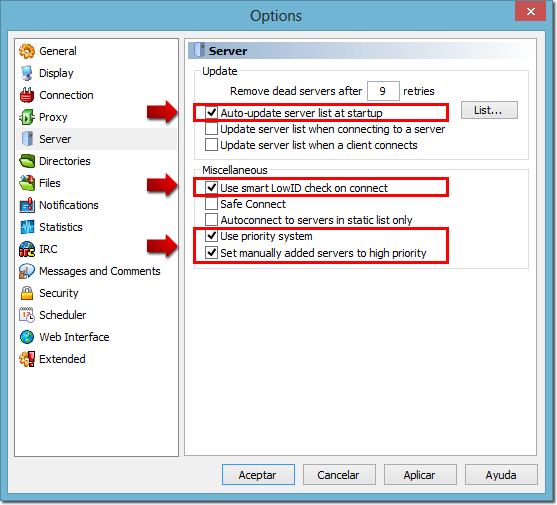
Are you tired of dealing with slow downloads and server problems on your favorite P2P platform, eMule? Look no further! In this article, we’ll show you how to update the list of servers that eMule uses to connect to the internet, and introduce you to a reliable alternative, aMule.
What is Server Safe?
Server safe refers to the practice of using servers that are not monitored or tracked by third parties. This ensures that your online activities remain private and secure.
Why Update The List of Servers on Emule?
Updating the list of servers on eMule helps you avoid problems like excessive download times and server crashes. By using a new list, you can circumvent the servers that are projected to monitor your online activity, ensuring a safer experience.
How to Update The List of Servers on Emule
To update the list of servers on eMule:
- Click on the Start button (#that with the Windows flag) and select the option to initiate the software.
- Select the link to update the server list in the menu that opens.
- Enter one of the following URLs in the Update server field:
- Http://Edk.Peerates.Net/servers.Met
- Http://Www.Gruk.Org/server/met
- Click on the #Update button to download the new list of servers.
Adding Server Addresses to Emule
Instead of updating entire lists, you can add individual server addresses to eMule:
- Select the Schedule tab in the eMule window.
- Compile the form in the right-hand sidebar by entering the server address, port number, and name of the server.
- Click on the Add Server button.
Best Server Addresses For Emule
Here are some reliable server addresses for eMule:
- EDonkey Server No1: 176.103.50.225:2442
- EDonkey Server No2: 176.103.56.135:2442
- EMule Security: 80.208.228.241:8369
Server Safe on Amule
AMule is an excellent alternative to eMule for macOS and Linux users. To update the list of servers on aMule:
- Select the icon (#that with the mule) in the Launchpad.
- Select the Schedule tab in the aMule window.
- Click on the Delete All Servers button.
- Enter one of the following URLs in the Update server field:
- Http://Edk.Peerates.Net/servers.Met
- Http://Www.Gruk.Org/server/met
Best Server Addresses For Amule
Here are some reliable server addresses for aMule:
- EDonkey Server No1: 176.103.50.225:2442
- EDonkey Server No2: 176.103.56.135:2442
- EMule Security: 80.208.228.241:8369
Troubleshooting Connection Problems
If you’re experiencing difficulty connecting to servers on eMule or aMule:
- Check the port numbers and server addresses.
- Open the router settings and create new rules for the ports used by eMule.
- Restart the program and try establishing a connection again.
Amule Server Addresses
To add individual server addresses to aMule:
- Select the Schedule tab in the aMule window.
- Compile the form in the right-hand sidebar by entering the server address, port number, and name of the server.
- Click on the Add Server button.
Best Server Addresses For Amule
Here are some reliable server addresses for aMule:
- EDonkey Server No1: 176.103.50.225:2442
- EDonkey Server No2: 176.103.56.135:2442
- EMule Security: 80.208.228.241:8369
Conclusion
Updating the list of servers on eMule and aMule ensures faster downloads, safer connections, and reduced risk of server crashes. By following these simple steps, you can enjoy a seamless P2P experience.
Frequently Asked Questions (FAQs)
- What is Server Safe?
Server safe refers to the practice of using servers that are not monitored or tracked by third parties. - Why Update The List of Servers on Emule?
Updating the list of servers on eMule helps you avoid problems like excessive download times and server crashes. - How do I Add Individual Server Addresses to Emule?
To add individual server addresses to eMule, select the Schedule tab in the eMule window and compile the form in the right-hand sidebar. - What Are Some Reliable Server Addresses For Amule?
Some reliable server addresses for aMule include eDonkey Server No1: 176.103.50.225:2442, EDonkey Server No2: 176.103.56.135:2442, And eMule Security: 80.208.228.241:8369. - How do I Troubleshoot Connection Problems on Amule?
To troubleshoot connection problems on aMule, check the port numbers and server addresses, open the router settings to create new rules for the ports used by aMule, and restart the program.


