
Creating a Blog: A Step-by-step Guide
Are you eager to share your knowledge and expertise with the world? Do you want to establish yourself as an authority in your niche? Creating a blog is an excellent way to achieve these goals! In this article, we will guide you through the process of creating a blog using various platforms, highlighting their features, advantages, and disadvantages.
Why Create a Blog?
Before we dive into the nitty-gritty, let’s explore why creating a blog is essential:
- Share your knowledge and expertise with a global audience
- Establish yourself as an authority in your niche
- Build your personal brand and reputation
- Generate leads and sales through content marketing
Free Blogging Platforms: WordPress.Com, Weebly, Blogger
If you’re new to blogging or want to try out a platform before investing time and money, consider the following free options:
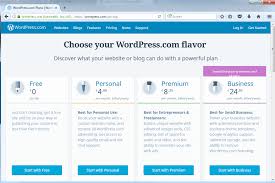
WordPress.com
WordPress.Com is one of the most popular free blogging platforms. It offers:
- A user-friendly interface
- 500MB storage space
- Free themes and templates
- Essential functionalities like SEO, statistics, and social sharing
To create a WordPress.Com blog, follow these steps:
- Sign up for an account on WordPress.Com.
- Choose a theme or template from the available options.
- Customize your blog’s design and content to suit your needs.
Weebly
Weebly is another user-friendly platform that allows you to create a professional-looking blog without any technical expertise. Its features include:
- A drag-and-drop editor
- 500MB storage space
- Free themes and templates
- Essential functionalities like SEO, statistics, and social sharing
To create a Weebly blog, follow these steps:
- Sign up for an account on Weebly.
- Choose a theme or template from the available options.
- Customize your blog’s design and content to suit your needs.
Blogger
Blogger is a free blogging platform offered by Google. Its features include:
- A user-friendly interface
- Free themes and templates
- Essential functionalities like SEO, statistics, and social sharing
To create a Blogger blog, follow these steps:
- Sign up for an account on Blogger.
- Choose a theme or template from the available options.
- Customize your blog’s design and content to suit your needs.
Paid Blogging Platforms: WordPress.Org, Drupal, Ghost, Joomla
If you’re serious about creating a professional-looking blog with advanced features, consider the following paid options:
WordPress.org
WordPress.Org is a self-hosted version of the popular blogging platform. Its features include:
- A user-friendly interface
- Unlimited storage space
- Free themes and templates
- Essential functionalities like SEO, statistics, and social sharing
To create a WordPress.Org blog, follow these steps:
- Sign up for an account on WordPress.Org.
- Choose a theme or template from the available options.
- Customize your blog’s design and content to suit your needs.
Drupal
Drupal is a powerful blogging platform that offers advanced features like custom themes, modules, and plugins. Its features include:
- A user-friendly interface
- Unlimited storage space
- Free themes and templates
- Essential functionalities like SEO, statistics, and social sharing
To create a Drupal blog, follow these steps:
- Sign up for an account on Drupal.
- Choose a theme or template from the available options.
- Customize your blog’s design and content to suit your needs.
Ghost
Ghost is a simple yet powerful blogging platform that offers advanced features like custom themes, modules, and plugins. Its features include:
- A user-friendly interface
- Unlimited storage space
- Free themes and templates
- Essential functionalities like SEO, statistics, and social sharing
To create a Ghost blog, follow these steps:
- Sign up for an account on Ghost.
- Choose a theme or template from the available options.
- Customize your blog’s design and content to suit your needs.
Joomla
Joomla is a popular blogging platform that offers advanced features like custom themes, modules, and plugins. Its features include:
- A user-friendly interface
- Unlimited storage space
- Free themes and templates
- Essential functionalities like SEO, statistics, and social sharing
To create a Joomla blog, follow these steps:
- Sign up for an account on Joomla.
- Choose a theme or template from the available options.
- Customize your blog’s design and content to suit your needs.
Conclusion
Creating a blog is an exciting venture that allows you to share your knowledge, expertise, and passion with a global audience. By choosing the right platform, you can establish yourself as an authority in your niche and build your personal brand. Remember to consider factors like features, advantages, and disadvantages when selecting a blogging platform.
Frequently Asked Questions
- What is the best free blogging platform?
- WordPress.Com
- Which paid blogging platform offers advanced features?
- WordPress.Org
- Can I create a professional-looking blog without any technical expertise?
- Yes, using platforms like Weebly and Wix.
- Do I need to invest time and money in creating a blog?
- Not necessarily, especially if you choose a free blogging platform.
- How do I customize my blog’s design and content?
- Use the built-in editor or hire a professional web designer.
By following these steps and considering your options carefully, you can create a successful blog that attracts and engages your target audience. Happy blogging!


