
Transforming Pdf Files Into Word Documents: A Step-by-step Guide
Are you struggling to convert PDF files into editable Word documents? Look no further! In this article, we’ll explore the best ways to transform your PDFs into Word-compatible files, using a range of tools and services that cater to different needs and preferences.
Understanding Pdfs And Their Limitations
Before diving into the conversion process, it’s essential to understand the nature of PDFs. PDFs (Portable Document Format) are designed to preserve the layout and formatting of documents, making them ideal for sharing and printing. However, this same feature can make it challenging to edit or modify the content within a PDF.
The Limitations of Editing Pdfs
If your PDF was created from a scanned image or document with editable text, you might find that editing becomes difficult or impossible. This is because the text within the PDF has not been “read” by an Optical Character Recognition (OCR) engine, which is necessary for editing and modifying the content.
Free Solutions to Transform Pdfs Into Word Documents
Fortunately, there are several free solutions available that can help you transform your PDFs into editable Word documents. Let’s explore some of these options:
Microsoft Word
The first option we’ll discuss is Microsoft Word itself. If you have a Windows or macOS device with an active Office subscription, you can use Word to convert your PDFs into editable files.
How to Transform Pdfs Using Microsoft Word
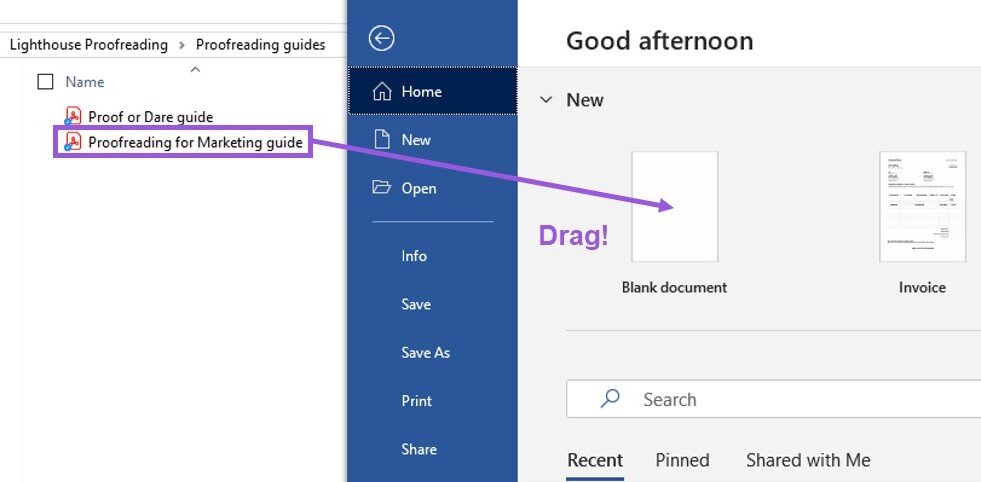
To get started, open Microsoft Word and select the “File” menu. From there, choose “Open” and navigate to the location of your PDF file. Once you’ve selected the PDF, click on the “OK” button to accept any potential layout changes. Finally, save the document in the .DOCX or .DOC format.
Adobe Acrobat Dc
Another option for transforming PDFs into Word documents is Adobe Acrobat DC. This powerful tool allows you to edit and modify your PDFs directly within the application.
How to Transform Pdfs Using Adobe Acrobat DC
To get started, download and install Adobe Acrobat Reader from the official website. Once installed, navigate to the PDF file you want to convert and select it. From there, go to the “File” menu and choose “Export” followed by “Microsoft Word.” Choose the desired format (.DOCX or .DOC) and save the document.
Doxillion Document Converter
If you’re looking for a more straightforward solution, consider using Doxillion Document Converter. This free tool allows you to convert PDFs into various formats, including Word documents.
How to Transform Pdfs Using Doxillion
To get started, download and install Doxillion from the official website. Once installed, navigate to the PDF file you want to convert and select it. From there, choose the desired output format (.DOCX or .DOC) and follow the on-screen instructions to complete the conversion.
Online Solutions For Transforming Pdfs Into Word Documents
If you don’t have access to a computer or prefer using online services, we’ve got you covered!
Pdf Candy
One popular online solution is PDF Candy. This service allows you to convert PDFs into editable Word documents, preserving the original formatting and layout.
How to Transform Pdfs Using Pdf Candy
To get started, navigate to the PDF Candy website and drag-and-drop your PDF file onto the platform. Alternatively, select the “Add Files” option or use the Google Drive or Dropbox integrations. Once the conversion is complete, download the resulting Word document.
Online2pdf
Another online solution for transforming PDFs into Word documents is Online2PDF. This service offers a user-friendly interface and allows you to convert multiple files simultaneously.
How to Transform Pdfs Using Online2pdf
To get started, navigate to the Online2PDF website and select the “Choose File” option. Upload your PDF file and choose the desired output format (.DOCX or .DOC). Once the conversion is complete, download the resulting Word document.
Additional Solutions For Transforming Pdfs Into Editable Word Documents
If you’re using a mobile device, consider the following solutions:
Microsoft Office (Android/iOS/iPadOS)
The official Microsoft Office app for Android and iOS devices allows you to transform PDFs into editable Word documents.
How to Transform Pdfs Using Microsoft Office
To get started, download and install the Microsoft Office app from the App Store or Google Play Store. Navigate to the PDF file you want to convert and select it. From there, choose the desired output format (.DOCX or .DOC) and follow the on-screen instructions to complete the conversion.
Converter Pdf to Word (Android/iOS/iPadOS)
Another mobile solution for transforming PDFs into editable Word documents is Converter PDF to Word.
How to Transform Pdfs Using Converter Pdf to Word
To get started, download and install the Converter PDF to Word app from the App Store or Google Play Store. Navigate to the PDF file you want to convert and select it. From there, choose the desired output format (.DOCX or .DOC) and follow the on-screen instructions to complete the conversion.
Pdf Conversion Suite (Android)
The PDF Conversion Suite for Android devices allows you to transform PDFs into various formats, including Word documents.
How to Transform Pdfs Using Pdf Conversion Suite
To get started, download and install the PDF Conversion Suite app from the Google Play Store. Navigate to the PDF file you want to convert and select it. From there, choose the desired output format (.DOCX or .DOC) and follow the on-screen instructions to complete the conversion.
Transforming Pdfs Into Editable Word Documents: Conclusion
In this article, we’ve explored various solutions for transforming PDFs into editable Word documents. Whether you’re using a computer or mobile device, these tools and services can help you achieve your goal with minimal effort.
Faqs
- What is The Best Way to Transform Pdfs Into Editable Word Documents?
The best method depends on your specific needs and preferences. Microsoft Word and Adobe Acrobat DC are powerful desktop solutions, while online services like PDF Candy and Online2PDF offer convenience and flexibility. Mobile apps like Microsoft Office and Converter PDF to Word provide a user-friendly interface for transforming PDFs on-the-go.
- Can I Transform Pdfs Into Editable Word Documents Using a Mobile Device?
Yes! Many mobile apps, such as Microsoft Office, Converter PDF to Word, and PDF Conversion Suite, allow you to transform PDFs into editable Word documents directly on your Android or iOS device.
- What Are The Limitations of Editing Pdfs?
PDFs created from scanned images or documents with editable text may not be easily editable due to the lack of Optical Character Recognition (OCR) technology. However, many services and software solutions can help you overcome these limitations.
- Are There Any Free Solutions For Transforming Pdfs Into Editable Word Documents?
Yes! Many online services, desktop tools, and mobile apps offer free or low-cost options for transforming PDFs into editable Word documents.
- Can I Transform Multiple Pdf Files at Once Using Some of The Mentioned Solutions?
Yes! Some services and software solutions, such as Online2PDF and Doxillion Document Converter, allow you to convert multiple PDF files simultaneously.
- Do I Need to Have Adobe Acrobat Installed on my Device to Use Its Conversion Features?
No! While Adobe Acrobat is a powerful tool for editing and modifying PDFs, you can still use its conversion features without installing the full software suite.
- Can I Transform Large Pdf Files Using Some of The Mentioned Solutions?
Some services and software solutions have limitations on file size or quantity, while others may offer additional features or integrations to help with larger files. Be sure to review the specific requirements for each solution.
- Are There Any Security Concerns When Using Online Services to Transform Pdfs Into Editable Word Documents?
While some online services may require you to upload your PDF files, reputable providers like PDF Candy and Online2PDF ensure that your data remains secure and protected throughout the conversion process.
By understanding these solutions and their capabilities, you can choose the best method for transforming your PDFs into editable Word documents.


