
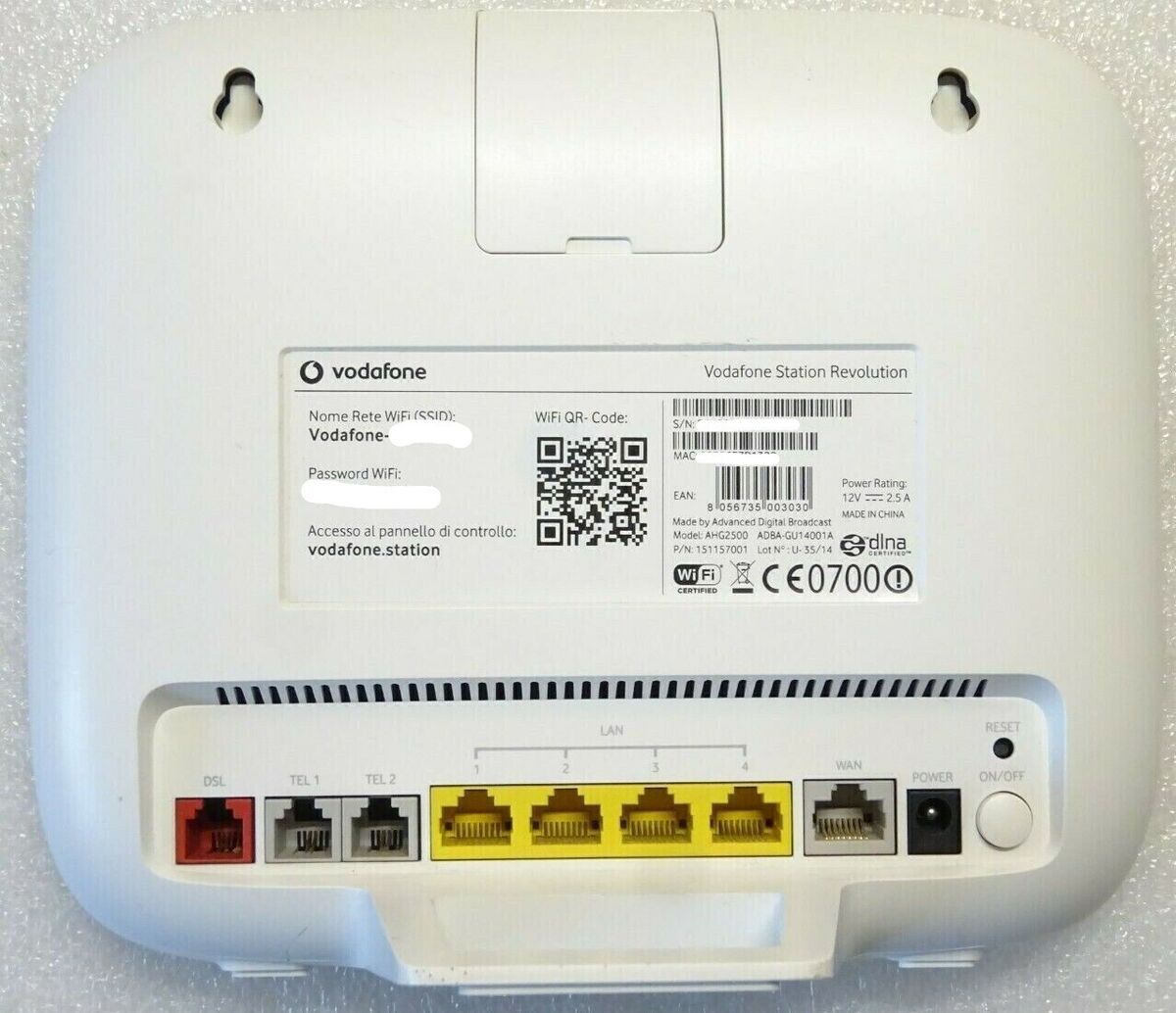
Vodafone Station Revolution: A Comprehensive Guide
Are you looking for a detailed guide on how to use your Vodafone Station Revolution? Look no further! This article will walk you through the process of installing, accessing, configuring, and troubleshooting your device.
What is Vodafone Station Revolution?
The Vodafone Station Revolution is a router and modem combo that provides high-speed internet connectivity to your home or office. It’s designed to be user-friendly and easy to set up, even for those who are not tech-savvy.
Installing The Vodafone Station Revolution
To install the device, follow these steps:
- Unbox the device and connect it to a power source.
- Connect the ADSL cable to your phone socket and plug in the other end of the cable into the device’s ADSL port.
- If you have subscribed to a VDSL/Fibre plan, connect the fibre cable to the device’s fibre port.
- Wait for the device to boot up and connect to the internet.
Accessing The Vodafone Station Revolution
To access the device’s panel, follow these steps:
- Open your web browser (e.G., Google Chrome, Mozilla Firefox) and type in one of the following addresses: Http://Vodafone.Station/, 192.168.1.1, Or 192.168.0.1.
- If you can’t access any of these addresses, try restarting your router and modem.
Configuring The Vodafone Station Revolution
To configure your device, follow these steps:
- Go to the panel’s settings section and select “Wi-Fi” from the drop-down menu.
- Select “Configure Wi-Fi” from the sub-menu.
- Choose a strong password for your Wi-Fi network (at least 12-16 characters).
- Save your changes.
Troubleshooting Issues With Your Vodafone Station Revolution
If you encounter any issues with your device, try the following:
- Restart your router and modem to resolve connectivity issues.
- Check if there are any physical obstructions blocking the signal.
- Ensure that you have a stable internet connection from your service provider.
Using Your Vodafone Station Revolution as an Access Point
If you want to use your device as a repeater, follow these steps:
- Connect your device to a power source and wait for it to boot up.
- Connect the device to your computer or other devices using Wi-Fi or Ethernet cable.
- Go to the panel’s settings section and select “Modem” from the drop-down menu.
- Select “Generic Modem” from the sub-menu.
- Follow the on-screen instructions to configure your device as an access point.
Does Vodafone Station Revolution Work With Other Operators?
Yes, you can use your Vodafone Station Revolution with other operators’ internet services. However, please note that there may be compatibility issues or limitations in terms of performance and features.
Can I Use My Vodafone Station Revolution With Fibre Internet?
Yes, the device is compatible with fibre internet plans from various service providers. Simply connect the fibre cable to the device’s fibre port, and you’ll be good to go!
Conclusion
In conclusion, this comprehensive guide has walked you through the process of installing, accessing, configuring, and troubleshooting your Vodafone Station Revolution. We hope that this article has been helpful in resolving any issues or doubts you may have had about using your device.
Frequently Asked Questions (FAQs)
Here are some frequently asked questions related to Vodafone Station Revolution:
- What is The Difference Between Adsl And Fibre Internet?
- ADSL (Asymmetric Digital Subscriber Line) is a type of internet connection that uses traditional phone lines, while fibre internet uses fibre-optic cables for faster speeds.
- How do I Reset my Vodafone Station Revolution to Factory Settings?
- Go to the panel’s settings section and select “Reset” from the drop-down menu. Follow the on-screen instructions to complete the process.
- Can I Use my Vodafone Station Revolution as a Wi-fi Range Extender?
- Yes, you can use your device as a repeater by configuring it as an access point.
- How do I Check if There Are Any Firmware Updates Available For my Vodafone Station Revolution?
- Go to the panel’s settings section and select “Firmware Update” from the drop-down menu.
- Can I Change The Wi-fi Channel on my Vodafone Station Revolution?
- Yes, you can change the Wi-Fi channel by going to the panel’s settings section and selecting “Wi-Fi Channel” from the sub-menu.
- How do I Reset my Vodafone Station Revolution Password?
- Go to the panel’s settings section and select “Password Reset” from the drop-down menu.
Bonus Tips
Here are some additional tips for getting the most out of your Vodafone Station Revolution:
- Regularly Update Your Device’s Firmware to Ensure Optimal Performance.
- Use a Strong Password For Your Wi-fi Network to Prevent Unauthorized Access.
- Check Your Internet Speed Regularly to Identify Any Potential Issues.


