
The Ultimate Guide to Browsers: Uncovering The Mysteries of The Internet
As we navigate the vast expanse of the internet, it’s easy to take for granted the tool that makes it all possible: The browser. But what exactly is a browser, and how do they work? In this comprehensive guide, we’ll delve into the world of browsers, exploring their history, types, and features.
What is a Browser?
In simple terms, a browser is a software program that allows us to access and view websites on the internet. It’s essentially a window into the online world, enabling us to navigate through the vast array of information available at our fingertips.
Types of Browsers
There are several types of browsers available, each with its unique features and characteristics. Some of the most popular ones include:
- Google Chrome: One of the most widely used browsers, known for its speed, security, and vast library of extensions.
- Mozilla Firefox: A free, open-source browser that’s been a stalwart on the internet scene for years, offering robust features and customization options.
- Microsoft Edge: The default browser on Windows 10, offering a sleek interface and seamless integration with Microsoft services.
- Apple Safari: The go-to browser for Mac users, boasting impressive speed and security features.
What is a Pre-installed Browser?
A pre-installed browser is the software that comes loaded onto your device’s operating system. In most cases, this will be the default browser for that particular OS. For example:
- Windows 10: Microsoft Edge
- Mac: Safari
What is a Tor Browser?
The Tor browser is not just another browser; it’s a specialized tool designed to protect user anonymity and security on the internet. By routing your connection through multiple nodes, the Tor browser helps conceal your IP address and location.
How Do Browsers Work?
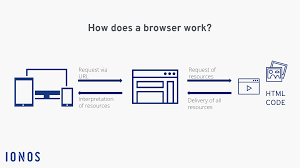
Browsers work by rendering web pages in real-time, using HTML, CSS, and JavaScript code. Here’s a simplified explanation of the process:
- User Input: You type in a URL or click on a link.
- Browser Request: The browser sends a request to the server hosting the website.
- Server Response: The server responds with the requested web page data.
- Rendering: The browser renders the received data, using its internal engine to create the visual representation of the webpage.
Key Features of Browsers
Some essential features you’ll find in most modern browsers include:
- Address Bar: Where you input URLs and search terms.
- Navigation Menu: Allows you to access bookmarks, history, and other features.
- Extensions: Additional tools and services that can be installed to enhance browser functionality.
- Incognito Mode: A feature that allows for private browsing, hiding your browsing history and data.
Conclusion
In conclusion, browsers are the gateway to the internet, providing us with access to a vast array of information and services. By understanding how browsers work and their various features, you’ll be better equipped to navigate the online world with confidence.
Frequently Asked Questions (FAQs)
- What is The Best Browser For Beginners?
- Google Chrome is an excellent choice for new users due to its user-friendly interface and extensive support resources.
- How do I Update my Browser?
- Check your browser’s settings or help section for instructions on updating to the latest version.
- Can I Use Multiple Browsers at Once?
- Yes, you can install and use multiple browsers simultaneously, but this may lead to conflicts and decreased performance.
- How do I Protect my Online Security Using a Browser?
- Ensure your browser is updated regularly, avoid accessing suspicious sites, and consider using a VPN for added protection.
- Can I Customize my Browser’s Interface?
- Yes, most browsers allow you to personalize the layout, add extensions, and adjust settings to suit your preferences.
- How do I Access Tor Browser?
- You can download and install the Tor Browser from official sources or visit the Tor Project website for more information.
- What is The Difference Between a Pre-installed Browser And a Downloaded One?
- A pre-installed browser comes with your device’s operating system, while a downloaded browser requires manual installation.
- Can I Use my Browser to Access Local Network Resources?
- Yes, browsers can be used to access local network resources, such as shared files or printers.
I hope this comprehensive guide has helped you understand the world of browsers and their various features!


