
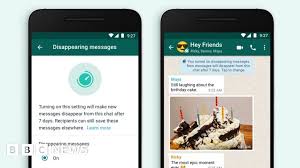
The Mysterious World of Ephemeral Messages on Whatsapp
As we navigate through the vast expanse of digital communication, we often come across features that seem mysterious or even magical. One such phenomenon is the ephemeral message feature on WhatsApp, which has left many users wondering what exactly it does and how to use it effectively.
In this article, we will delve into the world of ephemeral messages, exploring their purpose, functionality, and implications for our digital lives.
What Are Ephemeral Messages?
Ephemeral messages are a type of message on WhatsApp that disappears after a set period of time, usually 24 hours, 7 days, or 90 days. This feature allows users to send messages that can be viewed by the recipient only once before they disappear, leaving no digital footprint behind.
How Do Ephemeral Messages Function?
To activate ephemeral messages on WhatsApp, follow these simple steps:
- Open the WhatsApp chat you want to enable this feature for.
- Tap on the name of the contact or cluster (if you’re in a group).
- Go to the settings menu and select “Ephemeral Messages.”
- Choose the desired time frame for the messages to disappear (24 hours, 7 days, or 90 days).
What Happens When an Ephemeral Message is Sent?
When an ephemeral message is sent, it will appear in the chat as a regular message, but with a clock icon indicating that it will expire after a certain time. The recipient can view the message only once before it disappears.
Can I Save or Forward Ephemeral Messages?
While ephemeral messages are meant to disappear, there are ways to save or forward them:
- To save an ephemeral message, long-press on it and select “Save” (on Android) or tap and hold on the message (on iOS).
- To forward an ephemeral message, open the chat where you want to send it, tap on the name of the contact, and select “Forward.”
How Do Ephemeral Messages Work on Different Devices?
The functionality of ephemeral messages remains largely consistent across different devices:
- On Android: Follow the same steps as above.
- On iPhone: Tap on the chat icon, select the conversation you want to enable this feature for, go to settings, and choose “Ephemeral Messages.”
- On PC: Use WhatsApp Web or the desktop client, navigate to the chat settings, and select “Ephemeral Messages.”
What About Video And Photo Messages That Self-destruct on Whatsapp?
WhatsApp also offers a feature that allows you to send video and photo messages that will self-destruct after being viewed. To enable this feature:
- Choose the media file (photo or video) you want to forward.
- Tap on the share icon.
- Select “Self-Destruct” (on Android) or tap on the clock icon (on iOS).
The Importance of Ephemeral Messages
Ephemeral messages provide a unique way to communicate without leaving a digital footprint. This feature is particularly useful for sharing sensitive information or sending messages that are time-sensitive.
However, it’s essential to remember that even ephemeral messages can be saved or forwarded by the recipient if they take a screenshot or use other means to capture the content.
Conclusion
Ephemeral messages on WhatsApp offer a fascinating glimpse into the world of digital communication. By understanding how this feature works and its implications, we can harness its power to communicate more effectively and securely online.
Frequently Asked Questions (FAQs)
- What Happens if I Send an Ephemeral Message And The Recipient Doesn’t Open It?
Even if the recipient doesn’t open the message, it will still disappear after the set time period. - Can I Save or Forward Ephemeral Messages?
Yes, you can save or forward ephemeral messages by following the steps outlined above. - How do I Activate Ephemeral Messages on Whatsapp?
To enable this feature, follow the simple steps outlined in the article. - What Happens to Ephemeral Messages if I Back up my Chat History?
Ephemeral messages will be deleted from the backup even if they haven’t expired yet. - Can I Set a Timer For All New Chats to Have Ephemeral Messages?
Yes, you can enable this feature by going to WhatsApp settings > Privacy > Timer > Default Time. - How do I Disable Ephemeral Messages on Whatsapp?
To turn off this feature, go to the chat settings and select “No” under “Ephemeral Messages.” - Can I Use Ephemeral Messages in Group Chats?
Only administrators can enable or disable this feature for group chats. - What Happens if Someone Saves an Ephemeral Message?
Even if someone takes a screenshot or uses other means to capture the content, the original message will still disappear after the set time period.


