
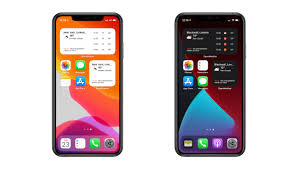
How to Create Personalized Widgets on Your Smartphone: A Step-by-step Guide
Are you tired of the same old home screen on your smartphone? Do you want to add a personal touch to your device without rooting or jailbreaking it? Look no further! In this article, we’ll explore the world of personalized widgets and show you how to create custom widgets on your Android and iOS devices.
What Are Personalized Widgets?
Personalized widgets are customized panels that can be added to your smartphone’s home screen. They can display a wide range of information, from news and weather updates to social media feeds and calendar events. With personalized widgets, you can tailor your device to suit your specific needs and interests.
Benefits of Using Personalized Widgets
Using personalized widgets offers several benefits, including:
- Increased Productivity: By displaying relevant information on your home screen, personalized widgets can help you stay organized and focused.
- Improved User Experience: Customizing your home screen with personalized widgets can make it feel more personalized to your needs and preferences.
- Enhanced Visual Appeal: Personalized widgets can add a touch of personality to your device’s home screen.
Creating Personalized Widgets on Android
To create personalized widgets on Android, you’ll need to download a widget app from the Google Play Store. Some popular options include:
- Kwgt Kustom Widget Maker: This app offers a wide range of customization options and allows you to create custom widgets from scratch.
- Magicwidgets: This app provides a user-friendly interface for creating personalized widgets and offers a variety of pre-made templates.
Creating Personalized Widgets on Ios
To create personalized widgets on iOS, you can use the Widgetsmith app. Here’s how:
- Download And Install The App: Head to the App Store and download the Widgetsmith app.
- Choose Your Widget Type: Select the type of widget you want to create from the available options.
- Customize Your Widget: Use the app’s intuitive interface to add your preferred elements, such as images or text.
Tips For Creating Effective Personalized Widgets
When creating personalized widgets, keep the following tips in mind:
- Keep it Simple: Avoid cluttering your home screen with too many widgets.
- Choose Relevant Information: Select information that’s relevant to your needs and interests.
- Experiment With Different Layouts: Try out various widget layouts to find one that suits your style.
Conclusion
Creating personalized widgets is a great way to customize your smartphone experience. By following the steps outlined in this article, you can create custom widgets on both Android and iOS devices. Remember to keep it simple, choose relevant information, and experiment with different layouts to get the most out of your personalized widgets.


