
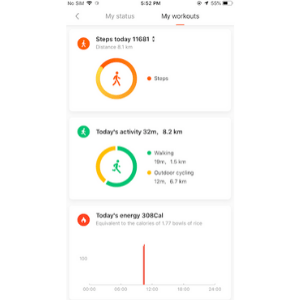
Unlocking The Full Potential of Your Xiaomi Scales With Zepp Life App
Are you one of the many individuals who have recently purchased a new set of Xiaomi scales, only to find themselves struggling to understand how to use them effectively? Do you want to unlock the full potential of your device and take advantage of its advanced features? Look no further! In this article, we will guide you through the process of setting up and using the Zepp Life app, which is specifically designed for Xiaomi scales.
Understanding The Importance of Synchronizing Data
Before we dive into the details of the Zepp Life app, it’s essential to understand why synchronizing data between your phone/tablet and scales is crucial. By doing so, you’ll be able to track your weight progress over time, monitor changes in your body composition, and receive valuable insights on how to achieve a healthier lifestyle.
A Step-by-step Guide to Setting Up Zepp Life App
Setting up the Zepp Life app is a straightforward process that requires some preliminary steps. Here’s what you need to do:
- Extract Your Scales: First, take your Xiaomi scales out of their packaging and ensure they are properly assembled.
- Install Batteries (If Necessary): If your scales require batteries, make sure to install them according to the manufacturer’s instructions.
- Place on a Flat Surface: Place your scales on a flat surface, making sure they are stable and secure.
- Check Functionality: Turn on your scales and ensure that they are functioning correctly by checking the weight displayed on the device.
Configuring Zepp Life App
Now that you have set up your Xiaomi scales, it’s time to configure the Zepp Life app. Here’s what you need to do:
- Download And Install The App: Download and install the Zepp Life app from the Google Play Store (for Android devices) or the Apple App Store (for iOS devices).
- Create a Profile: Create a new profile using your email address, password, and other required information.
- Add Your Scales to The App: Add your Xiaomi scales to the Zepp Life app by selecting the “Scales” option and following the on-screen instructions.
Exploring The Features of Zepp Life App
The Zepp Life app offers a range of features that make it an essential tool for anyone looking to track their weight progress, monitor changes in their body composition, or receive valuable insights on how to achieve a healthier lifestyle. Some of the key features include:
- Weight Tracking: Track your weight progress over time and receive notifications when you reach certain milestones.
- Body Composition Analysis: Monitor changes in your body composition and receive insights on how to improve your overall health and fitness.
- Balance Testing: Perform balance tests using your Xiaomi scales and receive feedback on your posture and stability.
Tips For Getting The Most Out of Your Xiaomi Scales With Zepp Life App
To get the most out of your Xiaomi scales and the Zepp Life app, here are some tips to keep in mind:
- Regularly Update The App: Ensure that you regularly update the Zepp Life app to take advantage of new features and improvements.
- Monitor Your Progress: Regularly track your progress using the app and make adjustments to your lifestyle as needed.
- Seek Support: Don’t hesitate to seek support from friends, family, or a healthcare professional if you need help achieving your health and fitness goals.
Conclusion
In conclusion, setting up and using the Zepp Life app with your Xiaomi scales is a straightforward process that requires some preliminary steps. By following the guide outlined in this article, you’ll be able to unlock the full potential of your device and take advantage of its advanced features. Remember to regularly update the app, monitor your progress, and seek support when needed to achieve your health and fitness goals.
Frequently Asked Questions (FAQs)
Here are some frequently asked questions related to the Zepp Life app and Xiaomi scales:
Q: What is The Purpose of The Zepp Life App?
A: The Zepp Life app is designed to help users track their weight progress, monitor changes in their body composition, and receive valuable insights on how to achieve a healthier lifestyle.
Q: How do I Set up my Xiaomi Scales With The Zepp Life App?
A: To set up your Xiaomi scales with the Zepp Life app, you’ll need to extract the device from its packaging, install batteries (if necessary), place it on a flat surface, and check that it is functioning correctly.
Q: What Features Does The Zepp Life App Offer?
A: The Zepp Life app offers a range of features, including weight tracking, body composition analysis, balance testing, and more.
Q: How do I Update The Zepp Life App?
A: To update the Zepp Life app, simply visit the Google Play Store (for Android devices) or the Apple App Store (for iOS devices) and download the latest version.
Q: Can I Use The Zepp Life App With Other Xiaomi Products?
A: Yes, the Zepp Life app can be used with other Xiaomi products, including smart scales, fitness trackers, and more.


